MarketingNews
Instagram Edits for Mac: Free, Mac-Only, With MCP Support
Instagram released Edits for Mac on November 5, 2026: a free desktop video editor with a multi-track timeline and 4K exports. It runs only on Apple silicon Macs, and it lets AI agents edit through MCP.

By Akif Qureshi
Published 6 min read
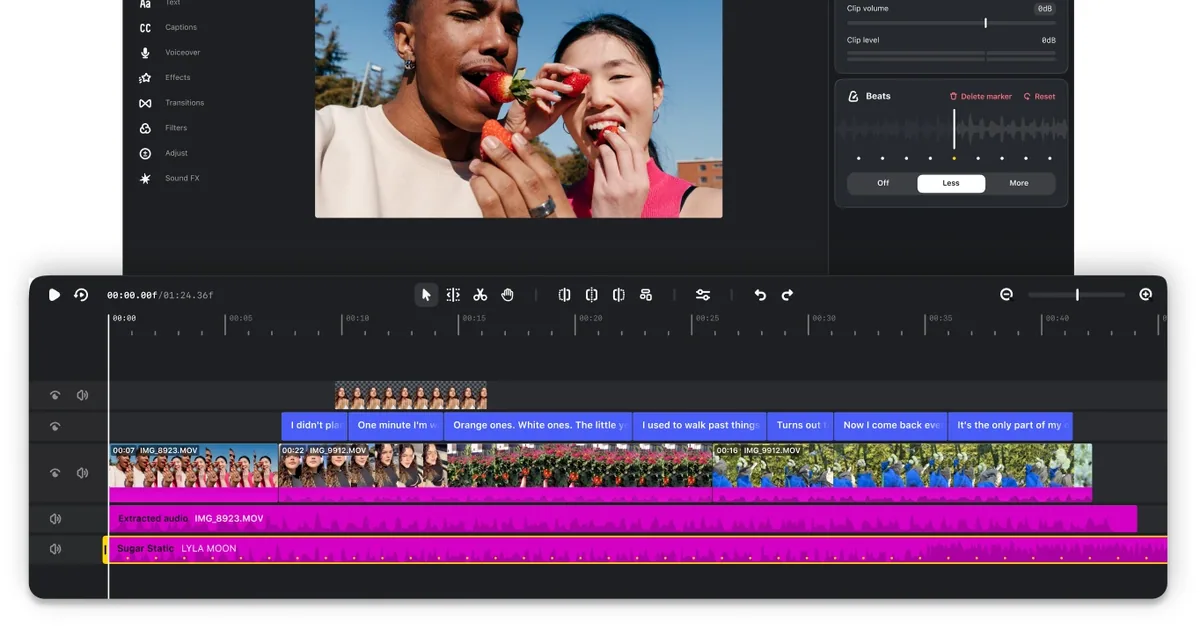
Instagram Edits for Mac, the desktop version of Instagram's free Edits video editor, came out on November 5, 2026, and it runs only on Macs with Apple silicon: there's no Windows version.
It's more than the phone app on a bigger screen. You get a multi-track timeline, color grading and 4K exports with no watermark, and the app has a built-in Model Context Protocol (MCP) server, so an AI agent running on your Mac can cut a video for you. Here's what's in it, what the AI agent support really does today, and who should try it. We checked everything against Instagram's Edits desktop page and Meta's on-record comments to The Verge on November 17, 2026.
Key takeaways
What Instagram released
Edits launched on iPhone and Android in April 2025 as Instagram's own video editor (Meta's announcement). The Mac app is its first desktop version. Instagram's page pitches it at bigger projects that are hard to manage on a phone, and MacRumors reported the release on November 5, 2026.
According to Instagram's download page, the Mac app adds:
- A multi-track timeline with keyframes for transitions and audio waveforms for cuts that land on the beat
- Color tools: color wheels and curves, plus import of your own LUTs and font files
- Instagram's libraries: licensed and royalty-free audio, and unlimited automatic captions
- Publishing and export: post straight to Instagram without downloading and re-uploading, edit in several aspect ratios, and export in 4K with no watermark for YouTube, TikTok or your website
Meta also told The Verge that the app supports keyboard shortcuts you can carry over from another editor, and that audio and text styles you saved in the mobile app show up on the Mac.
Mac only: what you need
| Edits for Mac (as of Nov 17, 2026) | |
|---|---|
| Price | Free |
| Computer | Mac with Apple silicon (M1 or later) |
| Intel Mac | Not supported |
| Windows or Linux | Not available, and none announced |
| Account | Instagram account required |
| Where to get it | edits.instagram.com/desktop (a Mac installer from Instagram) |
| Phone projects | Can't be opened on the Mac yet |
Instagram's FAQ answers the Windows question directly: Edits on desktop is only available on macOS. Its page doesn't list a minimum macOS version, so if your Apple silicon Mac is on an older release, check the installer before you plan a project around it.
If you edit on a Windows PC, nothing changes for now: keep using the Edits app on your phone, which is still free on iPhone and Android.
How the MCP connection works
MCP is an open standard that lets an AI agent use another app's tools. In Edits' case, an agent can call the editor's own functions (create a project, import a clip, trim, split, add text, export) instead of clicking around the screen.
Matthew Simari, Instagram's head of product management for Edits, told The Verge that Edits Desktop ships with an MCP for all of its tools and that creators can connect "any agent you want." Meta's own agent, Muse, is the one it names. His example: ask the agent to build a rough cut from a video in your Downloads folder, then open that project in Edits and finish it by hand.
What's confirmed so far, as of November 17, 2026:
- It's built into the app. The switch is in Settings > Automation, where you turn on the Automation Server and copy an access token. That's how the open-source Edits MCP Bridge project documents it. Meta hasn't published its own setup guide yet.
- It's local. The server listens only on your Mac (the bridge's docs list
http://127.0.0.1:19501/mcpas the default address). The AI agent has to run on the same Mac. A chatbot in a browser tab can't reach it on its own. - It's big. The bridge's developers counted 274 tools in Edits version 454. Which tools appear depends on the app version and the screen you're on.
- Clients aren't named. Besides Muse, Meta hasn't said which AI apps it tested. Community projects such as Insta Edits for Claude connect it to Claude Code. Neither project is made or endorsed by Meta. We couldn't confirm whether ChatGPT works.
Who should try it
Creators who already post Reels. A fitness coach in Denver who films on an iPhone and edits on the phone gets a real timeline, waveforms and a bigger preview, with the same audio library and direct posting. Everything stays free.
Small businesses and social media managers. A boutique in Charleston or a Shopify store shipping across the US can cut holiday Reels and a horizontal version for YouTube from the same footage. Black Friday is November 27, 2026, and the 4K, no-watermark export gives you one file for Instagram, YouTube and your product pages.
Teams curious about AI editing. The MCP server is the newest part. Use it for rough cuts, repetitive trims and captions, and keep the final edit and the post button with a person. It's early: Meta plans weekly updates, so expect the tools and setup to change.
Who should wait: anyone on Windows or an Intel Mac, and anyone who needs to move one project between a phone and a computer. Neither works today.
What to do now
- Check your Mac. Open Apple menu > About This Mac. If it lists an M-series chip (M1 or later), you can run Edits.
- Download it from Instagram only: edits.instagram.com/desktop. Skip third-party download sites.
- Start a new project on the Mac. Your phone drafts won't come across yet, but your saved audio and text styles will.
- Test the export. Export one video in 4K and one in a horizontal ratio, and compare them with what you get from your current editor.
- Try MCP on a test project first, with your agent asking before each edit, and keep publishing manual.
- Running Meta ads? A desktop editor makes it quicker to cut Reels with different hooks, messages and visuals. Our guide to Meta Andromeda explains why varied creative matters in Meta ads now.
Sources
All accessed November 17, 2026.
- Instagram: Edits for Desktop (download page and FAQ)
- The Verge: You can edit your videos with AI on Instagram's new desktop Edits app (November 5, 2026)
- MacRumors: Instagram's Edits Video Editor is Now Available on Mac (November 5, 2026)
- Meta: Introducing Edits: A Streamlined Video Creation App (April 2025)
- GitHub: Edits MCP Bridge and Insta Edits for Claude (community projects, not Meta products)
Hero image: Instagram / Meta, from the Edits for Desktop page, accessed November 17, 2026.
Frequently asked questions
Is Instagram Edits for Mac free?
Yes. Instagram's download page says Edits is free to download on macOS, and exports in 4K carry no watermark (as of November 17, 2026). You sign in with an Instagram account.
Does Edits work on Windows or Intel Macs?
No. Instagram says the desktop version is only available on macOS and needs a Mac with Apple silicon (M1 or later), so Intel Macs aren't supported. There's no Windows or Linux version, and Meta hasn't announced one. On a Windows PC, use the Edits app on your iPhone or Android phone.
Can I connect Claude or ChatGPT to Edits for Mac?
Meta says you can connect any AI agent you choose through Edits' MCP server, and it names only its own Muse agent. The server runs on your Mac, so the agent app needs to run on the same Mac. Open-source projects already connect it to Claude Code. Meta hasn't said whether ChatGPT works, and we haven't confirmed it.
Can I open my phone projects in Edits for Mac?
Not yet. You can't edit the same project on your phone and your Mac. Saved audio and text styles do carry over from the mobile app, and Meta says cross-platform editing is in the works.
Where do I download Edits for Mac?
From Instagram's Edits desktop page at edits.instagram.com/desktop, which offers a Mac installer. Download it only from that page.
Share
X (opens in a new tab)LinkedIn (opens in a new tab)WhatsApp (opens in a new tab)Akif Qureshi has worked in SEO for more than two years, auditing sites, planning content and tracking how Google updates change real traffic. He started SERP Times to report search changes clearly and to say exactly what site owners should do about them.
Certifications
- Google Analytics (Google)
- Google Ads Search (Google)
- HubSpot
- Digital Vidya
- DSIM
- Internship Studio