
AI SearchNews
Businesses in ChatGPT: How to Claim Your Business Profile
OpenAI now lets businesses claim their profile in ChatGPT, update their details, see how often ChatGPT mentions them and, in the US, launch a Business Agent that answers customer questions. Here's how it works and how to set it up.

By Akif Qureshi
Published 6 min read
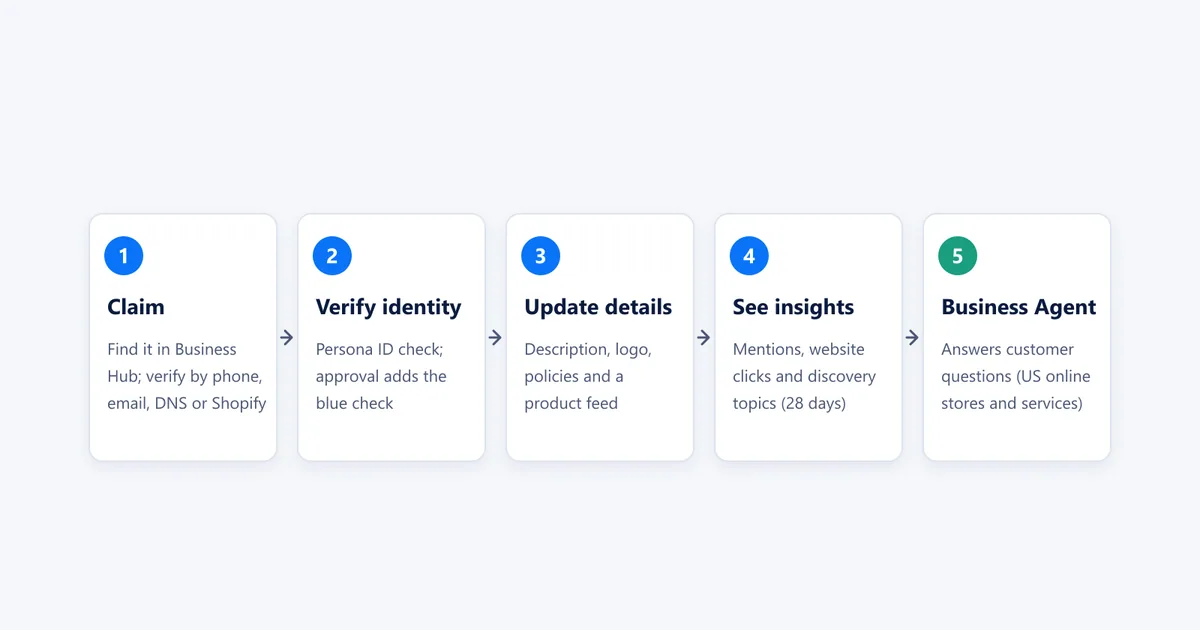
Businesses in ChatGPT is a new OpenAI program, launched in beta on November 10, 2026, that lets a business claim its profile in ChatGPT, keep its details and product information current, see how often ChatGPT mentions it, and, for eligible US ecommerce and online service businesses, publish a Business Agent that answers customers' questions.
It's the closest thing ChatGPT has had to Google Business Profile. Until now, businesses had no official way to correct what ChatGPT said about them; they could only improve the websites and listings it reads. OpenAI says ChatGPT has 1.2 billion weekly users, so this is worth setting up early. Here's what's included, who can use it, and how to claim your business step by step, based on OpenAI's announcement, program page and help article, all checked November 11, 2026.
Key takeaways
What's included in Businesses in ChatGPT
The program has three parts, plus an advertising link:
| Part | What it does | Who can use it |
|---|---|---|
| Business Hub | Claim your business, verify it, update its details and connect a product feed | Eligible businesses where ChatGPT is available |
| Insights | Mentions, website clicks and discovery topics over the past 28 days | Claimed businesses that pass identity verification |
| Business Agents | A chat with your business inside ChatGPT, answering questions from your information | Eligible US ecommerce and online service businesses |
| Sponsored agents | Use your Business Agent as the destination for ChatGPT Ads | ChatGPT advertisers |
When ChatGPT mentions your business, people can click through to your ChatGPT profile, which shows a blue check once you're verified. If you've published a Business Agent, they can start a separate, clearly labeled conversation with it.
Who can claim a business
According to OpenAI's help article:
- You must own the business or be authorized to represent it, and pass verification.
- Claiming is initially available to eligible businesses with a website. Eligibility also depends on your industry and location, and OpenAI may decline businesses that raise safety or integrity concerns.
- Local stores and restaurants can currently claim only an existing US listing. Online businesses that aren't listed yet may see an option to add one.
- Business Agents have stricter requirements: an eligible US ecommerce or online service business with a website, in an industry the Business Agents Policy allows.
- No ads or enterprise contract needed. You don't need an Ads account or a ChatGPT Enterprise agreement. Existing OpenAI enterprise customers and advertisers can also claim through their OpenAI representative.
How to claim your business in ChatGPT, step by step
- Open Business Hub. Sign in to ChatGPT and open Business Hub from the sidebar, or go to chatgpt.com/business-hub. Search for your business by name and select the matching listing.
- Verify your claim. Choose one of the methods offered:
- Business phone: get a code by text message or automated call.
- Business email: get a code at the email address associated with the business.
- Website domain: add the TXT record ChatGPT shows you to your domain's DNS settings, then select Verify domain.
- Shopify store: connect your store and sign in to Shopify.
- Wait for approval. OpenAI reviews the claim and emails you its decision or a request for more information.
- Complete identity verification with Persona. This step unlocks publishing changes, connecting a product feed, viewing insights and creating an agent. You may need a government-issued ID, business registration details and proof that you can represent the business. The blue check appears after Persona approves you.
- Update your information: website, description, category, logo, cover photo, and delivery and return policies. OpenAI reviews changes before they appear.
- Connect a product feed if you sell products: a CSV that follows OpenAI's product feed specification, a hosted feed URL, or your Shopify catalog. Products must follow OpenAI's Commerce policies.
If your business has already been claimed by someone else, open its profile, select the ••• menu and choose Dispute ownership. Shopify merchants can also start from the ChatGPT app in the Shopify admin.
What the insights show
After you pass Persona verification, the Insights tab shows aggregate activity over the past 28 days:
- Mentions. For an online business, a mention counts when ChatGPT references your website; your brand name alone doesn't count. For a local business, it counts when ChatGPT shows a result for your location, even if nobody opens it.
- Website clicks from ChatGPT to your site.
- Discovery topics: common themes in the answers that mentioned or cited your business.
OpenAI doesn't share individual prompts or conversations, including chats with your Business Agent, and a metric stays blank until there's enough activity to report. For the first time, this gives businesses an official count of their ChatGPT visibility; until now, the only options were third-party AI visibility tools. Compare these numbers with the ChatGPT referrals in GA4, which show up as chatgpt.com in the Traffic acquisition report.
Business Agents: what they can and can't do
A Business Agent answers questions using the product details, policies and instructions you give it, so a shopper comparing two of your products can ask which one fits their needs. You review it, preview it with real customer questions, and select Publish when it's ready.
The current limits matter:
- It can't complete purchases, make bookings or check orders. It explains products and policies and links to your website, where customers finish the job.
- It must say it's an AI representing your business, not a human or an independent adviser, and not something OpenAI endorses.
- No pressure tactics. OpenAI's Business Agents Policy bans false urgency, pushing a sale after someone says no, and collecting unnecessary or sensitive personal information such as health details, government IDs or financial credentials.
- No licensed advice. The agent can't give advice that legally requires a professional license, or claim professional credentials.
You can also sponsor your agent and use it as the destination for ChatGPT Ads; sponsored placements are labeled and kept separate from ChatGPT's answers. Our guide on how to advertise on ChatGPT in the US covers the ads side.
The rules for your profile
OpenAI's Businesses in ChatGPT policy (updated November 10, 2026) requires accurate, current information: your name, category, address or service area, hours, contact details and offerings. It bans fake or duplicate profiles, fabricated reviews or endorsements, unsupported guarantees, hidden fees, and misleading links. OpenAI can reject content, limit your access or remove a profile, and its support team can't delete or hide a published profile on request.
What US businesses should do now
- Claim your business this week, even if you're not eligible for an agent. Early claims let you fix wrong details before customers see them.
- Verify with your website domain if you can. It's the most direct proof of ownership, and anyone who manages your DNS can add the TXT record.
- Fill in every field, especially your description, category and return or delivery policies, which ChatGPT and your agent can use to answer questions.
- Connect a product feed if you sell online, with accurate prices and stock levels in US dollars.
- Keep the rest of the web consistent. ChatGPT still uses other sources, such as your website and review sites like Yelp. Our guide on how to get your business recommended by ChatGPT covers those, and our robots.txt checker confirms OpenAI's search crawler can reach your site.
- Check your insights monthly and compare the topics with the questions your website answers.
OpenAI calls this "an early step" and plans to expand Businesses in ChatGPT and Business Agents to more markets and business categories over time.
Frequently asked questions
Is Businesses in ChatGPT free?
OpenAI's announcement and help pages don't list any fee for claiming a business, updating its details or publishing a Business Agent, and you don't need an Ads account or a ChatGPT Enterprise agreement to claim an eligible business. Sponsoring your agent through ChatGPT Ads is a separate, paid option.
Will claiming my business make ChatGPT recommend it more?
No. OpenAI says claiming lets you manage the information you provide but doesn't guarantee higher placement or sales, and ChatGPT keeps making independent recommendations. It also says advertising doesn't influence ChatGPT's answers.
Do I need Shopify to use Businesses in ChatGPT?
No. Shopify merchants can connect their store to speed up verification and share their product feed, but any eligible business can claim its profile by verifying through its business phone, business email or website domain.
Can my Business Agent take orders or bookings?
Not yet. In the current version, a Business Agent explains your products and policies and links to your website, where customers complete purchases and bookings. It can't check a customer's order.
Share
X (opens in a new tab)LinkedIn (opens in a new tab)WhatsApp (opens in a new tab)Akif Qureshi has worked in SEO for more than two years, auditing sites, planning content and tracking how Google updates change real traffic. He started SERP Times to report search changes clearly and to say exactly what site owners should do about them.
Certifications
- Google Analytics (Google)
- Google Ads Search (Google)
- HubSpot
- Digital Vidya
- DSIM
- Internship Studio