AI SearchGuide
ChatGPT and Claude Watermarks: How to Check Your Content
Claude now watermarks its text worldwide, and ChatGPT does in the EU, but neither mark is a hidden character you can find. Here's what you can check yourself, how to clean stray Unicode and image metadata, and what Google can and can't see.

By Akif Qureshi
Published 13 min read
On this page
ChatGPT and Claude watermarks are real now, but they aren't the hidden characters most "watermark checker" sites look for. Since August 2026, Anthropic has watermarked text from supported Claude models worldwide, US included. In October 2026, OpenAI announced a text watermark for ChatGPT, but it's switched on by default only in the European Union. Both marks are statistical patterns in the model's word choices, and only the companies themselves can read them.
So what can you check? Two things: stray Unicode characters in text, and provenance metadata in images. This guide covers both. It also explains what each company actually marks, how to clean your content before you publish, and whether Google can see any of it when it crawls your site. Everything here was checked against Anthropic's, OpenAI's and Google's own pages on November 21, 2026.
Key takeaways
Do ChatGPT and Claude add hidden watermarks?
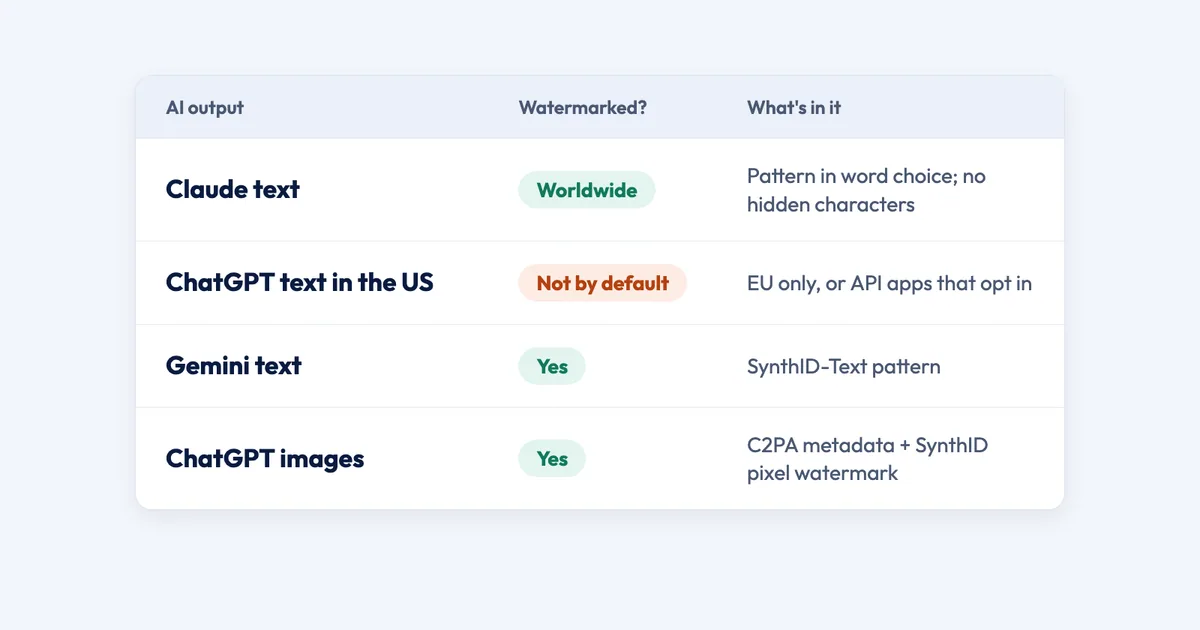
Yes, in some places and for some types of content. Here's where things stand as of November 21, 2026:
| Content | Watermarked? | What's in it | Who can check it |
|---|---|---|---|
| Claude text | Yes, worldwide | Statistical pattern in word choice | Anthropic's detection API (private preview) |
| ChatGPT text in the US | No, by default | Nothing | Nobody needs to |
| ChatGPT text in the EU | Yes | textGrain statistical pattern | OpenAI's detector (approved researchers) |
| OpenAI API text | Only if the developer opts in | textGrain statistical pattern | OpenAI's detector (approved researchers) |
| Gemini text | Yes | SynthID-Text statistical pattern | |
| ChatGPT images | Yes, everywhere | C2PA metadata + SynthID pixel watermark | Anyone, at openai.com/verify |
| Files Claude creates (.png, .jpg, .svg) | Yes | C2PA metadata | Anyone, at claude.com/check-content |
People use the word "watermark" for three different things, and each one is checked and removed in its own way:
| Type | Can you see it? | Can find and replace remove it? | Who can detect it |
|---|---|---|---|
| Hidden Unicode characters | Yes, in a code editor | Yes | Anyone |
| Statistical text watermark | No, there's nothing to see | No | Only the AI company |
| Image metadata (C2PA) | Yes, with a metadata tool | Yes, it's stripped by re-saving or screenshots | Anyone |
| Pixel watermark (SynthID) | No | Not easily | The AI company's checker |
How Claude's text watermark works
Anthropic explained its watermark in an August 14, 2026 post. The short version:
- It's a version of SynthID-Text, the method Google DeepMind published in Nature in 2024.
- It changes how Claude picks words, not what it adds. When several words would work equally well, a secret key decides which one Claude picks, instead of pure randomness. In Anthropic's words, "Nothing is added to the text and there are no hidden characters."
- It applies everywhere. Anthropic is applying it globally "because we don't yet have a durable way to scope it by region," so US users get it too. According to Anthropic's help center, it covers claude.ai, the API, Claude Code, Claude Cowork and Claude Tag, plus Claude models running on AWS, Google Cloud and Microsoft Foundry.
- Older models were added in November 2026. Anthropic's release notes added the watermark to Claude Mythos 5, Opus 4.7 and Sonnet 4.6 on November 3. Opus 4.6, Opus 4.5, Sonnet 4.5 and Haiku 4.5 followed on November 16. On some of these older models, API requests with a non-default temperature, top_p or top_k might not carry it.
Anthropic is open about the watermark's limits. Short texts are hard to detect, and so are factual passages and code, because there are few equally good word choices to work with. A translation by Claude carries the full watermark. If you only use Claude to proofread your own writing, there's little or nothing for the mark to attach to. And a positive result only shows that Claude was likely involved. It can't tell "Claude wrote this" from "Claude heavily edited this."
Who can check it: only organizations admitted to Anthropic's private-preview detection API. That means regulators, law enforcement, media, fact-checkers, researchers, educational organizations and some businesses with their own legal duties under the EU rules. You can't check your own Claude text today.
How ChatGPT's textGrain watermark works
On October 5, 2026, it announced "textGrain," an invisible statistical signal in ChatGPT's word choices, and rolled it out in three parts:
- EU only for ChatGPT. OpenAI said it would add the watermark to eligible ChatGPT and Codex text in the European Union over the following weeks. It also said, "We are not making text watermarking a global default at launch."
- Opt-in for the API, worldwide. Developers can turn it on for select models. It's off by default.
- A detector for a few. Access is limited to approved researchers and expert organizations, granted case by case.
OpenAI's help center now lists the text signal as "textGrain watermarks (EU only)" and says it "does not add hidden characters, invisible spaces, or unusual punctuation." It also notes that the EU rules don't require watermarks on outputs shorter than 200 tokens (roughly 150 words) or on code snippets.
What this means for US readers: if you use the ChatGPT app from the US, your text isn't watermarked by default. It can be if a writing tool you use runs on the OpenAI API and its developer has opted in. Ask your vendor if that matters to you.
The watermark is also fragile. In OpenAI's own tests on 400-token passages, replacing 10% of the words with synonyms cut detection from about 92% to 66%, and replacing 25% cut it to 17%. Detection also drops for short text and math, and it varies by language. OpenAI says plainly that "the absence of a detected watermark does not prove human authorship."
What about Gemini?
Google watermarks text from the Gemini app and web experience with SynthID, which adjusts the probability scores behind each word choice. Google's public SynthID Detector checks images, video and audio, not text. Claude's watermark uses the same method but a different secret key, so Google's tools can't read Claude's mark.
The hidden-character myth: where it came from
On April 20, 2025, the education startup Rumi reported that OpenAI's o3 and o4-mini models were inserting narrow no-break spaces (U+202F) into long answers, and called them watermarks. Two days later, Rumi added OpenAI's reply: the characters were "a quirk of large-scale reinforcement learning," not a watermark. By April 23, Rumi said it no longer saw them.
That story is why so many sites now sell "ChatGPT watermark removers" that delete invisible characters. Those tools remove formatting leftovers, not a watermark. Stray characters can come from any AI model, but also from Word, Google Docs, PDFs and web pages you copied from. Finding them doesn't prove AI wrote the text, and finding none doesn't prove a person did.
They're still worth cleaning out. A zero-width space inside a keyword can split it in two for on-site search, title tags and schema, and stray non-breaking spaces cause odd line wraps and failed find-and-replace.
How to check your text for hidden characters
Here are the characters to look for:
| Character | Code point | Replace with |
|---|---|---|
| No-break space | U+00A0 | A normal space |
| Narrow no-break space | U+202F | A normal space |
| Zero-width space | U+200B | Nothing (delete it) |
| Zero-width non-joiner and joiner | U+200C, U+200D | Delete in English text; keep in emoji and some scripts |
| Left-to-right and right-to-left marks | U+200E, U+200F | Nothing |
| Word joiner | U+2060 | Nothing |
| Byte order mark | U+FEFF | Nothing |
| Soft hyphen | U+00AD | Nothing |
Option 1: Paste into a browser checker
Search for an "invisible character checker" and pick one that says it processes text in your browser. Don't paste client work or anything confidential into a tool that uploads it to a server.
Option 2: Turn on VS Code's Unicode highlighting
VS Code can highlight invisible characters, but it switches this off for Markdown and plain text by default, which is exactly where pasted AI drafts end up. Add this to your settings.json:
"editor.renderControlCharacters": true,
"editor.unicodeHighlight.invisibleCharacters": true,
"editor.unicodeHighlight.nonBasicASCII": true,
"[markdown]": { "editor.unicodeHighlight.invisibleCharacters": true },
"[plaintext]": { "editor.unicodeHighlight.invisibleCharacters": true }
Hover over a highlighted character to see its code point. To search for all of them at once, open search (Cmd+Shift+F or Ctrl+Shift+F), turn on regular expressions and use:
[ -- -]Option 3: Scan a folder from the terminal (Mac or Linux)
This command lists every file, line and character it finds. It works with the tools that come with macOS:
perl -CSD -ne 'while (/([\x{00A0}\x{00AD}\x{200B}-\x{200F}\x{202A}-\x{202F}\x{2060}-\x{2064}\x{FEFF}])/g) { printf "%s line %d: U+%04X\n", $ARGV, $., ord($1) } close ARGV if eof' drafts/*.mdWe ran this check across all 31 articles and pages on SERP Times on November 21, 2026 and found none of these characters. If it prints nothing for your files, they're clean too.
Option 4: Check and clean with Python
Save this as check_chars.py and run python3 check_chars.py draft.txt. It prints each suspicious character, then writes a cleaned copy next to the original:
import re, sys, unicodedata
path = sys.argv[1]
text = open(path, encoding="utf-8").read()
for i, ch in enumerate(text):
if unicodedata.category(ch) in ("Cf", "Zs") and ch != " ":
print(i, f"U+{ord(ch):04X}", unicodedata.name(ch, "unknown"))
clean = re.sub("[ ]", " ", text)
clean = re.sub("[]", "", clean)
open(path + ".clean.txt", "w", encoding="utf-8").write(clean)The cleanup leaves zero-width joiners alone, for the reason in the warning above.
Option 5: Check a WordPress site
In the block editor, switch to the Code editor (Cmd+Shift+Option+M on a Mac, Ctrl+Shift+Alt+M on Windows) to see non-breaking spaces as . For a whole site, a search-and-replace plugin with regular expressions works. Back up your database before any bulk replacement.
How to check images and files
Images have two kinds of marks: C2PA "Content Credentials," which is signed metadata inside the file, and pixel watermarks like SynthID, which are part of the image itself.
- openai.com/verify checks images, audio and PDFs for both OpenAI signals. It doesn't check text. According to OpenAI's help center, images made with ChatGPT or the OpenAI API "include both signals."
- claude.com/check-content reads the C2PA credentials on files Claude creates, up to 100 MB. It runs in your browser and doesn't check text.
- contentcredentials.org/verify reads C2PA from any company and shows who signed the file.
- ExifTool on the command line shows whether a C2PA block and an IPTC "AI-generated" tag are present:
exiftool -G1 -a -s -JUMBF:all -XMP-iptcExt:DigitalSourceType image.jpgA DigitalSourceType of trainedAlgorithmicMedia means the image was AI-generated. ExifTool shows the metadata but doesn't verify the signature, so use one of the websites above for that.
A clean result doesn't prove much. Screenshots, format changes and most upload pipelines strip metadata. The SynthID pixel watermark in OpenAI images is built to survive common edits, so OpenAI's checker may still recognize a ChatGPT image after its metadata is gone. Heavy cropping or compression can defeat it.
Can Google detect AI watermarks when it crawls your site?
Not for Claude or ChatGPT text. Their watermarks can only be read with Anthropic's and OpenAI's secret keys, and neither company has announced any deal to share its detector with Google Search. Google can technically check its own Gemini SynthID-Text, but it has never said Search uses it.
Here's what Google has actually said:
- On AI content: Google's February 2023 guidance says "appropriate use of AI or automation is not against our guidelines." Content that is "useful, helpful, original, and satisfies aspects of E-E-A-T" can do well.
- On mass-produced pages: its generative AI guidance says that using AI to generate many pages without adding value for users may violate its scaled content abuse policy. It also tells you to fact-check AI content by hand before you publish.
- On images: Google can read C2PA metadata and may show how an image was made, including AI edits, in its "About this image" feature. Merchant Center requires AI-generated product images to carry the IPTC
trainedAlgorithmicMediatag. These are labels and policy rules, not ranking factors.
Independent data points the same way. In a July 2025 Ahrefs study of 600,000 top-20 pages, the correlation between a page's share of AI content and its ranking was 0.011, effectively zero. That study used Ahrefs' own AI detector, not watermark detection, but it fits Google's message: it ranks the page, not the tool.
Google doesn't publish all of its ranking signals, so "Google hasn't said it uses this" doesn't prove it never will. For now, whether your content is useful, accurate and not mass-produced matters far more than whether it carries a watermark.
Can you remove an AI watermark?
It depends on the type:
- Hidden characters: yes, with the tools above. Do it for clean text, not to hide anything.
- Image metadata: yes, it's easy to strip. That doesn't make it a good idea. Social platforms use this metadata to show "AI info" labels, and Merchant Center requires the tag on AI product photos. Check the rules of wherever you publish before you remove it.
- Pixel watermarks: not with metadata tools, because the mark is in the image itself.
- Statistical text watermarks: not with find and replace or a "cleaner." Anthropic says, "Light editing probably won't remove the watermark completely; a complete rewrite where every word is replaced will."
Be wary of paid "AI watermark removers" for text. At best they delete stray characters and leave the real watermark. At worst they're paraphrasing tools that change your meaning and add errors.
The approach that works for both readers and rankings is the one Google rewards anyway. Use the AI draft for research and structure. Then write the final version yourself, with your own examples, data and experience. That's original work, and it's also what makes a page worth ranking.
Why this is happening now: US and EU rules
Two laws are behind these changes. This is a summary, not legal advice.
- California AI Transparency Act (SB 942, as amended by AB 853): operative August 2, 2026. AI companies with more than 1 million monthly users in California must embed hidden disclosures in AI-generated images, video and audio, and offer a free tool to check them. It doesn't cover text. From January 1, 2027, large online platforms must also detect provenance data in content uploaded to them.
- EU AI Act, Article 50: in force from August 2, 2026, it requires AI providers to mark generated content in a machine-readable way. The European Commission's Code of Practice on AI-generated content was published June 10, 2026, and about 190 organizations had signed it by the end of July. This is why OpenAI's text watermark is EU-only. It matters to US businesses that publish for readers in the EU.
These duties fall mainly on AI providers like OpenAI and Anthropic, not on businesses that publish a blog post written with AI help. The FTC's rules against deceptive claims still apply to what you publish, whoever wrote it.
What to do now
- Assume Claude-drafted text is watermarked. Plan your disclosure policy on that basis instead of trying to beat it, especially for client work.
- Add a hidden-character check to your publishing routine, using VS Code, the terminal command or a WordPress plugin.
- Check AI images before you post them with openai.com/verify or contentcredentials.org/verify, so you know whether a platform's "AI info" label is likely.
- Keep honest metadata on AI product images if you use Google Shopping.
- Don't pay for text watermark removers. Spend the time on original reporting, examples and expert review instead.
- Check again every few months. The EU rules are still being put into practice, Claude's older models were only added in November 2026, and Anthropic and OpenAI may open their detectors more widely. We'll update this guide when they do.
For more on how AI tools find and use web content, see what search engine Claude uses and how to get cited by ChatGPT.
Frequently asked questions
Does Claude watermark its text?
Yes. Since August 2026, Anthropic adds an invisible statistical watermark to text from supported Claude models, and it applies it worldwide, including in the US. It works through the model's word choices, not hidden characters, so you can't see it or check for it yourself. Only Anthropic's detection API can read it, and that API is in private preview for approved organizations.
Is ChatGPT text watermarked in the US?
Not by default. OpenAI's textGrain watermark is applied to eligible ChatGPT text in the European Union. Outside the EU, text is watermarked only when an API customer opts in, so a tool built on the OpenAI API could add it. Images from ChatGPT carry C2PA metadata and a SynthID watermark everywhere.
Can a hidden character checker find the ChatGPT or Claude watermark?
No. Both OpenAI and Anthropic say their text watermarks add no hidden characters. A checker can find stray Unicode such as narrow no-break spaces or zero-width spaces, which are formatting leftovers, but a clean result says nothing about the statistical watermark.
Does Google penalize content with an AI watermark?
There's no evidence it does. Google doesn't have Anthropic's or OpenAI's watermark keys, and it has never said it uses any text watermark, including its own SynthID, for ranking. Google judges content on quality and its spam policies, such as scaled content abuse, not on how the text was produced.
How do I remove an AI watermark from text?
You can delete stray Unicode characters with find and replace, but that doesn't touch the statistical watermark. Anthropic says light editing probably won't remove its watermark and a complete rewrite will. The practical answer is to use the AI draft as research and write the final version yourself, with your own examples and experience.
Share
X (opens in a new tab)LinkedIn (opens in a new tab)WhatsApp (opens in a new tab)Akif Qureshi has worked in SEO for more than two years, auditing sites, planning content and tracking how Google updates change real traffic. He started SERP Times to report search changes clearly and to say exactly what site owners should do about them.
Certifications
- Google Analytics (Google)
- Google Ads Search (Google)
- HubSpot
- Digital Vidya
- DSIM
- Internship Studio