
ToolsGuide
Best SEO Chrome Extensions for 2027: AEO and GEO Audits
Eight SEO Chrome extensions that check whether ChatGPT, Perplexity and Google's AI features can reach, read and quote your pages, led by the two I've been using for months: SBMM and AITDK.

By Akif Qureshi
Published Updated 11 min read
On this page
The best SEO Chrome extensions for 2027 don't stop at title tags: they also tell you whether ChatGPT, Perplexity and Google's AI features can reach, read and quote your page.
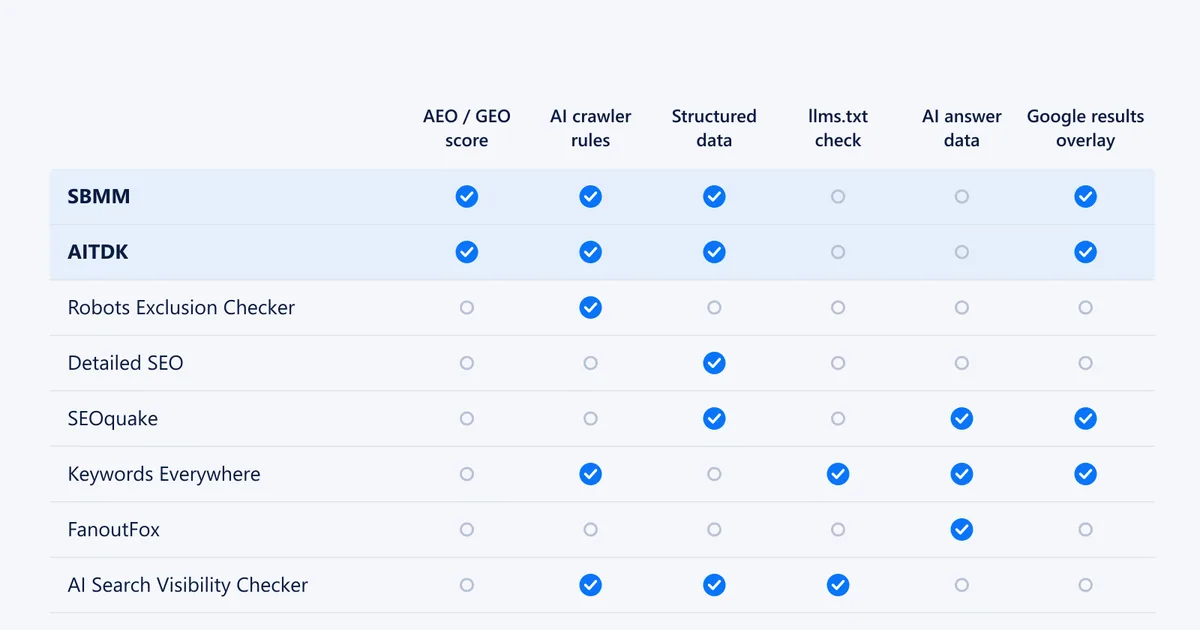
I've been using two of them, SBMM and AITDK, for several months, and honestly, they're amazing: they're the two I recommend first. This guide covers both in detail, then six more worth installing, with what each one actually checks, what it costs, and what data it sends.
Key takeaways
What an AEO and GEO audit should check
Answer engine optimisation (AEO) is about being the direct answer in AI Overviews, featured snippets and voice results. Generative engine optimisation (GEO) is about being read and cited by ChatGPT, Perplexity, Gemini and Copilot. An extension that "audits AEO and GEO" should check six things:
- AI crawler access. robots.txt must not block the crawlers you want, such as OpenAI's OAI-SearchBot and GPTBot, ClaudeBot and PerplexityBot. Google's AI Overviews and AI Mode use Googlebot; blocking Google-Extended affects how Gemini uses your content, not Search. Our robots.txt and sitemap checker shows what a site's rules allow.
- Content in the HTML. If the main text only appears after JavaScript runs, some AI crawlers never see it.
- Answer-first structure. Question-style headings, a direct answer in the first 40 to 60 words under each, and lists or tables for steps and comparisons.
- Structured data that matches what's visible on the page: Article, Organization, Product, FAQPage. Our schema generator writes FAQ and Article markup.
- Trust signals: a named author, a visible updated date, and links to sources.
- llms.txt (optional). A newer file some AI tools read. Google has said Search doesn't use it, so treat it as a bonus, not a fix.
The 8 best SEO Chrome extensions at a glance
User counts, ratings and update dates are from each Chrome Web Store listing on 31 October 2026.
| Extension | Best for | Price | Users · rating | Last updated |
|---|---|---|---|---|
| SBMM – SEO Signals & Etsy Toolkit | AEO and GEO scores, Google and Maps metrics | Free | ~3,000 · 4.9 (55) | 30 Oct 2026 |
| AITDK SEO Extension | GEO score, traffic, backlinks, Whois | Freemium | 100,000 · 4.6 (138) | 19 Oct 2026 |
| Robots Exclusion Checker | AI crawler rules and indexing directives | Free | 50,000 · 4.9 (29) | 4 Mar 2026 |
| Detailed SEO Extension | Headings, schema and canonical checks | Free | 600,000 · 4.8 (233) | 2 Jun 2026 |
| SEOquake | On-page audit and AI Overview sources | Free | 1,000,000 · 3.5 (2.6K) | 15 Oct 2026 |
| Keywords Everywhere | Keyword data, AI crawler and llms.txt checks | Freemium | 1,000,000 · 3.3 (5.7K) | 25 Oct 2026 |
| FanoutFox | Which sources ChatGPT fetched and cited | Free | ~3,000 · 4.9 (31) | 2 Sep 2026 |
| AEO, GEO and AI Search Visibility Checker | What AI crawlers see on JavaScript-heavy sites | Free | 311 · 5.0 (5) | 20 Aug 2026 |
1. SBMM – SEO Signals & Etsy Toolkit
Best for: a free, all-in-one audit that scores a page for AEO and GEO and puts SEO metrics on every Google result.
Install: SBMM on the Chrome Web Store · SBMM extension website
SBMM is made by SBMM, an SEO training institute in Pakistan. One click on the icon runs an on-page check, and the AEO / GEO analyzer gives the page separate AEO and GEO scores out of 100. It looks at answer structure, question headings, FAQs, schema, entities, trust signals and crawler access, then lists fixes sorted by impact. You can copy the report, export it as JSON or print it to PDF.
The fixes are specific enough to act on: add a visible FAQ with FAQPage markup, answer within the first lines under each heading, show the author and updated date, and make sure robots.txt doesn't block answer engines. SBMM is honest about what the score means: its listing calls it "a readiness checklist, not a ranking prediction".
The rest of the toolkit is just as useful:
- Google results overlay: each organic result gets a bar of 12 metrics, including DR, DA, referring domains, traffic, domain age, CMS, word count, schema and index status. A sidebar summarises page one, and Difficulty by SBMM scores the keyword from 0 to 100 from the live results, split into on-page and off-page.
- Page audit: indexing, headings, links, images, schema, social tags, redirect paths, CMS and plugin detection, and an internal link graph that helps find orphan pages.
- Google Maps and Business Profile audit: categories, website strength and claim status for local results, a profile score out of 100 with NAP, schema, competitor and review checks, and a 3×3 geo-grid rank check.
- Etsy tools: keyword research, listing audits, title and tag checks, and fee and ads calculators (these need a free SBMM account).
- It works on Bing, DuckDuckGo, Brave and Yandex results too, and in Edge, Brave and Opera.
Watch out for: the page audit, AEO/GEO scoring and keyword tools run on SBMM's server. The listing says it sends domain names, result URLs and the keywords you search, but not the content of pages you read. With about 3,000 users it's much younger than the big names, so the metrics are best used to compare sites, as SBMM itself advises.
2. AITDK SEO Extension (Traffic, Keywords, Whois, SEO analyzer)
Best for: checking any site's GEO readiness, traffic, backlinks and domain details in one side panel.
Install: AITDK on the Chrome Web Store · AITDK extension website
AITDK opens a panel with what it calls "15 SEO & GEO tools". The newest is a GEO score from 0 to 100 for how ready a page is to be crawled and cited by AI search. It's built from five sub-scores: AI crawler access, machine readability, structured data, content and citability, and trust and E-E-A-T. The crawler check separates AI training crawlers, AI search crawlers and assistant fetchers, which matters: many sites block training bots but still want to appear in ChatGPT search. You get a prioritised fix list you can copy as a report.
Everything else is in the same panel:
- Traffic: monthly visits, bounce rate, pages per visit, visit duration, global and country rank, and traffic sources including AI traffic. Under each Google result it also shows monthly visits and domain age.
- Backlinks: Domain Rating, backlinks and referring domains with the dofollow share, and top backlinks with anchors.
- SEO analyzer: title and description length, canonical, H1 to H6 outline, image alt text, internal and external links, Open Graph and Twitter tags, hreflang, a schema viewer, robots.txt, sitemap and server-rendering checks, and indexed-page counts across 12 search engines.
- Whois and DNS through RDAP, keyword density for one- to five-word phrases, and a reverse AdSense lookup that finds other sites using the same publisher ID.
Watch out for: most tools are free, but some advanced data needs a paid plan and a few lookups need a free AITDK account. There's no page-speed test (it links out to PageSpeed Insights). Of the extensions here that give a GEO score, it has by far the most users: 100,000, with a "Featured" badge on the Chrome Web Store.
SBMM or AITDK? I use both. SBMM is stronger on answer structure, local SEO and keyword difficulty. AITDK is stronger on AI crawler detail, traffic and backlink research. Run both on the same page and fix whatever both flag first. You can see them in action on my Instagram:
Watch the 9 October reel Watch the 30 October reel3. Robots Exclusion Checker
Best for: seeing at a glance whether a page, or any AI crawler, is blocked.
Install: Robots Exclusion Checker on the Chrome Web Store
Robots Exclusion Checker by Sam Gipson has long been the quickest way to see robots.txt rules, meta robots, X-Robots-Tag and canonical tags for the page you're on. Version 1.3.0 added checks for 14 AI bots from six companies: OpenAI, Anthropic, Google, Perplexity, Meta and Apple. They're split into training, search-indexing and real-time browsing bots, and an "AI" badge appears on the icon when any of them are blocked. It's free and asks for very few permissions.
4. Detailed SEO Extension
Best for: checking whether a page's structure is answer-ready.
Install: Detailed SEO Extension on the Chrome Web Store
Detailed, now owned by Ahrefs, has no AI-specific checks, but its tabs show what answer engines rely on: an indented heading outline, a Schema tab, meta robots and X-Robots-Tag, canonical and hreflang. It also extracts People Also Ask questions from Google, which make good question-style subheadings. It's free and needs no access to all your sites, which is rare.
5. SEOquake
Best for: a classic on-page audit plus a look at AI Overview sources.
Install: SEOquake on the Chrome Web Store
Semrush's SEOquake audits robots directives, hreflang, sitemap, alt text, structured data, headings and indexability. Its Google results overlay now also covers AI Overview sources, so you can see which sites Google cites for a query without leaving the results page. It's free, and an optional free Semrush account adds more metrics.
6. Keywords Everywhere
Best for: keyword research with an AI search layer.
Install: Keywords Everywhere on the Chrome Web Store
Keywords Everywhere adds search volume and related keywords to Google, and its newer features show AI crawler blocking, llms.txt and other AI standards files for any site. It can also show what share of ranking sites block AI crawlers, and the follow-up ("fan-out") queries ChatGPT and Gemini run. It's credit-based, with plans from $7 a month billed yearly. Its privacy disclosure says it collects personally identifiable information and location.
7. FanoutFox: AI Answer & GEO Inspector
Best for: seeing which sources ChatGPT actually reads and cites.
Install: FanoutFox on the Chrome Web Store
The page checkers above test readiness. FanoutFox shows the result: for a question you ask ChatGPT, it shows the searches ChatGPT ran, the sources it fetched, the ones it actually cited, and each domain's share of citations. You can save a baseline and compare after changing a page. It's free, and it reads your ChatGPT session to do this, so use it on an account you're comfortable with. RESONEO's Search & fan-out capture does something similar and adds Gemini.
8. AEO, GEO and AI Search Visibility Checker
Best for: JavaScript-heavy sites built with React or Next.js.
Install: AEO, GEO and AI Search Visibility Checker on the Chrome Web Store
This extension by Alli AI compares the server HTML with the rendered page and shows what crawlers miss when JavaScript doesn't run. It also reads robots.txt for about a dozen AI crawlers, requests the page as GPTBot, ClaudeBot and PerplexityBot to catch blocking, and checks JSON-LD, the sitemap and llms.txt. It's free and says analysis runs locally, but with only 311 users treat it as one to watch rather than a daily tool.
Extensions I left out
- SEO META in 1 CLICK: still popular, but it hasn't been updated since August 2024.
- MozBar: rated 1.3 out of 5, with no AI checks, and its useful features need Moz Pro.
- Ahrefs SEO Toolbar: maintained, but its metrics need a paid Ahrefs plan, and Detailed covers the on-page checks for free.
- Brand-new AEO and GEO checkers with a few dozen users: some look promising, but I'd wait for updates and reviews before giving them access to every site you visit.
A 10-minute AEO and GEO audit with SBMM and AITDK
- Open the page you want to rank and run AITDK's GEO score. Note the lowest of the five sub-scores.
- Run SBMM's page audit on the same page and read the AEO and GEO fixes, starting at the top of the impact-sorted list.
- Fix crawler access first. If either tool flags a blocked AI search crawler, check robots.txt with Robots Exclusion Checker. Nothing else matters if the crawler can't get in.
- Fix structure next: question headings, a direct answer under each, a visible FAQ with matching FAQPage markup, and the author and updated date.
- Validate the markup with Google's Rich Results Test.
- Re-run both scores, then check the real result a few weeks later in Search Console and with FanoutFox.
How to install SEO extensions safely
- Read the permissions. Most SEO extensions need to "read and change all your data" on the sites you visit. That's normal for page audits, so install only ones you trust.
- Check what gets sent. Read the data-use section of each listing: SBMM, for example, sends domains, result URLs and keywords to its server, but not page content.
- Use a separate Chrome profile for client work, so extensions don't see your personal accounts.
- Remove what you don't use. Every extension slows the browser a little and adds risk.
- Re-check after updates. Ownership changes, like Ahrefs buying Detailed, can change what an extension does with your data.
Frequently asked questions
Can an SEO Chrome extension really audit AEO and GEO?
It can check whether a page is ready to be read and quoted by AI search: AI crawler access in robots.txt, content in the HTML, answer-first structure, structured data and trust signals. It can't tell you how often an AI assistant cites you; for that you need a tool that captures real AI answers, such as FanoutFox.
Is an AEO or GEO score a ranking factor?
No. Google, ChatGPT and Perplexity don't use any extension's score. SBMM calls its score a readiness checklist, not a ranking prediction. Use the scores to find missing basics, then judge the page by its traffic and citations.
Are SBMM and AITDK free?
SBMM is free, and its Etsy tools need a free SBMM account. AITDK is free to install and most tools work straight away, but some advanced data needs a paid plan and a few lookups need a free AITDK account.
Do I need an llms.txt file for AI search?
It's optional. Google has said Search doesn't use llms.txt, and support among AI tools is patchy. Make sure AI crawlers aren't blocked in robots.txt and that your main content is in the HTML first; add llms.txt later if you want to.
Share
X (opens in a new tab)LinkedIn (opens in a new tab)WhatsApp (opens in a new tab)Akif Qureshi has worked in SEO for more than two years, auditing sites, planning content and tracking how Google updates change real traffic. He started SERP Times to report search changes clearly and to say exactly what site owners should do about them.
Certifications
- Google Analytics (Google)
- Google Ads Search (Google)
- HubSpot
- Digital Vidya
- DSIM
- Internship Studio