
ToolsGuide
Can I Use Claude on Multiple Devices at the Same Time?
One Claude account can stay signed in on your laptop, desktop and phone at once, and Claude Code can run on two computers with the same login. Here's how usage limits work across devices, how to keep two Claude Code accounts on one computer, and where account sharing crosses the line.

By Akif Qureshi
Published 9 min read
On this page
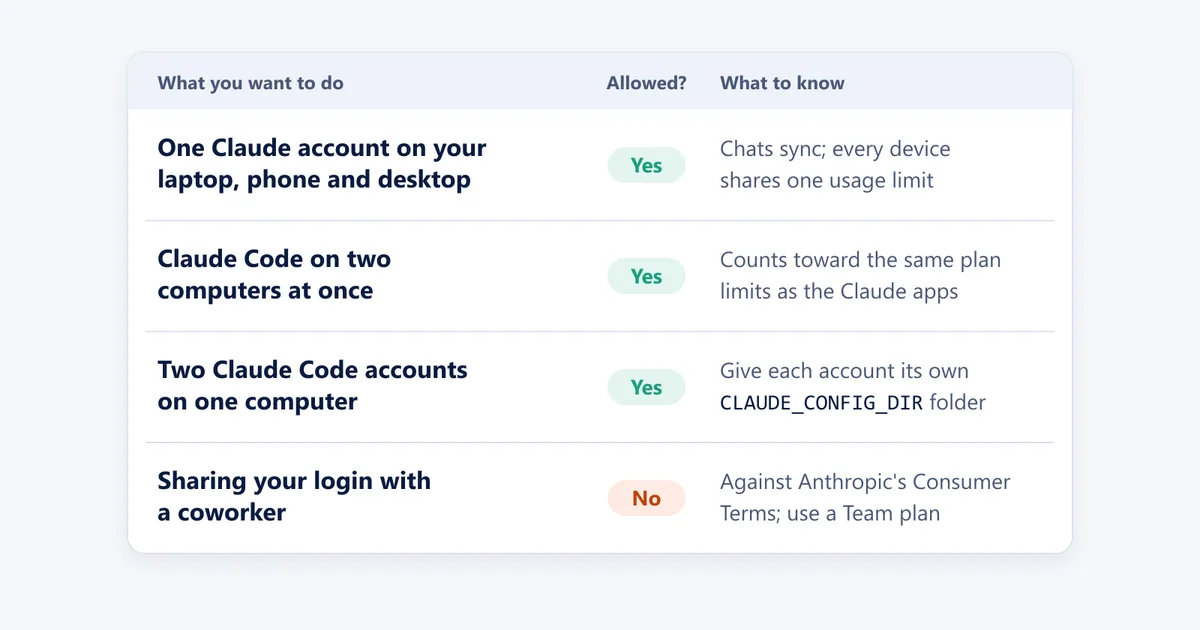
Yes, you can use Claude on multiple devices at the same time: one Claude account can stay signed in on your laptop, your work computer and your phone at once, your conversations sync between them, and Anthropic doesn't publish a limit on how many devices you use.
The catch is usage. Every device, and Claude Code, draws from the same usage limit on your account, so working on two computers at once just reaches that limit faster. Below: how multi-device use works, whether you can run Claude Code on two machines, how to keep two Claude Code accounts on one computer, and where account sharing crosses the line. Everything here was checked against Anthropic's help center, the Claude Code docs and claude.com/pricing on November 14, 2026.
Key takeaways
Can I use one Claude account on two computers at the same time?
Yes. To use your account on another device, Anthropic's login help article says to "enter the same email address you use to log in on your usual device." You can be signed in at the same time on:
- claude.ai in any web browser
- The Claude desktop app for Mac and Windows
- The Claude apps for iPhone and Android
- Claude Code in a terminal or code editor, on paid plans
According to Claude's download page, your conversations, projects, memory and preferences sync across all devices when you're signed in. A chat you start on your office PC is waiting on your phone when you leave. The one exception is a local session in Claude Cowork, which stays on the device that ran it.
Anthropic doesn't list a maximum number of devices or simultaneous sessions in its help center, pricing page or terms. That isn't a promise of "unlimited," though: the pricing page says Anthropic may limit usage "in other ways" at its discretion to manage capacity.
See and sign out of your other devices
Claude keeps a list of every device and browser where you're logged in. To see it, click your initials in the lower left, go to Settings > Account and scroll to Active sessions (called Where you're logged in in the newer settings layout). Each entry shows the browser and operating system, an approximate location and when it was last used. Select the ⋮ menu next to a session and choose Terminate to log that device out (Anthropic's guide).
To sign out of every device at once, use the Log Out button in Settings > Account on claude.ai. According to Anthropic's help article, it signs you out of:
- web browsers, the mobile apps and the desktop apps;
- Claude Code, including long-lived tokens made with
claude setup-token; - Claude in Chrome and Claude in Slack.
It doesn't affect API keys, and the option isn't available in the iPhone or Android app. It's worth doing if you signed in on a hotel business center or library computer and forgot to log out.
How usage limits work across devices
Usage limits belong to your account, not to each device. Claude's pricing page says your activity across Claude on web, desktop, mobile and Claude Code "all draws from the same pool." Most plans have a limit that resets on a rolling five-hour window, and paid plans add a weekly limit on top.
| Plan | US price (as of Nov 14, 2026) | Usage |
|---|---|---|
| Free | $0 | Limited usage every 5 hours and every week; no Claude Code |
| Pro | $20/month, or $17/month billed annually ($200 up front) | More than Free; includes Claude Code |
| Max | $100/month | 5x Pro usage every 5 hours and every week |
| Ultra | $200/month | 10x Pro usage every week; no 5-hour limit for verified accounts |
| Team | $25/seat monthly or $20/seat annually (Standard); $125 or $100 (Premium) | Per person; 2 to 150 seats |
Prices don't include tax. The plan once called Max 20x is now Ultra, at the same price.
So a second device doesn't double your allowance. If you're on Pro and you run a long Claude Code task on your desktop while you chat with Claude on your phone, both draw down the same five-hour window. To see where you stand, open Settings > Usage on claude.ai, which shows your current session, your weekly limit and when each resets. When you reach a limit, you can wait for the reset, move to a bigger plan, or, on paid plans, turn on usage credits to keep going at standard API rates.
Can I run Claude Code on two computers at the same time?
Yes. Install Claude Code on each machine, run claude and sign in with the same Claude account. Anthropic's Claude Code plan article says "these limits are shared across Claude and Claude Code," so both computers, and your chats, count toward the same usage. The docs don't list a cap on concurrent Claude Code sessions, whether they're on two computers or in two terminals on one.
Two things to check on each machine:
- Which account is active. Type
/statusat the Claude Code prompt to see the account and login method in use. - Your usage. Type
/usageto see your plan's usage bars. Its breakdown of what used the most is computed from that machine only; the docs note that "usage from other devices or claude.ai is not included."
One trap catches a lot of people: if the ANTHROPIC_API_KEY environment variable is set on a computer and you approve it, Claude Code uses that API key instead of your subscription, and you pay standard API rates for that usage. If one machine bills differently from the other, that's the first place to look.
Can I use multiple Claude Code accounts on the same computer?
Yes. Say you're a freelance developer in Austin with a personal Pro account and a seat on a client's Team plan. You have three ways to use both on one laptop.
Option 1: Switch with /logout and /login
Type /logout at the Claude Code prompt, run claude again and sign in with the other account in the browser window that opens. This is the simplest option when you only need one account at a time. Logging out also resets Claude Code's first-launch setup, so it walks you through setup again.
Option 2: Stay signed in to both with CLAUDE_CONFIG_DIR
To stay signed in to multiple accounts at once, Anthropic's authentication docs say to give each account its own configuration folder with the CLAUDE_CONFIG_DIR environment variable. Each folder has its own settings, session history and login.
On a Mac or Linux, add this line to ~/.zshrc or ~/.bashrc (it's the example from Anthropic's docs):
alias claude-work='CLAUDE_CONFIG_DIR=~/.claude-work claude'On Windows, add this function to your PowerShell profile (run notepad $PROFILE to open it):
function claude-work {
  $env:CLAUDE_CONFIG_DIR = "$HOME\.claude-work"
  try { claude @args } finally { Remove-Item Env:CLAUDE_CONFIG_DIR }
}
Open a new terminal and run claude-work. The first time, Claude Code walks you through login and setup for the new folder, so sign in with your work account there. From then on, claude opens your personal account and claude-work opens your work account, and you can keep both open side by side in separate terminal windows.
A few things to know:
- Your settings don't carry over. Each folder has its own settings and session history, so copy anything you rely on, such as
settings.json, from your default~/.claudefolder. A project's ownCLAUDE.mdstill loads in both, because it lives in the project. - Credentials are stored per folder. On Windows and Linux, Claude Code keeps the
.credentials.jsonfile in each folder; on a Mac, it keeps a separate Keychain entry for each folder. - One exception: separate folders don't keep two Claude Console sign-ins apart if you signed in to Console without an API key, because Claude Code stores that kind of sign-in outside the configuration folder.
Option 3: Use an API key for one account
If your company pays for Claude Code through the Claude Console instead of a Team plan, you can set ANTHROPIC_API_KEY in the terminal where you do that work. After you approve the key once, Claude Code uses it instead of your subscription, and that usage is billed per token. To go back to your subscription, remove the variable (unset ANTHROPIC_API_KEY in Bash or Zsh, Remove-Item Env:ANTHROPIC_API_KEY in PowerShell) and confirm with /status.
| Method | Both accounts signed in at once? | Best for |
|---|---|---|
/logout and /login | No | Switching now and then |
CLAUDE_CONFIG_DIR | Yes | Personal and work accounts used every day |
ANTHROPIC_API_KEY | Yes, in different terminals | Work billed through the Claude Console |
Can I have more than one Claude account?
Yes. Anthropic's help center explains how to switch between a personal account and a work account, and how you do it depends on the email address:
- Same email, personal plus Team or Enterprise: click your initials in the lower left of the Claude app and pick the account. A check mark shows the active one (help article).
- Different emails: there's no switcher in the apps. Log out, then log in with the other email address. In Claude Code, use one of the options above.
Every new account needs a phone number that can receive text messages, and Anthropic's verification article says a maximum of three Claude accounts can be verified with the same number. VoIP numbers, Google Voice and landlines aren't accepted. One more limit: Anthropic's Usage Policy bans using extra accounts to get around its safeguards or a suspension.
Can you share a Claude account with someone else?
No. Section 2 of Anthropic's Consumer Terms says "You may not share your Account login information" and you may not make your account available to anyone else. The login help article adds that subscription plans "can only be used by subscribers." Anthropic can suspend or close an account that breaks its terms, and sharing also hands the other person your chat history, memory and connected apps.
If two or more people need Claude, a Team plan is the supported route: it covers 2 to 150 people, and each seat is assigned to one named person. Standard seats cost $25 per month billed monthly, or $20 per month billed annually, as of November 14, 2026. For a couple or a small family, separate Free or Pro accounts do the same job.
Which setup fits you
| Your situation | What to do |
|---|---|
| You use Claude on a laptop, a phone and a work PC | Sign in with the same email everywhere and keep an eye on Settings > Usage |
| You run Claude Code on a desktop and a laptop | Use the same login on both; run /status and /usage on each |
| You have a personal account and a Team seat on one email | Use the account switcher in the apps and CLAUDE_CONFIG_DIR in Claude Code |
| Your personal and work accounts use different emails | Log out and back in in the apps; CLAUDE_CONFIG_DIR in Claude Code |
| You hit limits because you work on several devices at once | Move up to Max or Ultra, or turn on usage credits |
| Two people want to share one subscription | Not allowed; get a Team plan or separate accounts |
If you use Claude for research as well as coding, our guide to what search engine Claude uses explains where its web answers come from.
Frequently asked questions
How many devices can I use Claude on at once?
Anthropic doesn't publish a device limit. Its help center tells you to sign in with the same email address on each device, and your chats, projects, memory and preferences sync between them. Every device draws from the same usage limit, and Anthropic says it may limit usage in other ways at its discretion.
Does using Claude on two devices use up my limit faster?
Yes, if you use both at the same time. Usage limits belong to your account, not your device, and your activity on the web, desktop, mobile and Claude Code all draws from the same 5-hour and weekly limits. Check where you stand in Settings > Usage.
Can two people share one Claude Pro account?
No. Anthropic's Consumer Terms say you may not share your login information or make your account available to anyone else, and its help center says subscription plans can only be used by subscribers. For a team, a Claude Team plan gives each person their own seat, starting at $25 per seat per month billed monthly (as of November 14, 2026).
How do I switch accounts in Claude Code?
Type /logout at the Claude Code prompt, then run claude again and sign in with the other account. To stay signed in to both at once, give each account its own configuration folder with the CLAUDE_CONFIG_DIR environment variable. Run /status to see which account a session is using.
Can I use the same phone number for two Claude accounts?
Yes, up to a point. Anthropic's help center says a maximum of three Claude accounts can be verified with the same phone number. VoIP numbers, Google Voice and landlines aren't accepted, and you can't change the number on an account after it's verified.
Share
X (opens in a new tab)LinkedIn (opens in a new tab)WhatsApp (opens in a new tab)Akif Qureshi has worked in SEO for more than two years, auditing sites, planning content and tracking how Google updates change real traffic. He started SERP Times to report search changes clearly and to say exactly what site owners should do about them.
Certifications
- Google Analytics (Google)
- Google Ads Search (Google)
- HubSpot
- Digital Vidya
- DSIM
- Internship Studio