

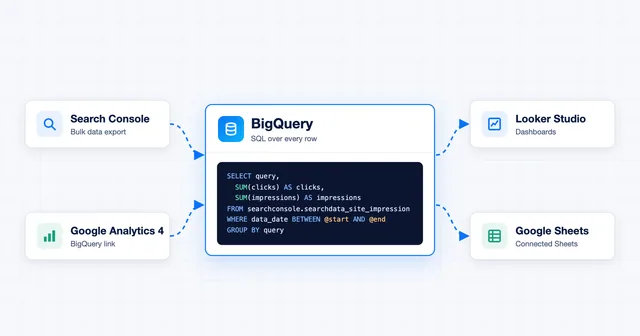
Analytics · Guide
What Is BigQuery? Pricing, Free Tier and SEO Uses
· 11 min read
Free tool · On-page
Generate FAQ, Article, local business, product, how-to and organization JSON-LD from a simple form and copy it into your page.
Runs in your browser: nothing you type is uploaded.
Question 1
<script type="application/ld+json">
{
  "@context": "https://schema.org",
  "@type": "FAQPage",
  "mainEntity": []
}
</script>Choose the type of schema: FAQ, Article, Local business, Product, How-to or Organization.
Fill in the form. Warnings point out missing recommended fields and values that look wrong.
Watch the JSON-LD update as you type, then copy the full script tag.
Paste it into your page's HTML and test it with Google's Rich Results Test.
Structured data describes your page in a format search engines read reliably: who wrote an article, what a product costs, where a business is and when it's open. Google recommends JSON-LD, the format this tool produces.
Each type has its own rules. Product results need an offer with a price, local business markup works best with a full street address and opening hours, and Google can penalize ratings that readers can't see on the page. The warnings under the form flag these.
Not every type earns a rich result today. Since August 2023 FAQ rich results appear only for well-known government and health sites, and Google stopped showing HowTo results in September 2023. The markup is still valid and describes your content to other search engines.
In a <script type="application/ld+json"> tag anywhere in the page's HTML. The tool outputs the full tag, ready to paste. Most content management systems have a field or plugin for it.
Probably not in Google. FAQ rich results are limited to well-known government and health sites, and HowTo results were removed in 2023. The markup still describes your content to other search engines.
Yes. Google's guidelines say structured data must describe content visitors can see. Marking up hidden content, or ratings nobody can see, can lead to a manual action.
The most specific one that fits, such as Dentist or Restaurant. Use LocalBusiness if none matches. Keep the name, address and phone number the same as on your Google Business Profile.
NewsArticle for news reporting, BlogPosting for blog posts and Article for anything else. Google treats all three the same way for article features.
Paste the code or your page URL into Google's Rich Results Test to see which features it's eligible for, and into the Schema Markup Validator to check it against schema.org.
Analytics · Guide
· 11 min read
SEO · Guide
· 6 min read
SEO · Guide
· 6 min read