SEOGuide
WebP vs JPEG: Which Image Format Should You Use?
For images on your website, WebP usually wins: smaller files at the same quality, and support in about 97% of browsers. Here's what the size savings really are, when JPEG still makes sense, and where AVIF fits.

By Akif Qureshi
Published 6 min read
On this page
In the WebP vs JPEG choice for website images, WebP usually wins: Google's tests found lossy WebP files 25% to 34% smaller than JPEGs of the same visual quality, and about 97% of browsers in use support it.
JPEG still has its place. It opens in every app, every email client and every photo editor, and for files people download, print or edit, that matters more than a few kilobytes. This guide compares the two on size, quality, support and what Google says, shows where the newer AVIF format fits, and gives you a simple rule for each kind of image.
Key takeaways
WebP vs JPEG at a glance
| JPEG | WebP | |
|---|---|---|
| Compression | Lossy only | Lossy or lossless |
| File size at equal quality | Baseline | 25% to 34% smaller (lossy, Google's study) |
| Transparency | No | Yes, in both modes |
| Animation | No | Yes |
| Browser support | Every browser | 97.32% of browsers in use (caniuse, Nov 2026) |
| Google Search | Supported | Supported |
| Opens in older desktop apps | Yes | Not always |
How much smaller is WebP, really?
The "25% to 34%" figure comes from Google's WebP compression study. Google compressed four image sets, including about 11,000 photos sampled from the web, as both JPEG and WebP, then compared files with the same SSIM score, a measure of how similar the result looks to the original. At every JPEG quality level tested (50, 75 and 95), the WebP file was 25% to 34% smaller.
Three caveats the study's own setup reveals:
- It used 2011 encoders. It tested libwebp 0.1.2 against libjpeg 6b. Both kinds of encoder have been developed further since, so today's gap on your images may be bigger or smaller.
- SSIM isn't your eye. Two files with the same score can look different on a sharp product photo or a screenshot with text.
- Quality numbers don't match across formats. "Quality 80" in WebP and "quality 80" in JPEG aren't the same setting, so comparing two files saved at the same number doesn't tell you much.
So treat 25% to 34% as a reasonable expectation for photos, not a promise. The only reliable number is the one you measure on your own images, at a quality you've looked at. For lossless images, Google's WebP overview says lossless WebP is 26% smaller than PNG.
What Google says about image formats
Google's image SEO guide lists the formats Google Search supports in an img tag: BMP, GIF, JPEG, PNG, WebP, SVG and AVIF. Both formats are fully indexable. Google doesn't call any format a ranking factor.
Where format choice does matter is speed. The same guide says images "are often the largest contributor to overall page size," and Lighthouse flags JPEG and PNG files that would be smaller as WebP or AVIF. Since Lighthouse 13, that check sits in the "Improve image delivery" insight. A smaller hero image loads sooner, which helps Largest Contentful Paint.
Google also recommends keeping the file extension matched to the actual format, so don't rename photo.jpg to photo.webp. Renaming doesn't convert anything.
When JPEG is still the right choice
Use JPEG when the file leaves your website:
- Email newsletters. caniemail.com's tests found that Gmail converts WebP images to JPEG and that Outlook.com and Yahoo Mail support depends on the reader's browser, and those tests were last run in 2021. JPEG is the safe choice inside an email.
- Downloads, print and editing. If customers download a spec sheet photo or a press kit, or your designer needs to edit it, JPEG opens everywhere.
- Uploads to other platforms. If a social network or marketplace re-compresses what you upload, a carefully made WebP gains nothing. Upload a high-quality JPEG and let the platform do its own compression.
- Very large images. Anything beyond WebP's 16,383-pixel limit.
One more rule: convert from the original, not from a compressed JPEG. Every lossy save throws away a bit more detail, and a WebP made from an already-compressed JPEG carries the old artifacts plus new ones.
Where AVIF fits
AVIF is newer and usually smaller again. In web.dev's guide to AVIF compression, Google's authors report savings of more than 50% compared with JPEG in their tests, while noting results depend on content and settings. caniuse.com puts AVIF support at 96.71% of browsers in use: Chrome 85+, Firefox 93+, Safari 16.4+ and iOS Safari 16+.
The tradeoffs: AVIF takes longer to encode, fewer apps open it, and most small sites won't notice the extra savings on top of WebP. A sensible setup is AVIF first, WebP or JPEG as the fallback, using the picture element:
<picture>
  <source srcset="/images/hero.avif" type="image/avif">
  <source srcset="/images/hero.webp" type="image/webp">
  <img src="/images/hero.jpg" alt="Soy candles on a kitchen counter" width="1600" height="900">
</picture>
The browser takes the first format it supports. Google's image guide says to always include the img element with a src, because some browsers and crawlers don't read srcset.
A simple rule for each image
| Image | Use |
|---|---|
| Photos and hero images on your site | WebP (or AVIF with a fallback) |
| Logos, icons, screenshots with sharp text | SVG for logos; lossless WebP or PNG for screenshots |
| Images with transparency | WebP |
| Email newsletters | JPEG (PNG for logos) |
| Downloads, print, files for editing | JPEG |
If you're on WordPress, Shopify or an image CDN, check whether it already serves WebP automatically. If it does, your job is just uploading good originals.
Convert images with our free compressor
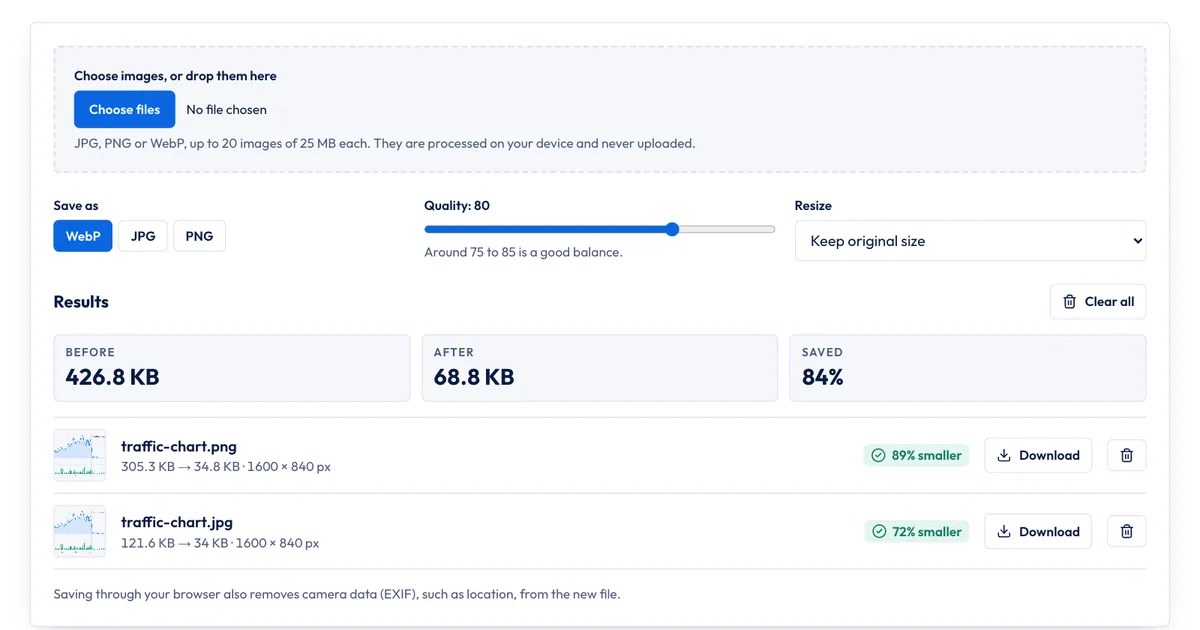
To test the difference on your own photos, use the free SERP Times image compressor. It runs in your browser, so images are never uploaded:
- Choose up to 20 JPG, PNG or WebP images (25 MB each), or drop them on the box.
- Pick WebP, JPG or PNG as the output format.
- Set the Quality slider (it starts at 80) and, if your images are wider than your page shows them, a Resize limit such as 1600 px.
- Compare the Before, After and Saved figures, then download each file.
To run your own WebP vs JPEG test, export the same photo twice, once as WebP and once as JPG, then lower each quality setting until you can just see a difference at 100% zoom. Compare the file sizes at that point. That's a fairer comparison than using the same quality number for both.
What it doesn't do: it doesn't make AVIF files, write picture markup or convert a whole media library. Saving through the browser also strips camera data such as location, which is good for privacy but means copyright details in the file are dropped too. For a few images a week, it's all you need; for thousands, use your platform's built-in conversion or an image CDN. For more on page speed, see our on-page SEO checklist, and if your images are icons, read our favicon size guide.
Sources
All accessed Nov 20, 2026:
- Google for Developers: WebP compression study
- Google for Developers: An image format for the web (WebP) and WebP FAQ
- Google Search Central: Image SEO best practices
- Chrome for Developers: Serve images in modern formats
- web.dev: Using AVIF to compress images on your site
- Can I use: WebP image format and AVIF image format
- Can I email: WebP image format
Frequently asked questions
Is WebP lossless?
It can be either. WebP has a lossy mode, which competes with JPEG, and a lossless mode, which competes with PNG. Google says lossless WebP files are 26% smaller than PNGs. JPEG has only a lossy mode.
Does WebP help SEO?
Not directly. Google Search indexes WebP and JPEG images alike, and Google doesn't list the file format as a ranking factor. Smaller images do make pages load faster, and Largest Contentful Paint, one of the Core Web Vitals, is often an image.
What's the largest image WebP can hold?
16,383 by 16,383 pixels, according to Google's WebP FAQ. That's far larger than any image a web page needs, but it can matter for very large panoramas or print files, which are better kept as JPEG or TIFF.
Should I convert all my existing JPEGs to WebP?
Convert the ones that matter most first: hero images, product photos and anything above the fold. Start from the original files if you still have them, not from already-compressed JPEGs, and keep the originals in case you need to re-export later.
Share
X (opens in a new tab)LinkedIn (opens in a new tab)WhatsApp (opens in a new tab)Akif Qureshi has worked in SEO for more than two years, auditing sites, planning content and tracking how Google updates change real traffic. He started SERP Times to report search changes clearly and to say exactly what site owners should do about them.
Certifications
- Google Analytics (Google)
- Google Ads Search (Google)
- HubSpot
- Digital Vidya
- DSIM
- Internship Studio