SEOGuide
Favicon Size: Every Size You Need and Google's Rules
There's no single favicon size. Here's the size each browser, phone and Google Search needs, what Google's rules say now (the old multiple-of-48 rule is gone), and the exact HTML to add.

By Akif Qureshi
Published 7 min read
On this page
The right favicon size depends on where the icon appears: Google Search needs a square image, ideally larger than 48 × 48 pixels, browser tabs use 16, 32 and 48 pixel versions inside favicon.ico, iPhones use a 180 × 180 apple-touch-icon, and Android uses 192 and 512 pixel icons from a web manifest.
Make one square source image at 512 × 512 pixels or more, and every other size comes from shrinking it. This guide lists each size with the source that asks for it, explains what Google's favicon rules say now (they've changed twice since many guides were written), and gives you the HTML to copy.
Key takeaways
Favicon sizes at a glance
| File | Size (pixels) | Used by | Who asks for it |
|---|---|---|---|
favicon.ico | 16, 32 and 48 in one file | Browser tabs, bookmarks | Long-standing convention; ICO is on Google's format list |
favicon-32x32.png | 32 × 32 | Tabs on high-resolution screens | Browsers choose by the sizes attribute |
favicon-16x16.png | 16 × 16 | Tabs on standard screens | Same |
apple-touch-icon.png | 180 × 180 | iPhone and iPad home screens | Apple's Safari documentation |
icon-192.png | 192 × 192 | Android home screen | Chrome, via the web manifest |
icon-512.png | 512 × 512 | Android splash screen, app installs | Chrome, via the web manifest |
| Any of the above | Larger than 48 × 48 recommended | Google Search results | Google Search Central |
You don't need the long lists of older Apple sizes (57, 72, 114, 152 pixels) that some guides include. Apple's documentation says that when there's no icon of the exact size a device wants, it uses the smallest larger one, so a single 180 px icon covers them.
What Google Search requires now
Google shows your favicon next to your site name in search results. Its favicon guidelines (last updated October 27, 2026) say:
- Shape and size: the favicon "must be a square (1:1 aspect ratio) that's at least 8x8px," and Google recommends one "larger than 48x48px so that it looks good on various surfaces."
- Formats: BMP, GIF, ICO, PNG, JPEG, PPM and TIFF.
- Where: a
linktag in the head of your home page. Google readsrel="icon",rel="shortcut icon",rel="apple-touch-icon"andrel="apple-touch-icon-precomposed". - Crawling: Googlebot must be able to crawl the home page, and Googlebot-Image must be able to crawl the icon file. Don't block either in robots.txt.
- One per hostname: example.com and shop.example.com can differ; example.com/shop can't.
- A stable URL that you don't change often, and an icon that represents your brand. Google replaces inappropriate icons with a default one.
- No guarantee: a favicon "isn't guaranteed to appear in Google Search results, even if all guidelines are met."
What changed, and why older guides disagree
Google's documentation changelog records two changes that many favicon size guides haven't caught up with:
- October 24, 2024: Google dropped the rule that a favicon "must be a multiple of 48px square" (48, 96, 144 and so on), replacing it with today's 8 × 8 minimum and the recommendation to go above 48 × 48, "to reflect the actual requirements for favicons."
- August 28, 2026: Google replaced a link to an outside list of formats with its own explicit list. The changelog says the supported formats didn't change; the page just names them now.
So if a guide tells you Google requires 48, 96 or 144 pixels, it's repeating the pre-2024 wording. Those sizes still work fine. They're just no longer required.
Browser tabs: favicon.ico, PNG and SVG
Tab icons are small, so 16 and 32 pixel versions (the second for high-resolution screens) are the usual pair, with 48 pixels added for larger spots. A favicon.ico file can hold several sizes at once, which is why one file covers all three. MDN explains that when a page lists several rel="icon" links, the browser uses their type and sizes attributes to pick the most appropriate one.
SVG favicons stay sharp at any size. caniuse.com shows support in Chrome and Edge 80+, Firefox 41+ and Safari 26 on Mac and iPhone, about 92.6% of browsers in use. But Google Search's format list doesn't include SVG, so if you use one, keep an ICO or PNG link for Google too.
iPhone and iPad: apple-touch-icon
When someone adds your site to their home screen, iOS uses the apple-touch-icon. Apple's Safari web content guide shows 180 × 180 for iPhone retina screens, and says that if there's no exact match, iOS uses the smallest icon larger than the size it needs. One 180 × 180 PNG covers current iPhones and iPads.
Two practical points: a file named apple-touch-icon.png in your site's root folder is found even without a link tag, and the icon should have a solid background color rather than transparent areas. Google also accepts rel="apple-touch-icon", so this file gives Google Search a larger icon to work with than a 48-pixel ICO.
Android: icons in a web manifest
Android and Chrome read icons from a web app manifest, a small JSON file linked from your pages. web.dev's manifest guide says: "For Chromium, you must provide at least a 192x192 pixel icon and a 512x512 pixel icon," and Chrome scales those to fit each device.
The HTML to add
Put the files in your site's root folder and add these tags to the head of every page (at minimum, your home page, which is where Google looks):
<link rel="icon" href="/favicon.ico" sizes="48x48">
<link rel="icon" type="image/png" sizes="32x32" href="/favicon-32x32.png">
<link rel="icon" type="image/png" sizes="16x16" href="/favicon-16x16.png">
<link rel="apple-touch-icon" href="/apple-touch-icon.png">
<link rel="manifest" href="/site.webmanifest">
And save this as site.webmanifest, with your site's name:
{
  "name": "Example Plumbing Co.",
  "icons": [
    { "src": "/icon-192.png", "sizes": "192x192", "type": "image/png" },
    { "src": "/icon-512.png", "sizes": "512x512", "type": "image/png" }
  ]
}
If your site runs on a hosted platform or a CMS theme, look for a favicon or site icon setting first. Many make these files from one uploaded image, so check the platform's help page for the size it wants.
Make every size with our favicon generator
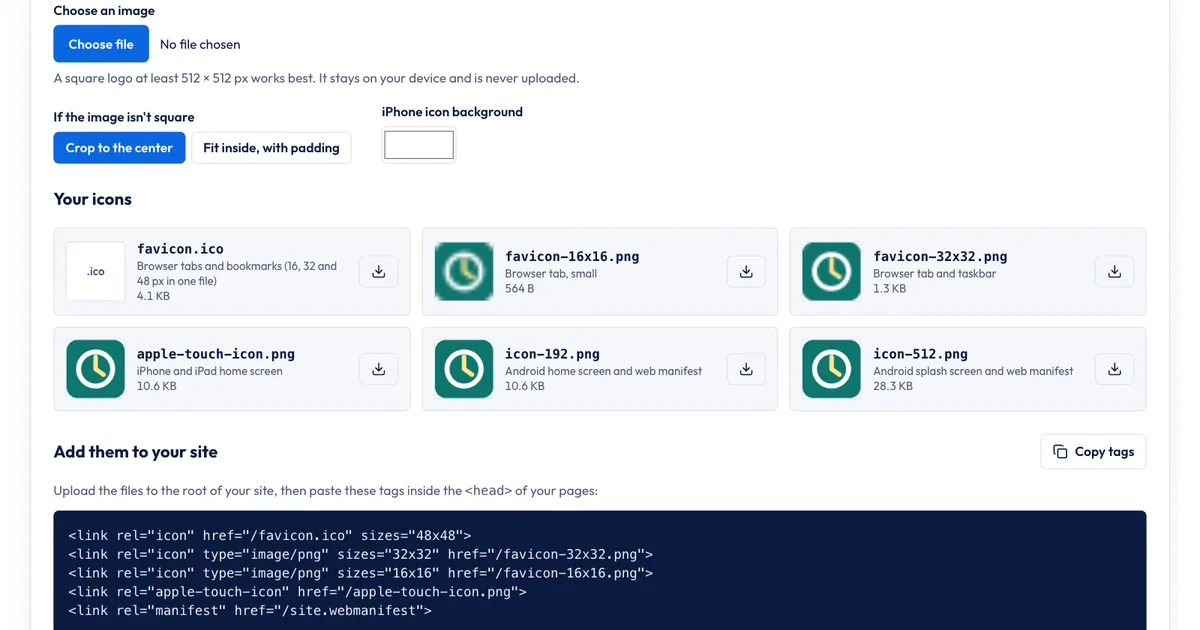
The free SERP Times favicon generator makes all six files and the HTML above from one image, in your browser:
- Choose an image. A square logo of 512 × 512 pixels or more works best; PNG, JPG, WebP, GIF and SVG files are accepted. The tool warns you if the image is smaller than 512 pixels.
- If the image isn't square, pick Crop to the center or Fit inside, with padding.
- Pick an iPhone icon background color for the apple-touch-icon.
- Download
favicon.ico, the PNGs, or all of them, and upload them to your site's root folder. - Click Copy tags for the HTML and Copy manifest for
site.webmanifest.
What it doesn't do: it doesn't make an SVG favicon, a dark-mode version or a maskable Android icon, and it doesn't upload anything for you. If you want those extras, a dedicated favicon service or a designer is the next step. For most sites, the six files above are the whole job. To shrink a logo file before you start, try the image compressor, and see our WebP vs JPEG guide for picking image formats elsewhere on your site.
If Google shows a generic icon
Work through these in order:
- Is the link tag on the home page? Google reads it there, not on inner pages.
- Can Google fetch it? Check robots.txt for rules that block the icon file or the home page.
- Is it square and in a supported format? An SVG-only favicon won't qualify.
- Did the URL change recently? Give Google time; its documentation says crawling takes from several days to several weeks.
- Ask for a recrawl. In Search Console, run URL Inspection on your home page and click Request indexing.
Sources
All accessed Nov 20, 2026:
- Google Search Central: Define a favicon to show in search results (last updated Oct 27, 2026)
- Google Search Central: Latest Google Search documentation updates and the 2024 updates archive
- Apple Developer: Configuring Web Applications (Safari Web Content Guide)
- web.dev: Add a web app manifest
- MDN Web Docs: HTML attribute: rel
- Can I use: SVG favicons
Frequently asked questions
Can a favicon be a JPG?
Yes. Google Search lists JPEG among its supported favicon formats, and browsers display JPG icons. PNG is the better choice, though, because it keeps edges sharp and supports transparency, which JPG doesn't.
Does a favicon affect SEO?
Google doesn't describe the favicon as a ranking factor. It does show it next to your site name in search results, so a clear, recognizable icon can help people spot your result. A missing or broken one just means Google shows a generic icon.
Why does Google still show my old favicon?
Google recrawls favicons on its own schedule, which its documentation says can take from several days to several weeks. Keep the new file at a stable URL, make sure Googlebot-Image can fetch it, and request indexing of your home page with the URL Inspection tool to speed things up.
Can each subfolder of my site have its own favicon in Google?
No. Google supports one favicon per hostname. A subdomain such as shop.example.com can have its own, but a subfolder such as example.com/shop uses the favicon of example.com.
Share
X (opens in a new tab)LinkedIn (opens in a new tab)WhatsApp (opens in a new tab)Akif Qureshi has worked in SEO for more than two years, auditing sites, planning content and tracking how Google updates change real traffic. He started SERP Times to report search changes clearly and to say exactly what site owners should do about them.
Certifications
- Google Analytics (Google)
- Google Ads Search (Google)
- HubSpot
- Digital Vidya
- DSIM
- Internship Studio