SEOGuide
Duplicate Title Tags: How to Find and Fix Them
Two pages with the same title aren't a penalty, but they confuse searchers and often point to a bigger duplicate-page problem. Here's how to find them and which fix fits each cause.

By Akif Qureshi
Published 7 min read
On this page
Duplicate title tags are two or more pages on the same site with the same title text, and you fix them by giving each page a title that says what makes it different, or by merging pages that really are the same. They aren't a penalty, but they make your results hard to tell apart and are often a sign of a bigger duplicate-page problem.
This guide covers what Google says about repeated titles, the causes behind most duplicates, three ways to find them (Search Console, a crawler and our free bulk checker), and which fix fits each cause.
Key takeaways
Are duplicate title tags bad for SEO?
Google's title link documentation asks you to give each page a distinct title that describes its content. It names two patterns specifically:
- Identical titles, such as "Cheap products for sale" on every product page, which make it hard for users to tell pages apart.
- Micro-boilerplate, where long titles differ in only one detail. Google's example is a TV show's season pages that all share one title.
Google doesn't describe a penalty for either. What happens instead:
- Google may rewrite the titles. For micro-boilerplate, Google says it may pull the missing detail (like the season number) from the page and add it to the title link. You lose control of what searchers see.
- Searchers can't tell your results apart. Two results with the same title in one search look like a mistake.
- The pages may be duplicates themselves. Identical titles often mean two URLs with the same content, and then Google has to choose which one to index.
Google dropped the old "HTML suggestions" report, which listed duplicate titles, from Search Console in 2019. Its announcement said Google's algorithms had "gotten better at showing and improving titles," and suggested crawling your site to extract titles if you still want the list. That's a fair summary of the issue: worth fixing on pages that matter, not an emergency.
What causes duplicate titles
| Cause | Example | Fix |
|---|---|---|
| CMS default title | Every new page is titled "Home | Example Dental" | Write a title for each page, or fix the template |
| Pagination | /blog/page/2/ and /blog/page/3/ both titled "Blog | Example" | Add "Page 2" and so on to the template |
| Filters and URL parameters | /boots/?color=brown and /boots/?sort=price share the boots title | Canonical tag pointing to the main URL |
| Product variants | Separate URLs for each size of the same boot | Canonical to one main product page, or a unique title per variant if each one should rank |
| Copied location pages | "Family Dentist in Austin, TX" on the Round Rock page too | Rewrite with the right city and details |
| Several versions of the site | http://, https://, www and non-www all load | One 301 redirect to your main version |
| Tag and category archives | A tag page and a category page with the same name | Rename one, or noindex the thin archive |
Search marketing tools also use "duplicate title tags" for a different problem: two <title> elements on one page, usually from a theme and a plugin both adding one. Our On-Page SEO Checker flags it ("2 title tags. Keep one.") when it checks a page.
How to find duplicate title tags
1. Search Console
Search Console can't list duplicate titles, but it shows the problems they often come from:
- Page indexing report. Look at the reasons "Duplicate without user-selected canonical" (Google found duplicate pages and you didn't name a main one) and "Duplicate, Google chose different canonical than user" (Google disagreed with your canonical tag). Pages here often share titles too.
- Performance report. Click a query, then open the Pages tab. If two of your URLs show up for the same query, check whether their titles are the same. This is where duplicates actually cost you clicks.
- URL Inspection. For one URL, "View crawled page" shows the HTML Google fetched, including the title.
2. A crawler
A crawler is the reliable way to get every title on a site:
- Screaming Frog SEO Spider has a Page Titles tab with a "Duplicate" filter, plus "Multiple" for pages with more than one title element. The free version crawls up to 500 URLs, per Screaming Frog's own guide.
- Site audit tools in SEO suites such as Semrush flag duplicate titles too. Semrush says a free account can crawl up to 100 URLs.
For a quick spot check without any tool, search Google for site:example.com intitle:"exact title". It shows a sample of indexed pages, not a complete list, but it's enough to confirm a suspected duplicate.
3. Our free bulk checker
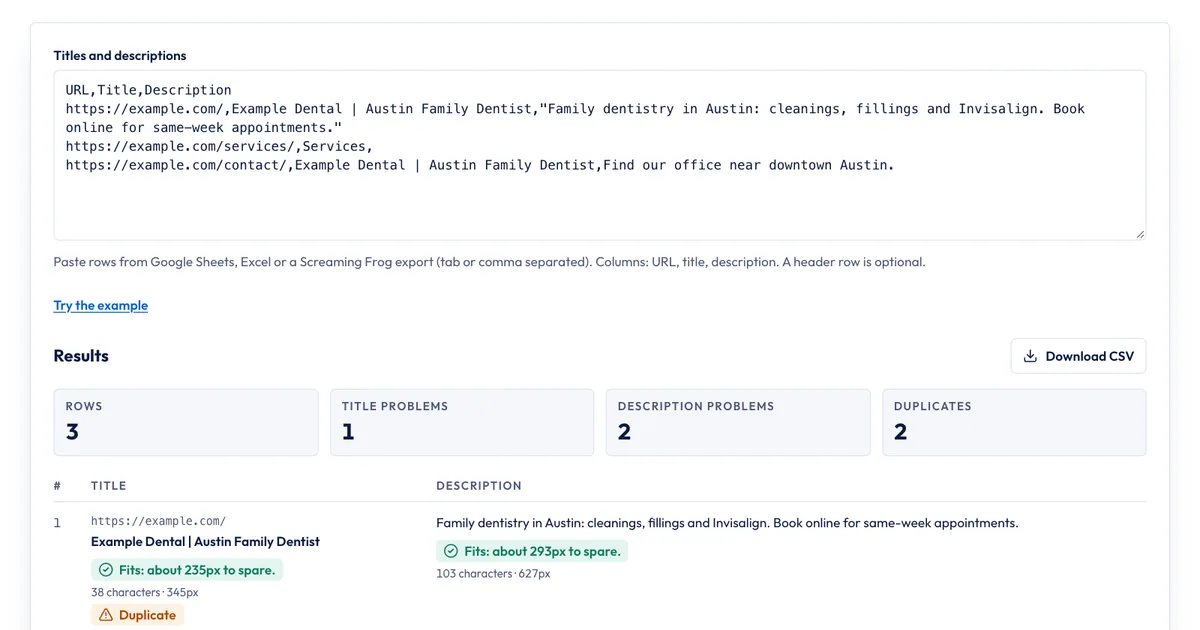
If you already have a list of titles (from a crawl export, your CMS or a spreadsheet), the Bulk Title & Description Checker finds the duplicates for you:
- Copy your rows from Google Sheets, Excel or a crawler export. The columns are URL, title and description, and a header row is optional. Screaming Frog's column names ("Address," "Title 1," "Meta Description 1") are recognized.
- Paste them into the box, or click "Try the example" first to see how it works.
- Read the summary (rows, title problems, description problems, duplicates), then the flagged rows.
- Click "Download CSV," fix the titles in your CMS, and paste the new rows to check again.
It counts two titles as duplicates when the text is the same after ignoring capital letters and extra spaces. It also measures every title and description against Google's display width, so you can fix length at the same time. Limits: it checks up to 1,000 rows at a time, it doesn't crawl your site (you bring the list), and it won't catch near-duplicates such as "Winter Boots | Example" and "Winter Boots - Example." Sort by title in your spreadsheet to spot those.
How to fix duplicate title tags
Start with one question for each group of duplicates: are these really different pages?
Yes, they're different pages. Give each one a title that names what makes it different. Templates make this scalable:
| Page type | Duplicate | Unique title pattern |
|---|---|---|
| Location page | Family Dentist | Example Dental | Family Dentist in Round Rock, TX | Example Dental |
| Product page | Winter Boots | Example Outfitters | Women's Waterproof Lace-Up Boots, Brown | Example Outfitters |
| Blog archive | Blog | Example CPA | Small Business Tax Tips, Page 2 | Example CPA |
| Event page | Webinar | Example | Tax Season Prep Webinar, February 10, 2027 | Example |
Put the distinguishing words first, so they survive if Google cuts the title. Our guide to meta title length shows how much fits.
No, it's the same page at several URLs. Don't write new titles: consolidate the URLs. Google's canonicalization guide says:
- a 301 redirect is the strongest signal, for duplicates you're retiring;
- a
rel="canonical"link is a strong signal, for duplicates that must stay reachable (filter, sort and tracking URLs); - using
noindexor robots.txt to handle duplicates is a mistake, because it doesn't tell Google which URL is the main one.
It's a thin page nobody needs in search, such as a tag archive with two posts. A noindex robots tag is fine here, because the page isn't a copy of anything, it just isn't worth indexing.
After you fix a batch, recheck the list, then watch the Page indexing report and the queries where two URLs used to compete. Changes show up as Google recrawls the pages, which can take a few weeks.
Duplicate meta descriptions come from the same templates and get the same fixes. See our guide to meta description length.
Sources
- Influencing your title links in search results, Google Search Central, accessed Nov 20, 2026
- Focusing on the new Search Console, Google Search Central Blog, January 25, 2019, accessed Nov 20, 2026
- How to specify a canonical URL with rel="canonical" and other methods, Google Search Central, accessed Nov 20, 2026
- Page indexing report, Search Console Help, accessed Nov 20, 2026
- SEO Spider tabs: Page Titles and Meta description guide, Screaming Frog, accessed Nov 20, 2026
- How to Find and Fix Duplicate Title Tags, Semrush, January 22, 2025, accessed Nov 20, 2026
Frequently asked questions
Is a duplicate title tag a Google penalty?
No. Google doesn't describe any penalty for duplicate titles. The cost is indirect: searchers can't tell the pages apart, Google may rewrite the titles, and the duplicates often mean you have duplicate pages competing with each other.
How many duplicate titles are too many?
There's no threshold. Fix duplicates on pages you want to rank first, such as product, service and location pages. Duplicates on pages that are already canonicalized or set to noindex matter much less.
Do duplicate meta descriptions matter as much as duplicate titles?
Less. Google says identical descriptions across pages aren't helpful, but it writes its own snippet for most results anyway. Fix duplicate titles first, then descriptions on your most important pages.
Can two pages on different websites have the same title?
Yes, and that's normal. The duplicate title issue is about pages on your own site. A product sold by many stores, for example, will often have the same name in every store's title.
Share
X (opens in a new tab)LinkedIn (opens in a new tab)WhatsApp (opens in a new tab)Akif Qureshi has worked in SEO for more than two years, auditing sites, planning content and tracking how Google updates change real traffic. He started SERP Times to report search changes clearly and to say exactly what site owners should do about them.
Certifications
- Google Analytics (Google)
- Google Ads Search (Google)
- HubSpot
- Digital Vidya
- DSIM
- Internship Studio