SEOGuide
Meta Title Length: How Long Should a Title Tag Be?
Google cuts titles by width, not by character count, so a 54-character title can fit or get cut depending on its letters. Here's what Google says, what the data shows and how to check yours.

By Akif Qureshi
Published 7 min read
On this page
The best meta title length is about 50 to 60 characters, but Google doesn't count characters: it cuts titles by pixel width, and on desktop roughly 580 pixels of text fits before the "..." appears.
That's why two titles with the same number of characters can look completely different in search results. This guide covers what Google itself says about title length, how pixel width works with real examples, why Google rewrites titles, and how to check yours before you publish.
Key takeaways
What Google says about title length
Google's documentation on title links is clear on one point: there's no maximum. Google says there's "no limit on how long a <title> element can be," and that title links are cut off "as needed, typically to fit the device width."
So the 50 to 60 character rule isn't a Google rule. It's a practical estimate of how much text fits in the space Google gives a title on a desktop results page. Everything past that point still counts as part of your title. Searchers just don't see it.
Google also doesn't promise to show your <title> at all. It builds the title link from several sources, including:
- the
<title>element; - the main visible title and
<h1>headings on the page; - the
og:titlemeta tag; - other prominent text on the page;
- anchor text in links pointing to the page;
WebSitestructured data (for the site name).
Your title tag is the strongest hint, but it's one input among several.
Why pixels matter more than characters
Google's results use a proportional font, so every letter has its own width. Our Meta Title & Description Checker measures titles with Arial's letter widths at 20 pixels, about the size of Google's desktop titles. At that size:
| Character | Width (approx.) |
|---|---|
i | 4.4 px |
| space | 5.6 px |
m | 16.7 px |
W | 18.9 px |
Here's what that does to real titles. All widths below come from the same calculation, with about 580 pixels available:
| Title | Characters | Width | Fits? |
|---|---|---|---|
| Memorial Day Mattress Sale | Warehouse Mattress Outlet | 54 | 511 px | Yes |
| MEMORIAL DAY MATTRESS SALE | WAREHOUSE MATTRESS OUTLET | 54 | 671 px | No, cut after "WAREHOUSE" |
| Black Friday Deals on Wireless Headphones: Up to 40% Off | 56 | 532 px | Yes |
| Tax Prep Checklist for Small Businesses in 2027 | Example CPA | 61 | 572 px | Just |
The all-caps title has exactly as many characters as the one above it, and it loses its last two words. The 61-character tax title fits because most of its letters are narrow.
To see what's typical, we ran the same calculation on the titles of all 29 articles on SERP Times. They averaged 9.7 pixels per character, which means about 60 characters of ordinary sentence-case text fill 580 pixels (580 ÷ 9.7 ≈ 60). That's where the 50 to 60 character advice comes from, and it's why it breaks down for titles full of capitals, Ws and Ms.
Desktop vs. mobile
On phones, Google's results are narrower, and title links can wrap onto a second line instead of being cut after one. In practice that means a title that fits on desktop usually shows in full on mobile too, but a long title can still end in "..." on a small screen.
If most of your visitors come from phones (check the Devices tab in Search Console's Performance report), preview the mobile layout first. Our SERP Snippet Preview shows desktop and mobile side by side.
Why Google rewrites titles
Google has replaced some titles since 2012, and it changed how it does so in August 2021. A month later, Google's Danny Sullivan wrote that title elements were then used "around 87% of the time," up from about 80% before the change.
Google's title link documentation lists the problems that lead to a rewrite:
- Half-empty titles: a template leaves only "| Site Name."
- Obsolete titles: the title still says last year while the page has been updated.
- Inaccurate titles: the title promises something the page doesn't show.
- Micro-boilerplate: many pages share one title and differ only in a detail, like a season number or a city.
- No clear main title: several headings look equally important.
- Site name duplication: your brand already shows in the site name line above the title, so Google may drop it from the title link.
Length plays a part too. Cyrus Shepard's study of about 81,000 titles at Zyppy (updated July 1, 2026) found that titles of 51 to 55 characters were rewritten least often, about 40% of the time, while titles over 70 characters were rewritten nearly every time. That's a correlation from one data set, not a Google rule, but it points the same way as everything else: a title that fits and describes the page is the one Google is most likely to keep.
If Google shows two pages with the same title, that's a different problem. See our guide to duplicate title tags.
How to write a title that fits
- Put the main keyword and the reason to click first. If anything gets cut, it should be the end.
- Keep the brand short and at the end, after a pipe, hyphen or colon. On inner pages it's the first thing to sacrifice, and Google may drop it anyway because the site name line already shows it.
- Avoid all caps. Capitals are much wider and read as shouting.
- Use numerals and short words. "40% Off" is narrower than "Forty Percent Off."
- Make every title unique. A dentist with offices in Austin and Round Rock needs "Family Dentist in Round Rock, TX," not the Austin title copied to both pages.
- Match the page. If the title and the H1 describe different things, Google is more likely to pick the H1.
The meta description follows the same logic with a wider box. Our guide to meta description length covers it.
Check your title length with our free tool
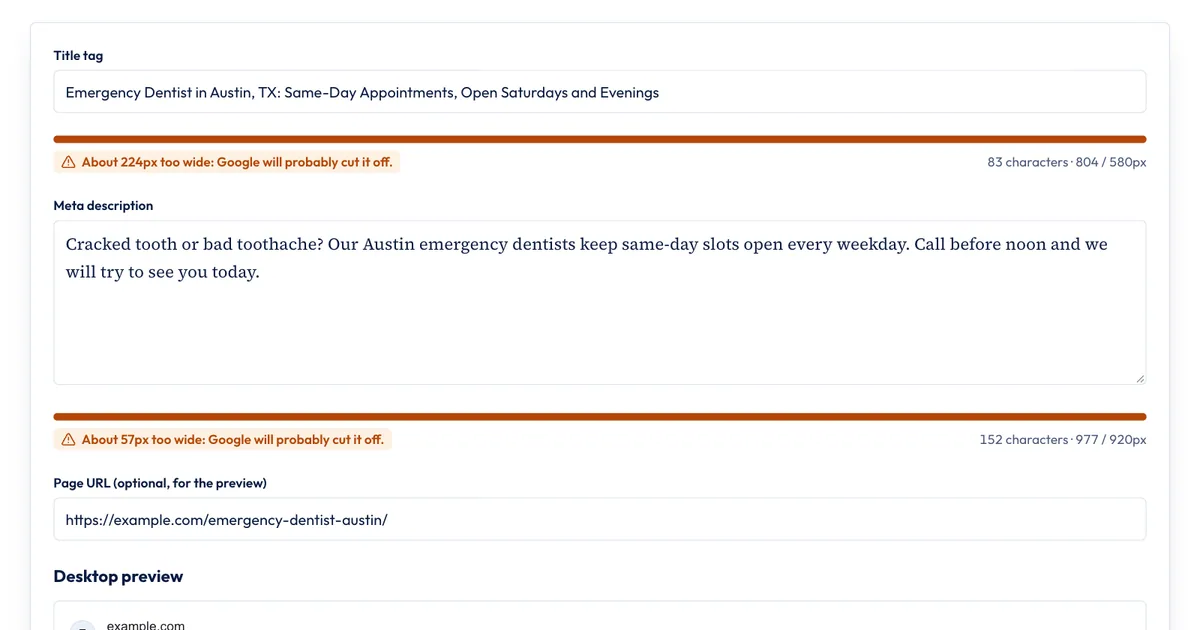
The Meta Title & Description Checker runs in your browser and measures as you type:
- Type or paste your title tag. The bar fills toward the roughly 580 pixels available, and the line under it shows the character count and the width, for example "54 characters · 511 / 580px."
- Read the status: "Fits" with the pixels to spare, "too wide" with how far over you are, or "Short" if it's under 30 characters.
- Add your meta description and, if you like, the page URL.
- Check the desktop preview, which cuts the title where the estimate says Google would.
What it doesn't do: it doesn't fetch a live page, it estimates with Arial's letter widths rather than reading Google's real layout, and it can't tell you whether Google will rewrite the title. To check a whole site's titles at once, paste a crawl export into the Bulk Title & Description Checker.
When a free check is enough
For writing and editing titles one page at a time, a pixel checker is all you need. You'd want more in two cases:
- You manage hundreds or thousands of pages. A desktop crawler such as Screaming Frog SEO Spider reports title width for every URL it finds.
- You want to know if a new title worked. Only Google Search Console shows real impressions and click-through rate. Compare the page's CTR for a few weeks before and after the change, with the same date ranges.
Sources
- Influencing your title links in search results, Google Search Central, accessed Nov 20, 2026
- More info about our update to title generation, Google Search Central Blog, September 17, 2021, accessed Nov 20, 2026
- The Best Title Tag Length for SEO (Latest Data), Zyppy, updated July 1, 2026, accessed Nov 20, 2026
- Pixel widths: SERP Times calculation with Arial letter widths at 20 px, the method used by our Meta Title & Description Checker, Nov 20, 2026
Frequently asked questions
Is a 70-character title too long?
For desktop results, usually yes. At normal sentence case, about 60 characters fill the roughly 580 pixels Google shows, so a 70-character title will most likely be cut off. It isn't penalized, though: Google still reads the whole title, and only the visible part is shortened.
Does meta title length affect rankings?
Not directly. Google's documentation sets no length limit and doesn't describe any penalty for long titles. Length matters for what searchers see: a cut-off title can hide the words that make people click, and very long or very short titles are rewritten more often.
Do spaces count toward title tag length?
Yes. Spaces count as characters, and they take up width too, about 5.6 pixels each at the size Google uses for desktop titles by our measurements. A pixel checker includes them automatically.
Should the title tag and the H1 be the same?
They don't have to match word for word, but they should describe the same thing. Google lists the main visible heading as one of the sources it can use for the title link, so a title that disagrees with the H1 is more likely to be replaced.
Share
X (opens in a new tab)LinkedIn (opens in a new tab)WhatsApp (opens in a new tab)Akif Qureshi has worked in SEO for more than two years, auditing sites, planning content and tracking how Google updates change real traffic. He started SERP Times to report search changes clearly and to say exactly what site owners should do about them.
Certifications
- Google Analytics (Google)
- Google Ads Search (Google)
- HubSpot
- Digital Vidya
- DSIM
- Internship Studio