

AI Search · Guide
How to Create an llms.txt File (and Does AI Read It?)
· 8 min read
Free tool · Generators
Build an llms.txt file: a short, curated Markdown guide to your site for AI tools, with a summary and links to your best pages.
Runs in your browser: nothing you type is uploaded.
Becomes the title of the file. It's the only part the format requires.
One or two sentences on what the site is and who it's for.
Paragraphs and bullet lists work. Headings aren't allowed here.
Group links into sections. Each link can have a short note that says what the page is for. Keep it to the pages you'd want someone to read first.
One per line: a bare URL, “Name | URL | note”, “Name, URL” or a Markdown link. Missing names are made from the URL.
Add your site name, a summary and a few links and the file appears here.
Upload it to the root of your site so it loads at https://example.com/llms.txt, as plain text. Pair it with a robots.txt file and an XML sitemap. Our robots.txt and sitemap generators are in the Generators group.
Enter your site or company name and a one or two sentence summary. The name is the only part the format requires.
Add the usual sections for your kind of site, or make your own, then add links to the pages you'd want someone to read first, each with a short note.
Have a long list? Paste it in one go. Bare URLs, “Name | URL | note” and Markdown links all work, and missing names are made from the URL.
Move lower-priority pages into the Optional section, check the warnings, then copy or download the file.
Upload it to the root of your site so it loads at /llms.txt, and open that address in your browser to confirm.
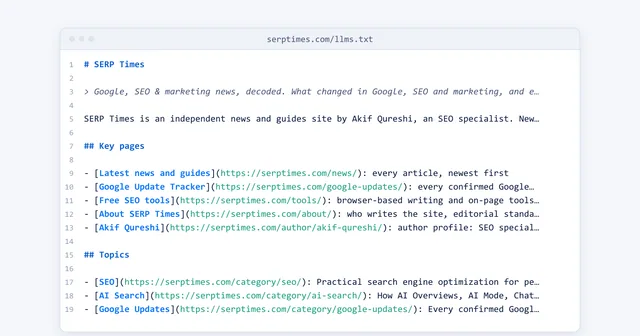
llms.txt is a proposal from 2024 (llmstxt.org) for a plain Markdown file at the root of your site. It gives AI tools a short, curated map: what the site is, and links to the pages that matter most, each with a note. It's readable by people and machines alike, so a model with limited room doesn't have to guess which of your hundreds of pages to open first.
Keep your expectations realistic. No major search engine has said it uses llms.txt to rank or cite pages, and Google's Search team has said Google doesn't use it in Search. Which AI tools read it is mostly unconfirmed, though some developer tools and coding assistants can use it, especially for documentation. Publishing one costs almost nothing, but it's no substitute for good content and links.
Think of it as a companion to two files you may already have. Robots.txt says what crawlers may fetch, your XML sitemap lists every URL, and llms.txt is the short, curated version with a sentence about each page.
A Markdown file at /llms.txt with a title, a short summary and lists of links to your most useful pages. The format was proposed at llmstxt.org in 2024.
There's no confirmed evidence that it does. Google has said it doesn't use llms.txt in Search, and the AI companies haven't said they use it for citations. Publish it as a low-cost extra, and put your effort into content, internal links and the crawlable basics.
In the root of your domain, so it loads at https://example.com/llms.txt as plain text. A subdomain needs its own file.
Robots.txt tells crawlers what they may fetch, and a sitemap lists every URL you want found. llms.txt is a short, curated, human-readable guide with context, aimed at AI tools. It doesn't block or allow anything.
In the format, a section named Optional holds links an AI tool can skip when it needs a shorter version. This tool always writes it last.
Keep it to your best pages, often 10 to 30. The tool warns past 50, because a long list defeats the point of a curated file. Some sites also publish llms-full.txt with the full text of key pages. That isn't part of the original proposal, and this tool doesn't create it.
AI Search · Guide
· 8 min read
AI Search · Guide
· 8 min read

Marketing · Guide
· 11 min read