SEOGuide
What Is a URL Slug? Examples and SEO Best Practices
A URL slug is the readable part of a web address that names one page, like keyword-stuffing in serptimes.com/keyword-stuffing/. Here's how to write good ones, based on Google's own URL guidelines.

By Akif Qureshi
Published 6 min read
On this page
What is a URL slug? It's the part of a web address that names one specific page, usually the last part of the path. In https://serptimes.com/keyword-stuffing/, the slug is keyword-stuffing. A good slug is short, readable and lowercase, with hyphens between the words.
A slug tells people, and search engines, what's at an address before they click. This guide shows where the slug sits in a URL, what Google's URL guidelines say, how to write one and what to do if you need to change it.
Key takeaways
Where the slug sits in a URL
Here's a full URL from a made-up Shopify store that ships across the US, broken into its parts:
https://www.examplestore.com/products/waterproof-hiking-boots?color=brown#reviews| Part | Value | What it does |
|---|---|---|
| Protocol | https:// | How the browser connects |
| Domain | www.examplestore.com | The website |
| Path | /products/waterproof-hiking-boots | Where the page sits on the site |
| Folder | products | Groups related pages |
| Slug | waterproof-hiking-boots | Names this one page |
| Query string | ?color=brown | Options or tracking, not part of the slug |
| Fragment | #reviews | Jumps to a section of the page; not part of the slug |
A few more examples:
| Site | URL | Slug |
|---|---|---|
| Dentist in Austin | austinsmiles.example/services/teeth-whitening/ | teeth-whitening |
| News site | serptimes.com/november-2026-core-update/ | november-2026-core-update |
| Home page | example.com/ | None: the home page has no slug |
Slug, URL, permalink and handle: what's the difference?
- URL: the full address, from
https://to the end. - Slug: the part that names one page.
- Permalink: WordPress's word for a page's permanent URL. The slug is one part of it.
- URL handle: Shopify's word for the slug of a product, collection or page, as in
/products/<handle>.
Different platforms, same idea.
What Google says about URLs
Google's URL structure guidelines are short and specific:
- Use readable words, not long ID numbers. Google's recommended example ends in
/wiki/Aviation; its counterexample is a longindex.php?topic=42&area=...string. - Use hyphens to separate words. Google recommends hyphens (
-) over underscores (_), and it advises against running words together, as ingreendress. - Use your audience's language. For US readers, that's plain American English words.
- Remember that case matters. Google's URL handling is case sensitive, so
/APPLEand/appleare different URLs. If your server treats them the same, pick one case (lowercase is the convention). - Don't use fragments to change content. Google generally doesn't support content that loads based on a
#fragment. - Trim unnecessary parameters that don't change the content.
On rankings, Google's SEO Starter Guide is blunt: the keywords in a domain name or URL path alone have hardly any effect beyond appearing in breadcrumbs. Google can show parts of the URL as a breadcrumb in search results, and it learns breadcrumbs from the words in the URL. So a slug is mainly for the person deciding whether to click, or reading a link someone shared.
How to write a good URL slug
Google's rules above are the foundation. These habits make slugs better in practice (they're our recommendations, not Google requirements):
- Describe the page in a few words. Three to five meaningful words is plenty for most pages:
fix-leaky-faucetorteeth-whitening-cost. - Use lowercase letters, numbers and hyphens only. No spaces, underscores, capital letters or symbols.
- Drop filler words when meaning survives. The, a, and and of rarely add anything. Keep a small word if removing it changes the meaning, as in
to-do-list, or makes the slug awkward. - Leave out dates on evergreen pages.
/best-coffee-shops-austin/can be updated every year./best-coffee-shops-austin-2026/needs a new URL and a redirect in 2027. Keep the year only when the page is about that year, such as a report on a specific Google update. - Don't stuff keywords.
/plumber-dallas-emergency-plumber-dallas-tx/reads as spam. Our guide to keyword stuffing explains why repetition doesn't help. - Make it stable. Choose the slug before publishing and keep it.
| Instead of | Use |
|---|---|
/p?id=4821 | /waterproof-hiking-boots/ |
/Blog/Black_Friday_Email_Tips/ | /blog/black-friday-email-tips/ |
/the-10-best-and-most-affordable-tax-preparation-services-in-houston-texas-for-2026/ | /tax-preparation-houston/ |
/services/teethwhitening/ | /services/teeth-whitening/ |
Should you change an existing slug?
Only for a good reason, such as a misleading slug, a typo or a URL full of IDs. Changing a slug changes the URL, so links to the old address break unless you redirect them.
If you do change one, follow Google's guidance on moving URLs:
- Add a permanent server-side redirect (301 or 308) from the old URL to the new one. Google says these redirects don't cause a loss in PageRank.
- Keep the redirect in place for a long time, generally at least a year.
- Update your internal links to point straight at the new URL.
- Update your sitemap so it lists the new URL.
Most platforms help. Shopify offers to create a redirect from the old handle when you edit a collection's or page's URL handle, and WordPress lets you edit a slug in the post settings sidebar (redirects need a plugin or a server rule). After the change, use our Redirect Checker to confirm the old URL returns a single 301 to the new one. Our guide to the 302 redirect explains why a temporary redirect is the wrong choice for a permanent slug change.
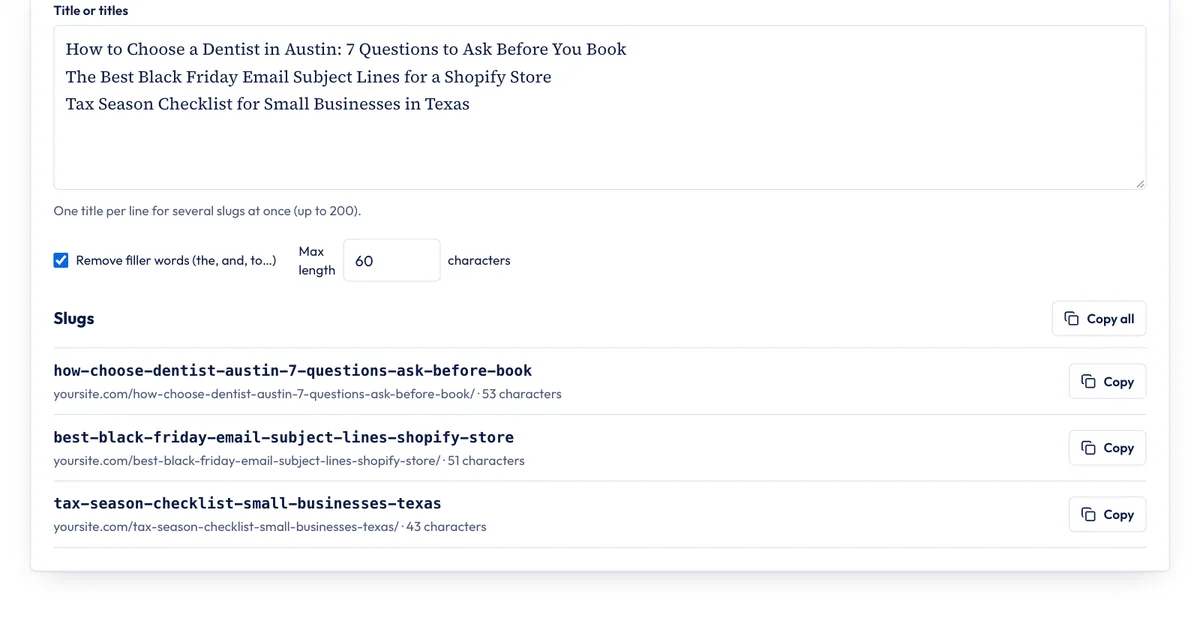
How to create slugs with our URL Slug Generator
Our URL Slug Generator turns titles into clean slugs:
- Type or paste a title. For several slugs at once, put one title per line (up to 200).
- Choose whether to Remove filler words (the, and, to…) and set a Max length (60 characters by default).
- Check each slug and the example URL under it, which also shows the length in characters.
- Copy one slug, or use Copy all for a list.
Here's what it produced for four titles with filler words removed:
| Title | Slug |
|---|---|
| How to Recover From a Google Core Update in 2027 | how-recover-google-core-update-2027 |
| 10 Best Coffee Shops in Austin, Texas (2026 Guide) | 10-best-coffee-shops-austin-texas-2026-guide |
| Café Menu & Prices – Summer Specials | cafe-menu-prices-summer-specials |
| What Is a URL Slug? A Plain-English Guide | what-url-slug-plain-english-guide |
Two things to notice. Accents are simplified (café becomes cafe), and & is spelled out as "and" before filler words are removed. And the filter is literal: what-url-slug lost the word "is," which is why this page's slug is what-is-a-url-slug. Read every slug before you use it, and add back a word if the meaning suffers. The generator keeps how, best and numbers, since those usually carry meaning, and it never drops a year for you, as the coffee shop example shows.
What it doesn't do: it doesn't check whether a slug is already used on your site, it can't add redirects, and it doesn't know your CMS's rules (some platforms add their own folder, such as Shopify's /products/). Letters from other scripts, such as Japanese, are kept as typed; your platform encodes them in the final URL.
Sources
- URL structure best practices for Google Search, Google Search Central, accessed Nov 20, 2026.
- SEO Starter Guide, Google Search Central, accessed Nov 20, 2026.
- How to move a site with URL changes, Google Search Central, accessed Nov 20, 2026.
- Customize permalinks, WordPress.org Documentation, accessed Nov 20, 2026.
- URL redirects, Shopify Help Center, accessed Nov 20, 2026.
Frequently asked questions
Should a URL slug include the target keyword?
Include it if it describes the page, because people read the URL. Don't count on it for rankings: Google's SEO Starter Guide says keywords in a URL path have hardly any effect beyond appearing in breadcrumbs. Never repeat a keyword in a slug.
What is a slug in WordPress?
It's the editable part of a post or page URL. WordPress creates it from the title, and you can change it in the post settings sidebar before you publish. It only appears in the URL when your permalink setting uses it, as the Post name setting does.
Can two pages have the same slug?
Not at the same address. Pages in different folders can share one, such as /blog/pricing/ and /docs/pricing/. In WordPress, if a slug is taken (even by a post in the trash), WordPress adds -2 to the new one.
What characters can a URL slug contain?
Lowercase letters, numbers and hyphens are the safest choice. Letters outside the basic ASCII range, such as é or Japanese characters, work too, but Google's URL guidelines say they should be percent-encoded in the actual URL. Avoid spaces, underscores and symbols such as & or ?.
Share
X (opens in a new tab)LinkedIn (opens in a new tab)WhatsApp (opens in a new tab)Akif Qureshi has worked in SEO for more than two years, auditing sites, planning content and tracking how Google updates change real traffic. He started SERP Times to report search changes clearly and to say exactly what site owners should do about them.
Certifications
- Google Analytics (Google)
- Google Ads Search (Google)
- HubSpot
- Digital Vidya
- DSIM
- Internship Studio