SEOGuide
OG Tags: How to Set Up Open Graph Tags for Sharing
Open Graph tags decide what your link looks like on Facebook, LinkedIn, X and in chat apps. Here are the tags to add, the image sizes each platform documents, and how to refresh a preview that went out wrong.

By Akif Qureshi
Published 7 min read
On this page
OG tags (Open Graph tags) are meta tags in a page's <head> that tell Facebook, LinkedIn, X and many messaging apps which title, description and image to show when someone shares the link. Without them, each platform guesses, and the card often comes out bare or with the wrong image.
They take five minutes to add. This guide shows the tags you need, example markup, the image sizes each platform documents (in their own words, not rounded-off rules of thumb), and how to refresh a preview that was cached before you fixed it.
Key takeaways
What OG tags are
The Open Graph protocol was originally created at Facebook so any web page could describe itself as a rich object in a social feed. Today most platforms that show link previews read it. The tags use the property attribute and the og: prefix:
<meta property="og:title" content="Waterproof Winter Boots for Women">X has its own twitter: tags, but it falls back to Open Graph for the title, description and image, so most sites only add one twitter:card line on top of their OG tags.
The OG tags every page needs
| Tag | What it holds | Required? |
|---|---|---|
og:title | The headline on the card | Yes |
og:type | website for most pages, article for posts | Yes |
og:image | The full URL of the card image | Yes |
og:url | The canonical URL of the page | Yes |
og:description | One or two sentences under the title | Recommended |
og:site_name | Your site's name | Recommended |
og:image:width, og:image:height | The image size in pixels | Recommended |
og:image:alt | A description of the image, for screen readers | Recommended |
og:locale | The language and region, en_US by default | Optional |
twitter:card | summary_large_image or summary | Needed for X cards |
Source: ogp.me and Facebook's webmaster sharing guide, accessed Nov 20, 2026.
Facebook says og:image:width and og:image:height let its crawler show the image the first time a link is shared, instead of after it has downloaded and processed the file.
Example markup
Here's a full set for a product page on a fictional Shopify store that ships across the US:
<meta property="og:type" content="website">
<meta property="og:title" content="Waterproof Winter Boots for Women">
<meta property="og:description" content="Lined, waterproof boots for snow and slush. Free shipping across the US and free 30-day returns.">
<meta property="og:url" content="https://example.com/products/waterproof-winter-boots/">
<meta property="og:image" content="https://example.com/images/winter-boots-1200x630.jpg">
<meta property="og:image:width" content="1200">
<meta property="og:image:height" content="630">
<meta property="og:image:alt" content="A pair of brown lace-up winter boots on a snowy porch step">
<meta property="og:site_name" content="Example Outfitters">
<meta name="twitter:card" content="summary_large_image">
Every URL is absolute. Facebook's FAQ says og:url and og:image must be absolute because they identify the canonical location of the page and the image, so relative paths like /images/boots.jpg fail.
On Shopify, WordPress with an SEO plugin, Squarespace and Wix, the platform writes these tags for you from the page title, description and social image fields. Check what it outputs before adding your own, or you'll end up with two sets.
Image sizes by platform
Each platform documents its own numbers:
| Platform | Recommended | Minimum and limits | Shape |
|---|---|---|---|
| At least 1200 × 630 | 600 × 315 for the large card; smaller images (down to 200 × 200) show as a small square. Max 8 MB. | As close to 1.91:1 as possible | |
| 1200 × 627 minimum | Under 401 pixels wide shows as a thumbnail. Max 5 MB. | 1.91:1 | |
X (summary_large_image) | 300 × 157 minimum, 4096 × 4096 maximum, under 5 MB; JPG, PNG, WEBP or GIF | 2:1 |
Sources: Facebook, "Images in Link Shares" and Link Sharing FAQ; LinkedIn Help, "Make your website shareable on LinkedIn"; X Developer Platform, Cards documentation. All accessed Nov 20, 2026.
A 1200 × 630 image meets all three. X's 2:1 card is slightly wider than 1.91:1, so a sliver of the top and bottom may be cut. Keep text and faces away from the edges. Facebook also says it crops around faces it detects, which is another reason to center the subject.
How to refresh a cached preview
Platforms read your tags once and keep them. If a link went out with the wrong image or title, fixing the page isn't enough on its own.
Facebook. Facebook's crawler updates link data automatically about every 30 days. To update sooner:
- Fix the tags on the page. If the image changed, upload it under a new file name: Facebook caches images by URL and won't fetch a new file at the same address. Leave the old file in place so existing posts don't show a blank box.
- Paste the URL into the Sharing Debugger and click "Scrape Again."
- For a post that's already live, open its menu and choose "Refresh share attachment."
One limit: Facebook freezes a link's title once the link has more than 50 interactions (likes, comments and shares), so get the title right before a big promotion.
LinkedIn. Paste the URL into Post Inspector. LinkedIn's help page says this updates the preview for new posts, messages and articles only. Posts already published keep the old card.
X. X doesn't document a way to force a refresh. A common workaround is to share the URL with a harmless query string added (such as ?v=2), which X treats as a new link. Make sure your canonical tag still points to the clean URL.
Do OG tags help SEO?
Not directly. Google doesn't rank pages on their Open Graph tags. Two of them do feed Google features, though:
- Google's title link documentation lists
og:titleas one of the sources it can use for the title in search results. - Google's site name documentation lists
og:site_nameas one of the signals for the site name shown above your results.
The indirect benefit is clicks. A clear card with the right image is more likely to be clicked and shared, and that brings visitors whether or not it moves rankings. For the tags that do affect Google Search, see our guide to meta tags for SEO.
Common mistakes
- Relative image paths. Use the full
https://address. - An image behind a login, a firewall or a bot check. The platform's crawler has to be able to download it.
- The same title and image on every page, usually from a theme default.
- An
og:urlthat doesn't match the canonical URL, which splits share counts between addresses. - A small or square logo as the image, which shrinks the card to a thumbnail on Facebook and LinkedIn.
- Replacing an image at the same URL and expecting the cards to update.
Preview your card with our free tool
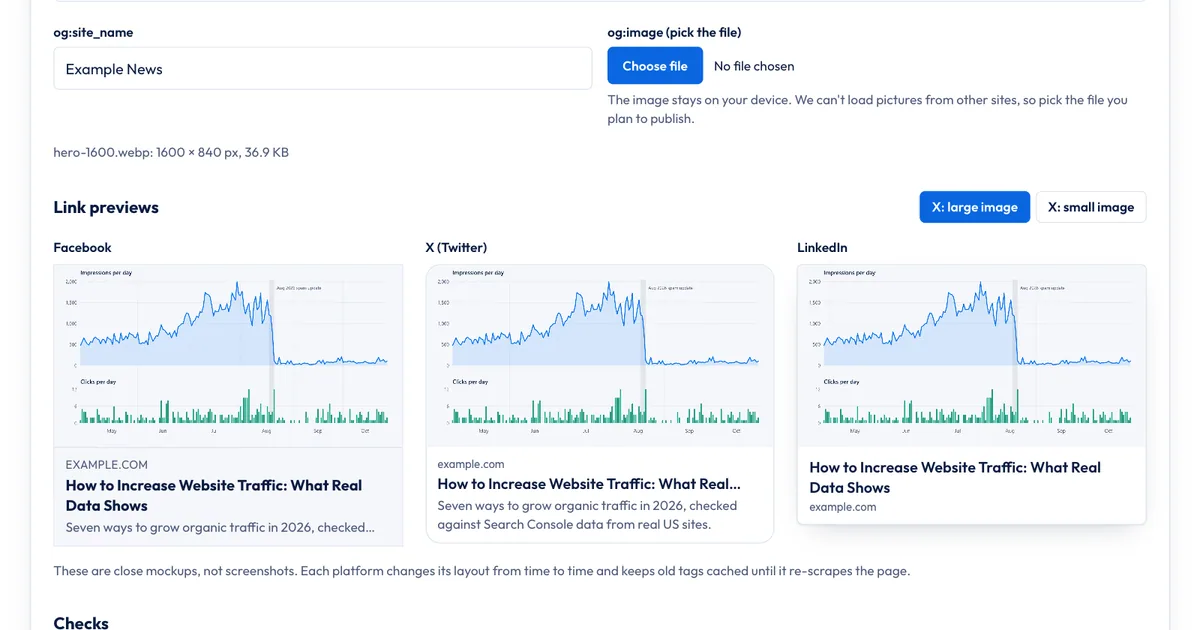
Our Open Graph Preview shows how a link card could look on Facebook, X and LinkedIn before you publish:
- Enter the og:title, og:url, og:description and og:site_name.
- Pick the image file you plan to use. It stays on your device and is never uploaded.
- Compare the three cards, and switch X between "large image" and "small image."
- Read the checks: missing tags, an image under 600 × 315, a shape far from 1.91:1, or a file over 8 MB.
What it doesn't do: it doesn't fetch a live URL or read the tags already on your page, so it can't tell you what a platform has cached. Its file size check uses Facebook's 8 MB limit, while LinkedIn and X stop at 5 MB. Once the card looks right, build the final tags with the Meta Tag Generator, and after publishing, use Facebook's Sharing Debugger and LinkedIn's Post Inspector to see what each platform actually reads.
Sources
- The Open Graph protocol, accessed Nov 20, 2026
- A Guide to Sharing for Webmasters, Meta for Developers, accessed Nov 20, 2026
- Images in Link Shares, Meta for Developers, accessed Nov 20, 2026
- Link Sharing FAQ and How to Change the Metadata for an Existing Link, Meta for Developers, accessed Nov 20, 2026
- Make your website shareable on LinkedIn and Use Post Inspector to refresh URL, LinkedIn Help, accessed Nov 20, 2026
- Cards markup, X Developer Platform, accessed Nov 20, 2026
- Influencing your title links and Provide a site name to Google Search, Google Search Central, accessed Nov 20, 2026
Frequently asked questions
What happens if a page has no OG tags?
Each platform guesses. Facebook's crawler, for example, uses its own rules to pick a title, description and image from the page, and the result is often a bare link or the wrong picture, such as a logo or an ad.
Can every page use the same og:image?
It works as a fallback for pages without their own image, such as your contact page. For articles and products, a page-specific image gets more attention in a feed and tells people what they're about to open.
Should og:title be the same as the title tag?
It can be, but it doesn't have to be. Facebook suggests leaving your site name out of og:title, since the card shows your domain anyway. Many sites drop the brand suffix and keep the rest of the title.
Do OG tags work in Slack, iMessage and WhatsApp?
Generally yes: most apps that show link previews read Open Graph tags. Each app has its own crop and caching rules, so preview a test message to a colleague or yourself before you send a link to a big list.
Share
X (opens in a new tab)LinkedIn (opens in a new tab)WhatsApp (opens in a new tab)Akif Qureshi has worked in SEO for more than two years, auditing sites, planning content and tracking how Google updates change real traffic. He started SERP Times to report search changes clearly and to say exactly what site owners should do about them.
Certifications
- Google Analytics (Google)
- Google Ads Search (Google)
- HubSpot
- Digital Vidya
- DSIM
- Internship Studio