AnalyticsGuide
How to Create UTM Links That GA4 Reports Correctly
A UTM link is your page URL plus a few tags that tell GA4 where a visit came from. Here's how to build one, which medium values GA4 understands, and the naming rules that keep your reports clean.

By Akif Qureshi
Published 7 min read
On this page
Here's how to create UTM links: add utm_source, utm_medium and utm_campaign to the end of your page's URL after a question mark, join them with ampersands, and use lowercase values that match the channel rules in Google Analytics 4 (GA4).
That last part is where most tagged links go wrong. GA4 reads the medium to decide which channel a visit belongs to, and a medium it doesn't recognize sends the visit to "Unassigned," where nobody looks. This guide shows the six parameters GA4 reads, the exact medium values its default channel groups expect, a full Black Friday email example, and the naming rules that keep a year of campaigns comparable.
Key takeaways
What a UTM link looks like
A UTM link is a normal URL with tracking tags on the end. Here's one for a newsletter:
https://example.com/collections/sale/?utm_source=newsletter&utm_medium=email&utm_campaign=black-friday-2026Everything after the ? is the tagging. Each tag is a name=value pair, and & separates them. The page loads exactly as it would without them; GA4 just reads the tags when the visit starts.
Google's URL builders help page lists the parameters GA4 accepts:
| Parameter | What it records | Example | Needed? |
|---|---|---|---|
utm_source | Where the visit came from | newsletter, facebook, google | Always |
utm_medium | The kind of channel | email, cpc, social, referral | Always |
utm_campaign | The campaign, promotion or product | black-friday-2026 | Always |
utm_id | A campaign ID that matches cost data you upload | bf26 | Recommended |
utm_term | The paid keyword | soy-candles | Optional |
utm_content | Which link or creative was clicked | hero-button | Optional |
Google lists three more: utm_source_platform (the buying platform, such as Search Ads 360), plus utm_creative_format and utm_marketing_tactic, which the same page says aren't currently reported in GA4. Most small sites can ignore all three.
How GA4 decides the channel
GA4 groups every visit into a "default channel group" using rules written against the source and medium. You don't pick the channel; your tags have to match a rule. These are the rules for manually tagged traffic, from Google's default channel group page:
| Channel | The rule GA4 applies |
|---|---|
Source or medium is email, e-mail, e_mail or e mail | |
| Organic Social | Source is a known social site, or medium is social, social-network, social-media, sm, social network or social media |
| Paid Social | Source is a known social site and medium matches the paid pattern (cpc, ppc, retargeting, or anything containing "cp" or starting with "paid") |
| Paid Search | Source is a known search site and medium matches the paid pattern |
| Organic Search | Source is a known search site, or medium is organic |
| Referral | Medium is referral, app or link |
| Display | Medium is display, banner, expandable, interstitial or cpm |
| Affiliates | Medium is affiliate |
| SMS | Source or medium is sms |
| Mobile Push Notifications | Medium ends in push, or contains mobile or notification |
| Organic Video | Source is a known video site, or medium contains video |
| Unassigned | Nothing above matched |
Three common mistakes send visits to the wrong channel:
- Putting the platform in the medium.
utm_medium=facebookmatches no rule. The platform goes in the source; the medium is the kind of channel (socialorcpc). - Inventing mediums.
newsletter,qr,print,flyerandinfluenceraren't in the list. Useemailfor newsletters and put the detail in the campaign or content tag. - Tagging paid posts as social. Giving an ad
utm_source=facebookandutm_medium=socialmatches the Organic Social rule, so your ad spend looks like free traffic. Paid clicks need a paid medium such ascpcorpaid-social.
Example: tagging a Black Friday email
Say you run a Shopify store that ships candles across the US, and you're sending a Black Friday email on Friday, November 27, 2026. The email has a big "Shop the sale" button at the top and a smaller text link in the footer. You want to know which one people click.
Tag both links the same way, except for utm_content:
| Tag | Value | Why |
|---|---|---|
| Source | newsletter | Where the click came from (your list, not the email platform) |
| Medium | email | Matches GA4's Email rule |
| Campaign | black-friday-2026 | The promotion, with the year so next year's email doesn't merge with it |
| Content | hero-button or footer-link | Tells the two links apart |
| Campaign ID | bf26 | Optional; useful if you import costs later |
The two finished links:
https://example.com/collections/black-friday/?utm_source=newsletter&utm_medium=email&utm_campaign=black-friday-2026&utm_content=hero-button&utm_id=bf26

https://example.com/collections/black-friday/?utm_source=newsletter&utm_medium=email&utm_campaign=black-friday-2026&utm_content=footer-link&utm_id=bf26
If you send a Cyber Monday reminder on November 30, keep the same campaign name and change the content tag (cyber-monday-reminder), so the whole sale adds up in one row and each email can still be split out.
Naming rules that keep reports clean
GA4 treats SpringSale, Spring_Sale and springsale as three campaigns, because values are case-sensitive. A naming system matters more than any single link.
- Lowercase everything. Google's own best practice.
- One separator. Pick hyphens or underscores and never mix them. Spaces turn into
%20or+, which are easy to mistype. - Put the year (or month) in campaign names.
black-friday-2026, notblack-friday. - Keep a shared list. A one-tab spreadsheet with every source, medium and campaign you've used stops a teammate from inventing
e-mailnext month. - No personal data. Google says URL paths and parameters must be free of personally identifiable information. Never put a subscriber's email address or name in a tag.
Where not to use UTM tags
Links within your own site. A tag on an internal link (a homepage banner pointing to your sale page, say) tells GA4 the visitor arrived from that campaign. The visitor who actually came from Google search gets credited to your banner. Use GA4 events to measure internal promotions instead.
Google Ads. Turn on auto-tagging, which adds a gclid to each click. Google's auto-tagging page says GA4 prioritizes auto-tagging over manual tags, so manual UTMs on Google Ads add work without changing the result. Microsoft Ads, Meta and other platforms still need tags. Where a platform supports dynamic tags that fill in values such as the campaign name, Google recommends using them to cut down on typing errors.
Organic search and your sitemap. Search traffic is classified automatically. Don't put tagged URLs in your XML sitemap, and keep a canonical tag on your pages so a tagged URL someone shares isn't treated as a separate page.
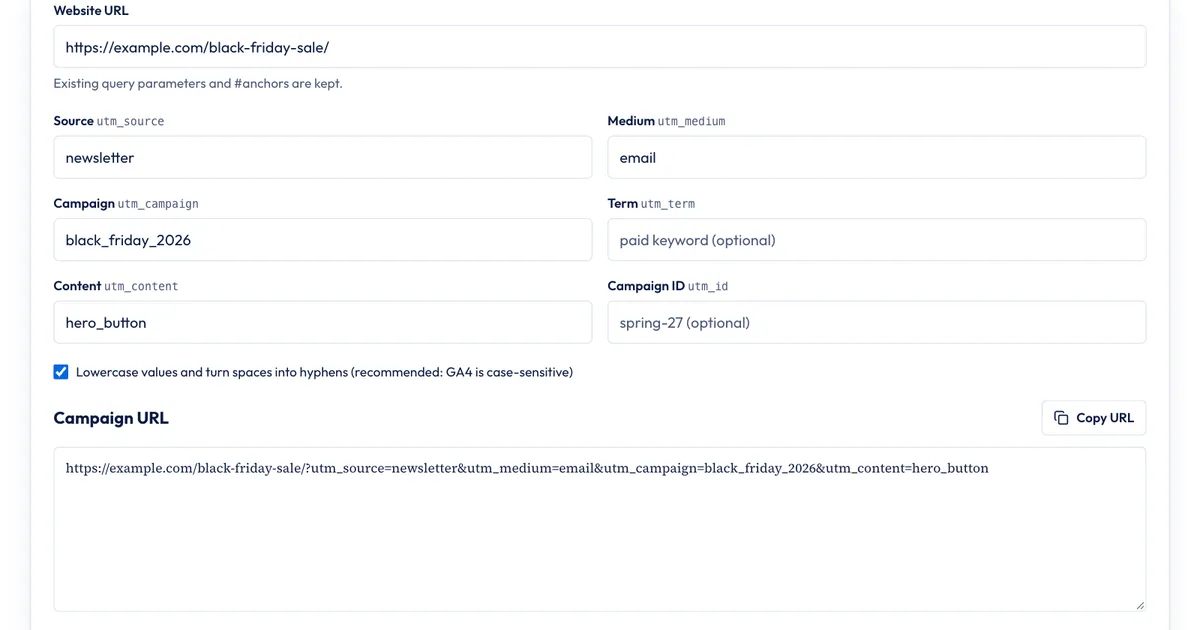
Build the link with our UTM builder
You can type tags by hand, but one typo splits your data. The free SERP Times UTM builder runs in your browser and catches the common mistakes:
- Paste the page URL into Website URL. Existing query parameters and
#anchorsare kept. - Fill in Source, Medium and Campaign. The source and medium fields suggest common values as you type.
- Add Term, Content or Campaign ID if you need them.
- Leave Lowercase values and turn spaces into hyphens checked, so
Black Friday 2026becomesblack-friday-2026. - Watch for the warning under the result. If GA4's default channel rules don't recognize your medium, the builder says so before you send anything.
- Click Copy URL.
What it doesn't do: it doesn't shorten links, save a history of the links you've built, make QR codes or check that the landing page loads. If several people tag links for one company, keep the shared spreadsheet from the naming rules above; the builder makes each link correct, the list makes them consistent. Google's own Campaign URL Builder is another free option, and paid link managers earn their cost when you need team permissions and a searchable link history.
Check that the tags worked
- Click your finished link once and confirm the page loads with every tag still in the address bar.
- In GA4, open Reports > Acquisition > Traffic acquisition. Google says this report shows session source/medium and session campaign. Standard reports aren't instant, so give a new campaign a day before you worry.
- If visits show under Unassigned, check the medium against the channel table above.
For a refresher on what GA4 measures and what Search Console measures, read our Search Console vs. Google Analytics guide. To see what your Black Friday campaign actually earned once the visits are in, our guide to ROAS vs ROI walks through the math.
Sources
All accessed Nov 20, 2026:
- Google Analytics Help: [GA4] URL builders: Collect campaign data with custom URLs
- Google Analytics Help: [GA4] Default channel group
- Google Analytics Help: Best practices to avoid sending Personally Identifiable Information (PII)
- Google Ads Help: About auto-tagging
- Google Analytics: Campaign URL Builder
Frequently asked questions
Do UTM links expire?
No. The tags are just part of the URL, so a tagged link keeps working, and keeps reporting the same source, medium and campaign, for as long as the page it points to exists. That's why a link in an old PDF or a pinned post can still bring visits to a campaign you ended years ago.
Can I shorten a UTM link?
Yes. A link shortener redirects to the full tagged URL, and the UTM tags survive as long as the redirect keeps the query string. Click the short link once and check that the address bar still shows every utm_ parameter before you send it.
Why does my campaign show as (not set) in GA4?
Usually because a parameter is missing. Google says missing UTM values show up as (not set), so a link with a source and medium but no utm_campaign reports its campaign as (not set). Fill in all three required parameters on every link.
Can I use UTM links in a QR code?
Yes. Build the tagged URL first, then make the QR code from it. Use a medium GA4 recognizes, or the visits can end up in Unassigned. For print, one option is a medium of referral with the campaign name saying which flyer or mailer it was; GA4 also lets you create a custom channel group if you want print in its own channel.
Share
X (opens in a new tab)LinkedIn (opens in a new tab)WhatsApp (opens in a new tab)Akif Qureshi has worked in SEO for more than two years, auditing sites, planning content and tracking how Google updates change real traffic. He started SERP Times to report search changes clearly and to say exactly what site owners should do about them.
Certifications
- Google Analytics (Google)
- Google Ads Search (Google)
- HubSpot
- Digital Vidya
- DSIM
- Internship Studio