AnalyticsNews
Search Analytics API Adds Branded and Multimodal Data
Three Search Console Performance report features are now in the Search Analytics API: the branded queries filter, web multimodal data and multi-value country and device filters.

By Akif Qureshi
Published 6 min read
Google added three new options to the Search Analytics API on Nov 16, 2026, so the features it added to the Search Console Performance report over the past year now work in code too. You can now split traffic into branded and non-branded queries, pull data from Google Lens and Circle to Search, and filter by several countries or devices in one request.
Google announced the change on the Search Central blog and in a LinkedIn post from its Search Central account. This report covers what each option does, the exact field names and values, the limits Google lists, and sample requests you can adapt.
Key takeaways
What changed in the Search Analytics API
The Search Analytics API is the part of the Search Console API that returns Performance report data: clicks, impressions, click-through rate (CTR) and average position. Each of the three additions matches a feature that was already in the Search Console interface:
| Feature | In Search Console since | New in the API |
|---|---|---|
| Branded queries filter | Nov 20, 2025 (all eligible sites by Mar 11, 2026) | brandedClassification dimension |
| Web multimodal reporting | Sep 24, 2026 | webMultimodal value for type |
| Multi-country and multi-device filtering | Already in the Performance report | filterLists field |
Sources: Google's posts introducing the branded queries filter and web multimodal reporting, and the Search Analytics API reference, accessed Nov 18, 2026.
Google says it made the change "following ecosystem requests," meaning site owners and tool makers who wanted the data in their own dashboards and scripts. Until now, splitting branded from non-branded traffic in the API meant keeping your own list of brand terms and running regex filters against them.
Branded queries: brandedClassification
brandedClassification is a new dimension. You can group by it (to get one row for branded and one for non-branded) or filter on it. It takes two values, BRANDED and NON_BRANDED.
Google classifies queries with an internal, AI-assisted system, not keyword matching. A branded query includes your brand name, misspellings of it, and products or services unique to your brand. In Google's own example, "Gmail" counts as a branded query for google.com. Google also says some queries may be misclassified.
The limits, from the API reference:
- Equals only. The only operator it supports is
equals. - No query filter in the same request. You can't group or filter by
brandedClassificationand filter byqueryin the same call. - Data starts Feb 21, 2026. Earlier dates return nothing.
- Eligible properties only. It works for top-level properties with enough query and impression volume. URL-path properties (
https://example.com/blog/) and subdomain properties don't qualify. For other properties, the response has no rows rather than an error.
This request returns one row each for branded and non-branded traffic from the United States in October 2026:
{
  "startDate": "2026-10-01",
  "endDate": "2026-10-31",
  "dimensions": ["brandedClassification"],
  "dimensionFilterGroups": [
    {
      "filters": [
        { "dimension": "country", "operator": "equals", "expression": "USA" }
      ]
    }
  ]
}
Send it as a POST to https://www.googleapis.com/webmasters/v3/sites/{siteUrl}/searchAnalytics/query. Here {siteUrl} is your property, URL-encoded, for example sc-domain%3Aexample.com for a Domain property.
Web multimodal: type webMultimodal
webMultimodal is a new value for the type field. The API reference describes it as search results from Google Lens, Circle to Search on Android and image uploads in Google Search. Google's September post on the Search Console report also lists Chrome's right-click "Search this image" option.
Two things to know:
- No query data. Google's help center says multimodal searches mostly use images, so text query data isn't available and the Queries dimension isn't shown for this search type. Group by
page,country,deviceordateinstead. - BigQuery too. If your property has an active bulk data export, the multimodal data will also be in BigQuery.
This request lists the pages that earned the most multimodal clicks from US mobile searches in October 2026:
{
  "startDate": "2026-10-01",
  "endDate": "2026-10-31",
  "type": "webMultimodal",
  "dimensions": ["page"],
  "dimensionFilterGroups": [
    {
      "filters": [
        { "dimension": "country", "operator": "equals", "expression": "USA" },
        { "dimension": "device", "operator": "equals", "expression": "MOBILE" }
      ]
    }
  ],
  "rowLimit": 100
}
For an online furniture store, that's the list of product pages people reach by pointing a phone camera at a chair they like. For a recipe site, it's the dishes people photograph to identify.
Multi-country and multi-device: filterLists
filterLists sits inside dimensionFilterGroups, next to the existing filters. Each entry names one dimension and a list of exact values, and a row matches if its value equals any of them. Before this, a filter could hold only one value, so combining countries meant one request per country or a regex.
The limits, from the API reference:
- Country and device only. Countries use three-letter ISO 3166-1 alpha-3 codes. Devices are
DESKTOP,MOBILEandTABLET. - Exact matches only. There is no operator: every value is an exact match.
- One place per dimension. A request can't filter the same dimension in both
filtersandfilterLists.
Google's examples are regional groups such as EMEA, LATAM and DACH. For a US site, a more useful group is the United States plus its territories. Puerto Rico (PRI), Guam (GUM), the US Virgin Islands (VIR), American Samoa (ASM) and the Northern Mariana Islands (MNP) have their own country codes, so they're counted separately from USA. This request returns daily US-and-territories traffic from phones and tablets combined:
{
  "startDate": "2026-10-01",
  "endDate": "2026-10-31",
  "dimensions": ["date"],
  "dimensionFilterGroups": [
    {
      "filterLists": [
        { "dimension": "country", "expressions": ["USA", "PRI", "GUM", "VIR", "ASM", "MNP"] },
        { "dimension": "device", "expressions": ["MOBILE", "TABLET"] }
      ]
    }
  ]
}
The country list and the device list both have to match, so this returns mobile and tablet traffic from those six places only.
Combining the new options
The three options work together. Google gives two examples: tracking brand growth across regional hubs, and seeing which pages perform best in multimodal search across key markets and devices.
A US example: a Shopify store selling across the US could group by brandedClassification and date, with a filterLists entry for US mobile and tablet traffic. That shows whether Black Friday searches came from people who already knew the store or from new shoppers.
Remember the one clash: brandedClassification can't be used with a query filter. If you need both, run two requests.
What to do now
- If you run reports from the API (in Python, Apps Script or a custom dashboard), add a branded vs. non-branded split for your top-level property. It replaces a hand-made brand regex, and it catches misspellings and product names that a regex can miss.
- If your site gets image-led traffic (products, recipes, places, plants, fashion), pull a monthly
webMultimodalreport by page. Until now, this data was only in the Search Console interface and its exports. - If you report on several countries or devices, swap separate requests or regex filters for one
filterListsrequest. - If you use a third-party tool or connector, check whether it supports the new fields before you rely on them. Each tool has to add them itself.
- Test before you automate. The APIs Explorer on the reference page lets you run a request against your own property in the browser.
If you're new to the data itself, our guide to the difference between Search Console and Google Analytics explains what Search Console measures. For Google's ranking changes, see the Google Update Tracker.
Sources
All accessed Nov 18, 2026:
- Google Search Central Blog: New filtering and reporting capabilities in the Search Analytics API (Nov 16, 2026)
- Google Search Console API: Search Analytics: query reference
- Google Search Central Blog: Introducing the branded queries filter in Search Console (Nov 20, 2025, updated Mar 11, 2026)
- Google Search Central Blog: Announcing web multimodal Search performance reporting in Search Console (Sep 24, 2026)
- Search Console Help: Performance report: Dimensions and data groupings
- Search Console Help: Performance report: Advanced filtering and comparison
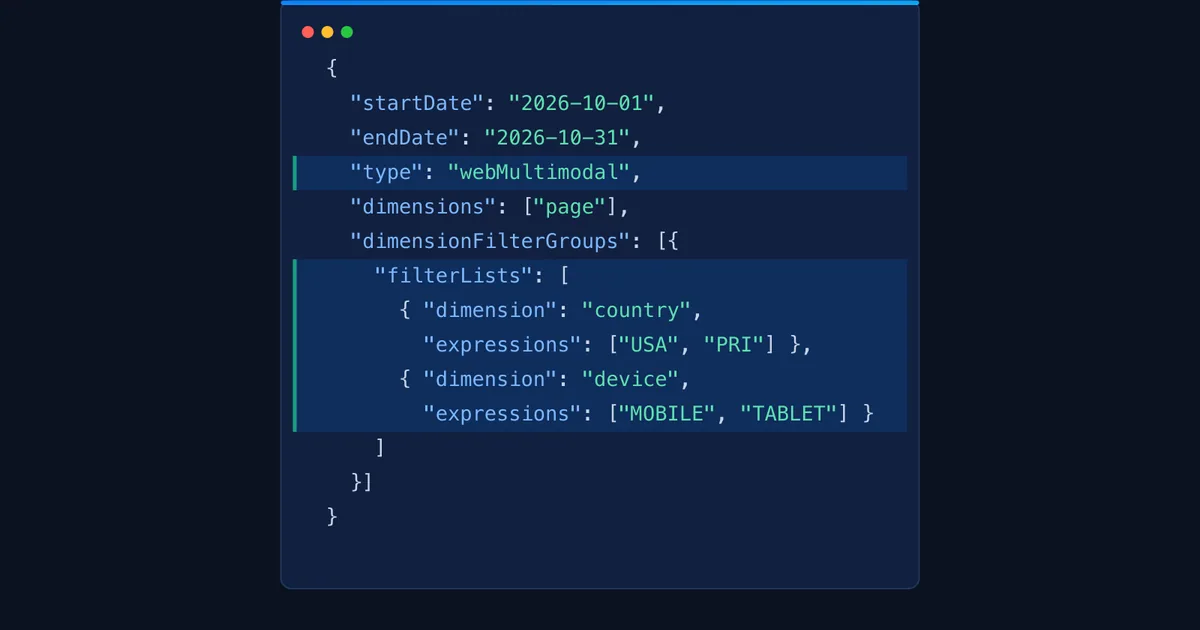
The hero image is our own illustration of a request that uses two of the new options, webMultimodal and filterLists.
Frequently asked questions
Do I need to change my existing Search Analytics API code?
No. The three additions are optional. Requests that don't use brandedClassification, webMultimodal or filterLists work the same way they did before Nov 16, 2026.
Why does my brandedClassification request return no rows?
Branded data is only available for eligible properties: top-level properties (not URL-path or subdomain properties) with enough query and impression volume. For other properties, Google says the response won't include any rows. Data also starts on Feb 21, 2026, so earlier date ranges come back empty.
Can I see search queries for Google Lens and Circle to Search traffic?
No. Google's help center says multimodal searches mostly use images, so text query data isn't available for this traffic. Group webMultimodal data by page, country, device or date instead.
Can I filter by a list of pages or queries with filterLists?
No. As of Nov 18, 2026, filterLists accepts only the country and device dimensions. For several pages or queries, use a regex filter (includingRegex or excludingRegex) in the regular filters field.
Does the branded classification affect my rankings?
No. Google says the branded queries filter is only there to help you analyze your data and has no effect on how Google Search ranking works.
Share
X (opens in a new tab)LinkedIn (opens in a new tab)WhatsApp (opens in a new tab)Akif Qureshi has worked in SEO for more than two years, auditing sites, planning content and tracking how Google updates change real traffic. He started SERP Times to report search changes clearly and to say exactly what site owners should do about them.
Certifications
- Google Analytics (Google)
- Google Ads Search (Google)
- HubSpot
- Digital Vidya
- DSIM
- Internship Studio