
SEOGuide
Google Search Profile for Creators: Now Live in India
Google's Search profiles give creators and publishers their own page in Search and Discover, with a Follow button. After the US, they're now open in India and Canada. Here's who qualifies and how to claim yours.

By Akif Qureshi
Published Updated 8 min read
On this page
A Google Search profile is a free page inside Google Search where creators and publishers bring together their social accounts, website and latest posts, and since 6 October 2026 creators in India can claim one too.
Google launched Search profiles in the United States in June. India and Canada were added in October, and Brazil is next. If you have 10,000 followers on YouTube, Instagram, X or TikTok, you can probably claim yours today. Here's what the profile shows, who qualifies, how to set it up, and what it actually does for your visibility.
Key takeaways
What is a Google Search profile?
Google calls it "a dedicated, shareable space to highlight content across platforms". In practice it's a profile page hosted by Google that pulls your content from the platforms you link and shows it in one place. A profile can show:
- your name, handle, profile photo and cover image;
- a short bio ("About");
- your total followers and the platforms you're on;
- up to 8 website links;
- your latest posts and videos, added automatically from linked accounts, and up to 8 featured posts you choose;
- a Follow on Google button.
People reach it in three ways: from your knowledge panel on mobile ("View Search Profile"), by tapping your name on a post in Google Discover, or through its direct address. Google says profiles are designed to show up when someone searches for you specifically.
The Follow button is the important part. Google says that when people follow you, your content is more likely to appear in their Discover feed on the Google app's home screen.
Now live in India, Canada and soon Brazil
| Date | What changed |
|---|---|
| 4 June 2026 | Search profiles launch in the United States for publishers and creators with a "sizable following" |
| 16 September 2026 | The follower threshold drops to 10,000; publishers can manage several profiles from one login; article previews get better thumbnails and longer headlines |
| 6 October 2026 | India and Canada open, announced on X by Robby Stein, VP of Product for Google Search, with Brazil to follow soon |
The US launch was announced on Google's blog in a new profile to help publishers and creators highlight their work on Search, and the September changes in 3 new ways we're improving Search profiles. Google's Help Center now lists Canada, India and the United States as the countries where profiles are available.
For Indian creators this is a bigger deal than it looks. Until now, most creators' only presence on Google beyond their own links was a knowledge panel, which Google creates and you can only suggest edits to. A Search profile is something you can claim, edit and grow.
Who can get a Google Search profile?
According to Google's Create a new Search profile help page, you need:
- to be in the United States, India or Canada;
- at least 10,000 followers or subscribers on at least one of YouTube, Instagram, X or TikTok;
- to be 18 or older. You can manage a profile for someone under 18, but only from a Google Account owned by an adult;
- content that follows Google's policies for user-generated content on Search.
The 10,000 has to be on a single platform: 6,000 on Instagram plus 4,000 on YouTube doesn't count. Depending on your follower counts, Google may ask you to sign in to up to three of your accounts to prove they're yours.
How to claim your Google Search profile, step by step
1. Check whether Google already made one for you
If you have a knowledge panel, Google may have generated a Search profile for you automatically. Search your name or your @handle on Google, open your knowledge panel and look for View Search Profile. You can also go to profile.google.com while signed in to the Google Account linked to your YouTube channel.
2. Claim or create it
- Go to profile.google.com/claim.
- Sign in with the Google Account you want to manage the profile with. If you have a YouTube channel, use that channel's account.
- Sign in to at least one content platform account with 10,000 or more followers. If an unclaimed profile is already linked to it, Google will tell you; review its other linked accounts before claiming it.
- Optionally, sign in to more of your accounts to add them. Only link accounts that belong to the same person or brand: Google can refuse unrelated ones.
- Click Create Profile, or Next and then confirm if you're claiming an existing one.
Google may also ask you to verify your identity with a "Selfie with ID" step. If you've already claimed your knowledge panel, it verifies you automatically.
3. Set it up properly
- Handle: your handle is taken from your most-followed linked account, and you can't type a custom one. Use the same handle everywhere if you can.
- Photo and cover: upload a profile photo of at least 256 × 256 px and a cover image.
- Bio and name: these changes go to Google for review and show as "Pending" until approved. You get an email either way.
- Links: add up to 8, starting with your website.
- Featured posts: pin up to 8 of your best posts from the last 365 days.
New posts from your linked accounts appear automatically, usually within 24 to 48 hours.
Two limits to know: one Google Account can manage up to 10 profiles, but each profile can be claimed by only one Google Account, with no extra admins. If you need to move a profile to another account, or you can't claim yours, use Google's Search profile support form.
A real example: my Google Search profile
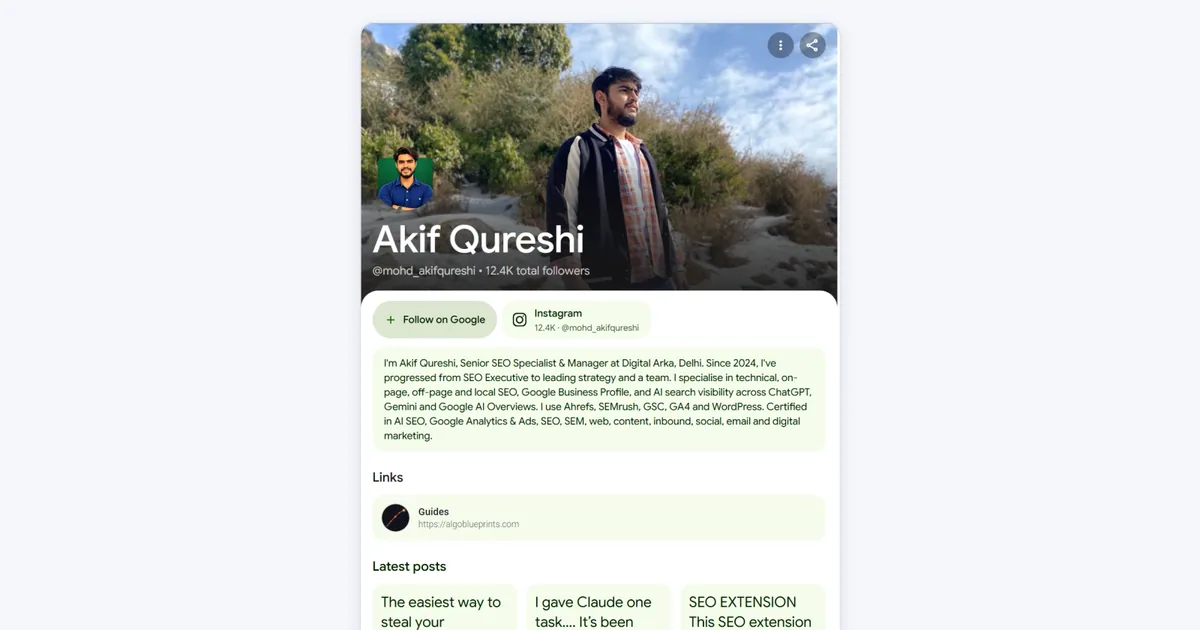
My profile at profile.google/@mohd_akifqureshi shows:
- my name, handle (@mohd_akifqureshi) and 12.4k total followers, which come from my Instagram account;
- the Follow on Google button right under my name;
- my Instagram account with its follower count;
- a short About bio on my role and what I specialise in (bio changes go to Google for review before they appear);
- a Links section pointing to my SEO guides website;
- Latest posts: my recent Instagram reels and posts, pulled in automatically, with video lengths and how long ago each went up.
Two small things I noticed. The short profile.google/@handle address redirects to profile.google.com/@handle, so either works for sharing. And because the latest posts update themselves, the profile only stays fresh if you keep posting.
Does a Google Search profile help SEO?
Not directly. Google's help pages are clear that creating or editing a profile doesn't change your ranking in Search or Discover. It helps in three other ways:
- Discover reach. Followers are more likely to see your new content in Discover. That's the one direct path from a profile to more visits, so ask your audience to tap Follow on Google. (For other ways to grow, see how to increase website traffic.)
- Your name search. Claiming can create a knowledge panel or update an existing one with your photo, latest content and a link to the profile, so people who search for you see an accurate, current result.
- Insights. A beta Insights section shows your top content, clicks, impressions and audience by country, filtered by Search or Discover. It needs a minimum follower count on one platform, and only the account that claimed the profile can see it.
To make the most of it, keep your name and handle consistent across platforms, put your website first in Links, share your profile link in your bios, and keep posting so the "Latest posts" section stays current.
Search profile vs knowledge panel vs Business Profile
| Feature | Search profile | Knowledge panel | Google Business Profile |
|---|---|---|---|
| Who it's for | Creators and publishers | People, organisations, places and things | Local businesses |
| Who creates it | You, or Google generates one for you to claim | Google, automatically | You |
| Can you edit it? | Yes; name and bio changes are reviewed by Google | Only suggest changes, after claiming it | Yes |
| What's special | Your latest posts from every platform, and a Follow button | Facts Google has gathered about you | Address, hours, reviews and photos |
| Where it appears | Its own page, your knowledge panel and Discover | Beside search results for your name | Search and Maps for local searches |
They work together: your knowledge panel links to your Search profile, and a business can have a Business Profile alongside a founder's Search profile.
Common problems and fixes
| Problem | What to do |
|---|---|
| "My profile doesn't show when I search my name" | Search your @handle instead; common names can take longer. If it still doesn't show, use More → Send feedback in Edit mode. |
| "I'm not eligible" | Check you have 10,000 on a single platform, you're 18 or older, and you're in the US, India or Canada. |
| Bio or name stuck on "Pending" | Google reviews these changes by hand and emails you when they're approved or denied. |
| New posts are missing | Wait 24 to 48 hours after posting. |
| A linked account was rejected | Link only accounts that belong to the same person or brand as the profile. |
| Someone else claimed your profile | Contact Google through the Search profile support form. |
Frequently asked questions
Is a Google Search profile free?
Yes. Claiming and managing a Search profile is free. You need a Google Account and at least one eligible YouTube, Instagram, X or TikTok account.
Which countries can use Google Search profiles?
Search profiles launched in the United States on 4 June 2026 and opened to creators and publishers in India and Canada on 6 October 2026. Google has said Brazil is coming soon.
How many followers do I need for a Google Search profile?
At least 10,000 followers or subscribers on at least one of YouTube, Instagram, X or TikTok. Google lowered the threshold to 10,000 in September 2026. You also need to be 18 or older.
Will a Search profile improve my Google rankings?
Not directly. Google says creating or editing a profile doesn't affect ranking in Search or Discover. It can still help: people who follow you may see more of your content in Discover, and claiming can create or update your knowledge panel.
Share
X (opens in a new tab)LinkedIn (opens in a new tab)WhatsApp (opens in a new tab)Akif Qureshi has worked in SEO for more than two years, auditing sites, planning content and tracking how Google updates change real traffic. He started SERP Times to report search changes clearly and to say exactly what site owners should do about them.
Certifications
- Google Analytics (Google)
- Google Ads Search (Google)
- HubSpot
- Digital Vidya
- DSIM
- Internship Studio