ToolsGuide
Google Deep Review: What It Is and How to Use It
Google Deep Review is an AI reviewer from Google Research that checks long documents for errors, weak arguments and missing context. Here's how it works, what's free, what a review costs with your own Gemini API key, and how marketers can use it.

By Akif Qureshi
Published 10 min read
On this page
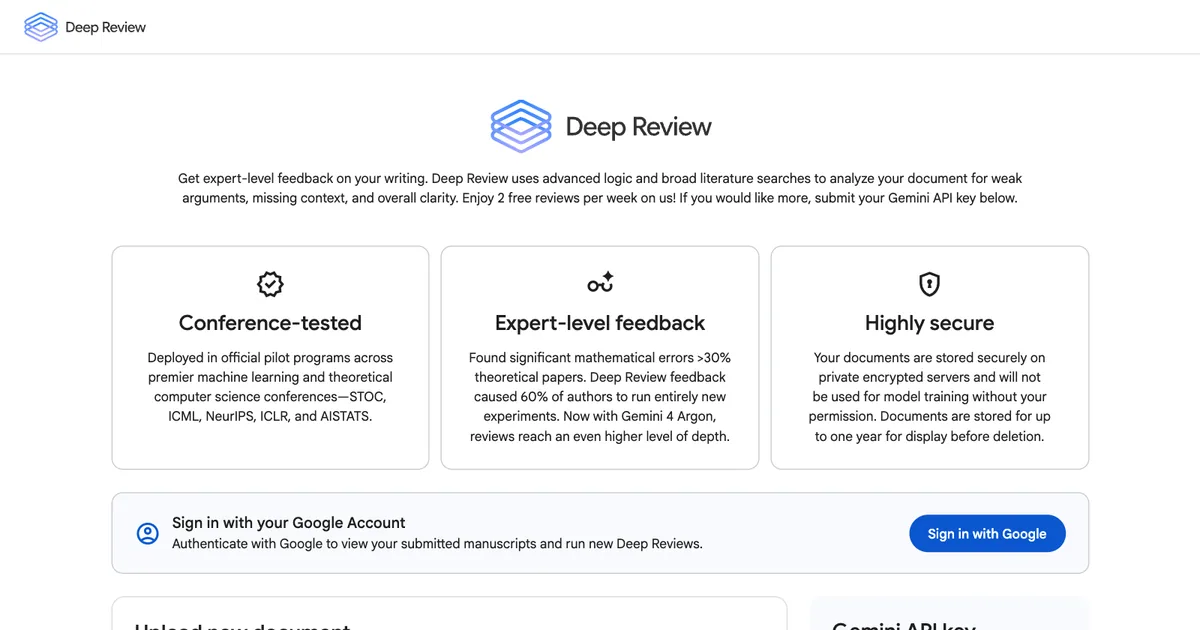
Google Deep Review is a free AI tool from Google Research that reads a long document and reports weak arguments, errors, missing context and unclear writing. It started as a reviewer for computer science papers and opened to the public on Oct 14, 2026. You get two free reviews a week, and more if you connect a Gemini API key.
This guide explains what Deep Review does, how its four-step review works, what it costs (including a Gemini API price change on Dec 1, 2026), what happens to your documents, and how US marketing and SEO teams can use it on research reports, white papers and other content that has to be right.
Key takeaways
What is Google Deep Review?
Deep Review is a web app at research.google/deepreview that gives "expert-level feedback" on documents. Google's FAQ describes it as a system that uses Gemini models "via an inference-time scaling and reasoning-centric pipeline" to review "technical details, logical soundness, and accuracy."
In plain terms: instead of asking a chatbot "what do you think of this document?" once, Deep Review splits the document into sections, spends more computing effort on the hard parts, checks each part in depth, and then checks that the parts agree with each other. It can also run web searches to find related work and check claims against it.
It isn't a grammar checker or an SEO tool. It won't tell you to add a keyword or shorten a sentence for readability. It tells you where your reasoning breaks, where a number doesn't support a claim, and what a skeptical expert would ask.
Where it came from
Deep Review grew out of Google's Paper Assistant Tool (PAT), an experiment that gave researchers private feedback on their papers before conference deadlines. According to Google's launch post (Oct 14, 2026), PAT ran at four major computer science conferences: STOC 2026, ICML 2026, NeurIPS 2026 and ICLR 2027. Authors who opted in got feedback weeks before the deadline, separate from the official peer review.
Google's numbers for the pilots vary slightly by page: the launch post says more than 16,000 manuscripts, and the Deep Review FAQ says more than 15,000 papers. Either way, it was tested at scale before the public launch.
The reason Google gives for building it: AI now helps write papers, code and proposals much faster than people can check them. Google's post notes that ICLR, NeurIPS and ICML received more than 74,000 submissions this year, up from about 23,000 in 2023. Deep Review is meant to take on the most tiring parts of review and leave "higher-level judgements to humans."
How Deep Review works
Google's launch post describes a four-stage pipeline:
- Document segmentation. A segmenter agent splits the document into logical sections (introduction, methods, results and so on). Sections can overlap, but together they cover the whole document.
- Adaptive budgeting. The system checks how dense each section is and gives harder sections more compute. A page of proofs or financial tables gets more attention than an introduction.
- Deep parallel verification. Separate reasoning agents review each section at the same time. Each one can see the full document to follow cross-references but focuses on its own section.
- Global synthesis and grounding. A final agent merges the section reports, checks that sections are consistent with each other, reruns logic checks where needed and checks claims against outside sources to cut down on hallucinations.
This design targets a known weakness of single-prompt AI reviews: on long documents, a model can run out of reasoning budget, miss a contradiction between page 3 and page 40, or accept a claim without checking it.
Review depth vs. thinking level
Deep Review has two settings that are easy to confuse. From the FAQ:
| Setting | What it controls | Options |
|---|---|---|
| Review depth | How many multi-agent review and verification passes run across the document | Low, Medium, High, Extra High |
| Thinking level | How much reasoning each individual Gemini call spends on claims, proofs and details | Low, Medium, High |
Free reviews run on Medium for both. With your own API key, every combination is available. Higher settings use more tokens, so they cost more.
What Deep Review costs
Free: two reviews per week, on Gemini 4 Argon at Medium depth and Medium thinking.
With your own Gemini API key: Deep Review itself costs nothing extra. You pay Google only for the Gemini API calls the review makes, at standard rates. After you upload a document, Deep Review shows an estimated cost before the review starts, and you decide whether to run it.
Gemini 4 Argon isn't on the Gemini API free tier, so you need a paid-tier key. Google's Gemini API pricing page (accessed Nov 20, 2026) lists these standard rates:
| Gemini 4 Argon (per 1 million tokens) | Through Nov 30, 2026 | From Dec 1, 2026 |
|---|---|---|
| Input | $2.00 | $4.00 |
| Output (including thinking tokens) | $10.00 | $20.00 |
Google hasn't published a typical cost per review, and it depends on the document's length, the review depth and the thinking level. Use the estimate Deep Review shows before you confirm. If you plan to run many paid reviews, do them before Dec 1, when the token price doubles. For more on the model behind it, see our coverage of Gemini 4 Carbon and Argon.
To get a key, sign in to Google AI Studio, create an API key, set up billing on the linked Google Cloud project, and paste the key into the Gemini API key field on the Deep Review page.
How to use Google Deep Review
- Go to research.google/deepreview and click Sign in with Google.
- Upload your document (drag a file into the upload area) or choose Paste text.
- Add custom context (optional). Tell it who the document is for and what to focus on, for example: "This is a public research report for US marketing managers. Check that every statistic supports the claim next to it."
- Pick settings if you've added an API key. Otherwise the free review runs at Medium and Medium.
- Click Upload Document for Review. With an API key, check the cost estimate and confirm.
- Open the results in the Your documents table when the review is done.
All uploads must follow Google's Generative AI Prohibited Use Policy.
Get better feedback
- Upload the final draft, not an outline. Deep Review checks reasoning and evidence, which needs the full argument.
- Give it context. Say who the audience is and what the document must prove. "A pitch for a CFO" and "a guide for beginners" call for different feedback.
- Ask it to check sources. If your report cites US government data (Census Bureau, BLS) or Google documentation, tell it to check that the numbers in the text match what you cite.
- Treat the output as a list to check, not a list to accept. Google's own framing leaves judgment calls to humans. Some flags will be wrong or won't matter for your audience.
What happens to your documents
This is the part to read before you upload anything for a client. From the Deep Review page and FAQ (accessed Nov 20, 2026):
- Storage: documents are kept on encrypted servers for up to one year so you can see past reviews, then deleted.
- Training: documents aren't used for model training without your permission. You can opt in to let the research team use your data to improve Deep Review.
- Web searches: Deep Review may run web searches to find related work. Google says your document stays private.
Google's launch post on Oct 14 said uploaded documents are "never used to train, fine-tune, or improve Google models." The current FAQ adds the opt-in option, so check the page for the latest wording before you upload.
A practical rule for agencies and in-house teams: don't upload anything your contract, NDA or company policy says must stay inside approved systems, and leave out personal data such as customer lists. Remove names and confidential figures, or ask the client first. US state privacy laws such as the California Consumer Privacy Act (CCPA/CPRA) may apply to customer personal information you share with outside services. This isn't legal advice; check with your legal team if you're unsure.
What the results show so far
Google's evidence comes from its own pilots and research, so treat it as the company's reported results:
- Error detection: in the PAT preprint (June 26, 2026), the system found mathematical errors 34% better than a single zero-shot model call on the SPOT benchmark (measured as recall).
- Real papers: the Deep Review page says it "found significant mathematical errors" in more than 30% of theoretical papers, and that its feedback led 60% of authors to run entirely new experiments.
- Newer model: Google says the switch to Gemini 4 Argon has improved review quality beyond the earlier PAT versions described in the preprint.
What we don't have yet: independent tests on business documents such as marketing reports, contracts or financial models. Google says the system now covers legal and finance documents, but the published evidence is mostly from computer science papers.
How marketing and SEO teams can use it
Deep Review isn't built for blog posts, but several kinds of marketing content have the same needs as a research paper: claims backed by evidence, consistent numbers and sound logic. Good candidates:
- Original research and data studies. If you publish a survey of 500 US small businesses or an analysis of a million search results, Deep Review can check that each conclusion follows from the data and flag claims the data doesn't support. Research that earns links has to hold up when journalists and competitors read it closely.
- White papers and e-books. Long gated content often has contradictions between sections written by different people. Cross-section checks are what Deep Review is designed for.
- Case studies. It can flag results without a baseline ("traffic grew 300%" from what, over what period?) and cause-and-effect claims the data doesn't prove.
- Technical SEO documents. Site migration plans, redirect maps explained in prose, or an audit report for a client can be checked for missing steps and unstated assumptions, the same way Google suggests using it on design documents.
- Proposals and strategy decks. Google lists presentations as a use case: checking that slides follow logically and that takeaways match the charts.
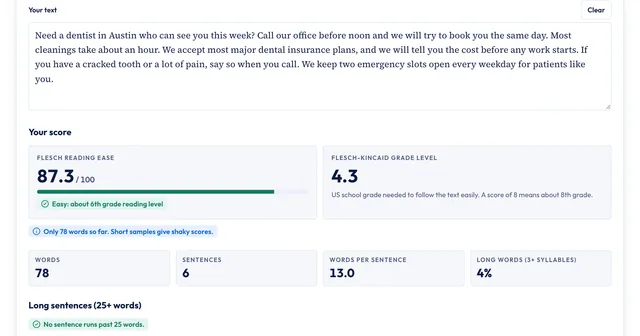
Where it adds little: short posts, news write-ups and product pages, where a careful human edit is faster. For those, our free readability scorer and headline analyzer are quicker checks.
Deep Review API and Antigravity
Two options for teams that want to automate reviews:
- Deep Review API. The FAQ points to the Deep Review API in Google's APIs Explorer. It uses your Gemini API key, so you could run a review automatically whenever a report draft is finished.
- Antigravity. Google also released a "Teamwork Deep Document Review Pattern" in Antigravity, Google's agentic development platform, inspired by Deep Review. Antigravity users run it with the
/teamwork-previewcommand.
Limits to keep in mind
- Two free reviews a week is enough to try it, not to run it on every draft.
- It can be wrong. It's an AI system; verify every flagged error before you change a document, and don't assume a clean review means the document is correct.
- Multi-file reviews aren't available yet. Google says checking sets of related documents, spreadsheets and exhibits together is coming.
- The evidence is mostly academic. Results on business documents haven't been independently tested.
- Paid reviews get more expensive on Dec 1, 2026, when Gemini 4 Argon's API price doubles.
What to do now
- Pick your most important long document this quarter, such as a research report, white paper or client audit, and remove anything confidential.
- Run it through Deep Review's free tier with a sentence of context about the audience.
- Check each flagged issue against your sources and fix the ones that hold up.
- If you'll need more than two reviews a week, set up a paid Gemini API key and run the heavy reviews before Dec 1.
Sources
- Google Research: Deep Review (product page and FAQ), accessed Nov 20, 2026
- Google Research blog: Analyzing technical documents with Deep Review, Oct 14, 2026
- arXiv: Towards Automating Scientific Review with Google's Paper Assistant Tool, June 26, 2026
- Google AI for Developers: Gemini Developer API pricing, accessed Nov 20, 2026
- Google: Generative AI Prohibited Use Policy, accessed Nov 20, 2026
Frequently asked questions
Is Google Deep Review free?
Yes, up to two reviews a week, run on Gemini 4 Argon at Medium review depth and Medium thinking level. For more reviews or other settings, add your own Gemini API key and pay Google's standard Gemini API rates. Deep Review shows an estimated cost before each paid review starts.
What file types does Deep Review accept?
The Deep Review FAQ lists PDFs, plain text, Google Docs and Google Slides. Google's launch post on Oct 14, 2026, said PDFs and plain text at first, with multi-file uploads coming later.
Does Google use my documents to train its AI models?
Not by default. The Deep Review page says documents aren't used for model training without your permission, and you can opt in to let the research team use your data. Documents are stored for up to one year so you can see past reviews.
Is Deep Review available in the United States?
Yes. Google says Deep Review is available worldwide. You need a Google Account to sign in, and a paid-tier Gemini API key if you want more than two reviews a week.
Can Deep Review check my blog posts for SEO?
Not in the SEO sense. It doesn't look at keywords, search intent or rankings. It checks whether claims hold up, whether the logic is consistent and whether important context is missing. That makes it most useful for data studies, research reports, white papers and technical guides.
Share
X (opens in a new tab)LinkedIn (opens in a new tab)WhatsApp (opens in a new tab)Akif Qureshi has worked in SEO for more than two years, auditing sites, planning content and tracking how Google updates change real traffic. He started SERP Times to report search changes clearly and to say exactly what site owners should do about them.
Certifications
- Google Analytics (Google)
- Google Ads Search (Google)
- HubSpot
- Digital Vidya
- DSIM
- Internship Studio