
AnalyticsGuide
PostHog vs Google Analytics vs Matomo: Which Should You Use?
Google Analytics 4 is free and built for marketing, PostHog is built for products and experiments, and Matomo is built for owning your data. Here's how they compare on price, features and ease of use, and whether you need more than GA4.

By Akif Qureshi
Published 9 min read
On this page
PostHog vs Google Analytics comes down to what you're measuring: Google Analytics 4 (GA4) is free marketing analytics for websites, PostHog is product analytics for apps and software with session replay, feature flags and experiments built in, and Matomo is a privacy-focused Google Analytics alternative you can host yourself so you own all of the data.
For most beginners, GA4 is the right first tool: it's free at any traffic level, installs in minutes on WordPress and connects directly to Google Ads and Search Console. PostHog and Matomo earn their place when you need something GA4 doesn't do well. This guide compares all three on price, features, privacy and ease of use, with US prices as of November 3, 2026, and answers the real question: do you need either one for advanced tracking?
Key takeaways
PostHog vs Google Analytics vs Matomo at a glance
| Google Analytics 4 | PostHog | Matomo | |
|---|---|---|---|
| Built for | Marketing analytics for websites and apps | Product analytics for apps and software | Website analytics with full data ownership |
| Price | Free (GA4 360: contact sales) | Free up to 1M events a month, then per event | Free to self-host; Cloud from $26 a month |
| Hosting | Google's servers | PostHog Cloud (US or EU) or self-hosted | Your own server, or Matomo Cloud (Germany) |
| Data sampling | Above 10M events per query | None by default | None |
| Data retention | 2 or 14 months for explorations | 1 year free, 7 years paid | Up to you (self-hosted); 24 months raw on Cloud |
| Session replay, heatmaps | Not included | Included (free tiers) | Cloud, or paid plugins when self-hosted |
| A/B testing | Not included since Google Optimize ended | Included (experiments) | Cloud, or a paid plugin when self-hosted |
| Google Ads and Search Console | Native links | Search Console as a data source; Ads in beta | Paid plugins (or included on Cloud) |
| Best for beginners? | Yes | Developers and product teams | WordPress owners who want privacy |
How much do they cost?
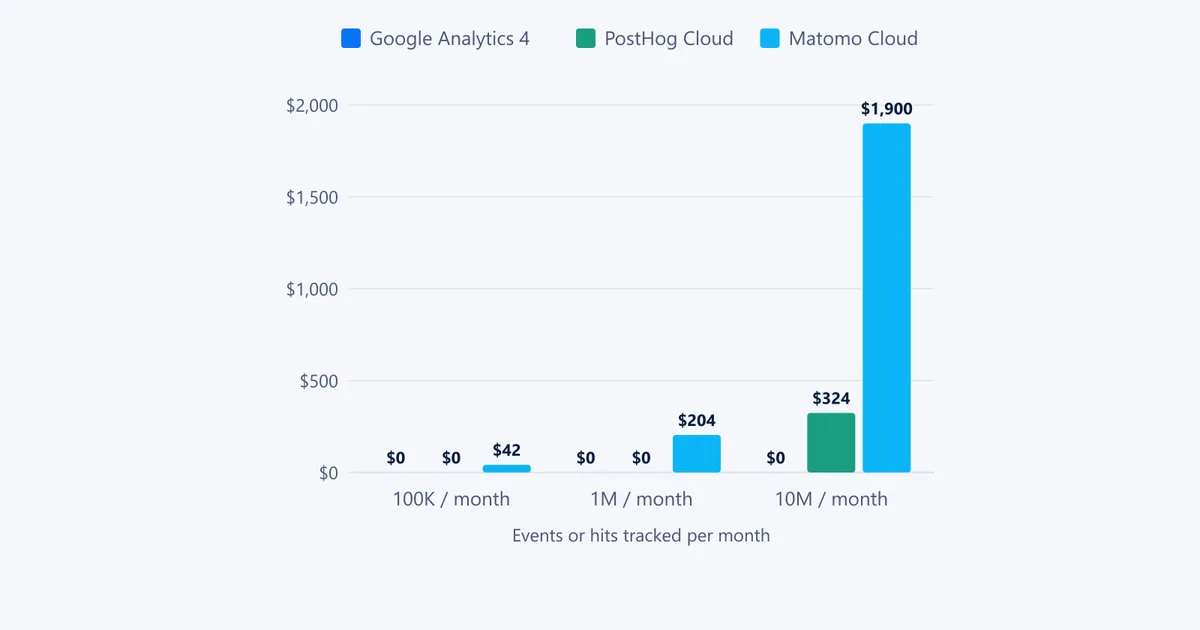
All three can be free, but they charge for different things. Prices below are in US dollars as of November 3, 2026, from Google, PostHog and Matomo.
| Monthly volume | Google Analytics 4 | PostHog Cloud (anonymous events) | Matomo Cloud (hits) |
|---|---|---|---|
| 100,000 | $0 | $0 | $42 |
| 1 million | $0 | $0 | $204 |
| 10 million | $0 | about $324 | $1,900 |
A few things the table hides:
- GA4 360, the enterprise version with higher limits and unsampled explorations, has no public price. A Google partner, Cardinal Path, said in 2022 that it would start at about $50,000 a year.
- PostHog charges more for identified events (when you tie events to a logged-in person): $0.000198 each after the first million, versus $0.00005 for anonymous events. Session replay, feature flags and surveys each have their own free allowance and per-unit price.
- Matomo Cloud counts "hits," which include pageviews, events, downloads and outlinks, so it isn't a like-for-like unit with PostHog's events. Self-hosted Matomo is free, but premium plugins cost $189 to $269 a year each, and you pay for the server.
- Self-hosting isn't free of effort. PostHog's free self-hosted version gets no support, keeps paid features cloud-only, and PostHog itself suggests its cloud above about 300,000 events a month.
Google Analytics 4: the free default
GA4 is what most US businesses already have, and for good reason.
Where it's strong:
- Free at any traffic level for the standard version.
- Native links to Google Ads (shared conversions and audiences) and Search Console (search queries next to on-site behavior).
- Explorations for funnels, paths, cohorts and segments, plus ecommerce reports.
- BigQuery export, so you can query raw events with SQL when you outgrow the reports.
- Known bot traffic is filtered automatically.
Where it falls short:
- Limited history for deep analysis. User-level data for explorations and funnels can be kept for only 2 or 14 months on the standard version. Set it to 14 months on day one.
- Sampling and thresholds. Queries over 10 million events can be sampled, and Google hides small numbers in some reports for privacy, which you can't switch off.
- No session replay, heatmaps or A/B testing. Google Optimize shut down on September 30, 2023; Google now points to third-party testing tools.
- No HIPAA option. Google says it doesn't offer business associate agreements for Google Analytics, so US healthcare sites shouldn't send it protected health information.
PostHog: product analytics with everything built in
PostHog is aimed at software companies, but any site with logged-in users or a signup funnel can use it.
Where it's strong:
- Autocapture. Pageviews, clicks and form submissions are recorded without writing tracking code, so you can analyze events you didn't plan for.
- Product analytics: trends, funnels, retention, user paths and SQL.
- Session replay, heatmaps, feature flags, experiments and surveys in the same tool, each with a free monthly allowance.
- No forced sampling, and events are kept for a year on the free plan and seven years on paid plans.
- US data hosting (Virginia) on PostHog Cloud, and a HIPAA business associate agreement on its Boost plan and up, from $250 a month.
Where it falls short:
- Not built for marketers. There's no native Google Ads link (an ad-platform integration is in beta), and marketing-channel reports are thinner than GA4's.
- Costs grow with usage. Busy apps that identify users can pass the free tier quickly.
- AI training by default. PostHog said in May 2026 it trains its own AI models on anonymized customer data, with US cloud customers opted in by default. Admins can opt out in organization settings.
Matomo: Google Analytics you own
Matomo looks the most like the old Universal Analytics, which makes it the easiest switch for people who miss it.
Where it's strong:
- You own the data. Self-hosted, it runs on your server (PHP 8.1+ and MySQL 8.0+ or MariaDB). With the official WordPress plugin, data stays in your WordPress database.
- No data sampling, and raw data is kept as long as you choose when self-hosted.
- Familiar reports, goals, ecommerce, segments and a free tag manager.
- Cookie-free tracking is available, though Matomo says it can reduce accuracy (returning visitors are harder to count).
Where it falls short:
- Matomo Cloud stores data in Frankfurt, Germany. There's no US data center option, which some US companies' policies rule out.
- Extras cost money when self-hosted: heatmaps and session recording ($269 a year), A/B testing ($269), funnels ($239) and Search Console keyword import ($189).
- You maintain it. Self-hosting means updates, backups and server capacity are your job, and Matomo's Cloud service is not HIPAA compliant.
Which is easiest for beginners?
- Google Analytics 4. On WordPress, Google's Site Kit plugin (5 million+ installs) sets up GA4 and Search Console without touching code, and Google's free Analytics Academy courses on Skillshop teach the basics.
- Matomo, via its WordPress plugin. It's free and the reports are easy to read, with the trade-off that very busy sites should move to self-hosted Matomo or Matomo Cloud.
- PostHog. Setup is quick (a JavaScript snippet, Google Tag Manager or an install wizard), but the product is built around events, funnels and experiments, so it rewards people who know what they want to measure.
One lesson from auditing GA4 on client sites this fall: the tool matters less than the setup. One site had recorded zero key events for months, so it couldn't say which pages brought in leads; another had silently lost its GA4 tag for seven weeks. I covered both in our guide to the difference between Search Console and Google Analytics.
Do you need PostHog or Matomo for advanced tracking?
Usually not, if "advanced tracking" means custom events, conversions, ecommerce, funnels and campaign tracking on a marketing website. GA4 handles all of that, with Google Tag Manager for custom events and our UTM builder for campaign links. Server-side tagging is possible too, at about $45 a month per server on Google Cloud Run, with at least two servers recommended by Google.
Add PostHog when you need:
- session replay or heatmaps to see why people drop off;
- feature flags and A/B tests (GA4 has no testing tool);
- product funnels and retention for logged-in users, such as a SaaS app's signup-to-activation flow;
- in-app surveys, or SQL across your analytics and other data.
Choose Matomo instead of, or alongside, GA4 when you need:
- raw data you own and keep for years, with no sampling;
- cookie-free or tightly controlled tracking for privacy reasons;
- analytics that stay on your own US servers, for example for a healthcare provider that self-hosts and signs agreements with its own hosting company.
Can you run them together? Yes, and many companies run GA4 for marketing and PostHog for product. Expect the numbers to differ: ad blockers, consent choices and counting methods vary by tool. Matomo says it can report 5% to 10% fewer visits than other platforms, and PostHog says routing its tracking through your own domain typically captures 10% to 30% more events.
A note on US privacy rules
None of these tools makes you compliant by itself. If you serve residents of California or other states with consumer privacy laws, your privacy policy should disclose the analytics you use, and you should honor visitors' opt-outs. GA4 offers a US state privacy laws addendum, consent mode and IP handling that doesn't store addresses; PostHog and Matomo both offer cookie-free modes. Healthcare sites should check the HIPAA notes above before installing anything. This isn't legal advice; check your setup with a privacy lawyer.
The bottom line
Start with GA4: it's free, beginner-friendly and covers what most marketing sites need, as long as you set up key events and check the tag stays installed. Add PostHog when you're building a product and want replays, flags and experiments in one place. Pick Matomo when owning your data matters more than Google's integrations. Whichever you choose, measure what turns visitors into customers; our guide on how to increase website traffic covers how to grow the numbers once you can trust them.
Frequently asked questions
Is PostHog better than Google Analytics?
For products and apps, often yes: PostHog adds session replay, feature flags, experiments and surveys, and doesn't sample your data. For a marketing website or blog, Google Analytics 4 is usually the better fit, because it's free at any traffic level and links directly to Google Ads and Search Console.
Is PostHog free?
PostHog Cloud includes 1 million analytics events, 5,000 session recordings, 1 million feature flag requests and 1,500 survey responses free every month, and PostHog says 97% of companies use it for free. Beyond 1 million events, anonymous events cost $0.00005 each at first, with volume discounts (as of November 3, 2026).
Is Matomo free?
Matomo On-Premise is free with unlimited sites and traffic if you host it yourself, and its official WordPress plugin is free too. Matomo Cloud, where Matomo hosts it for you, starts at $26 a month for 50,000 hits on its published US price list, after a 21-day free trial.
Can Matomo or PostHog replace Google Analytics?
Yes, both can track pageviews, traffic sources, events and conversions on their own. Most sites that switch lose the native Google Ads and Search Console links, though Matomo and PostHog can import Search Console data and send conversions to Google Ads through plugins or integrations.
Share
X (opens in a new tab)LinkedIn (opens in a new tab)WhatsApp (opens in a new tab)Akif Qureshi has worked in SEO for more than two years, auditing sites, planning content and tracking how Google updates change real traffic. He started SERP Times to report search changes clearly and to say exactly what site owners should do about them.
Certifications
- Google Analytics (Google)
- Google Ads Search (Google)
- HubSpot
- Digital Vidya
- DSIM
- Internship Studio