
AnalyticsGuide
Difference Between Search Console and Google Analytics
Search Console counts what happens on Google before the click; Google Analytics counts what visitors do after it. Real data from two sites shows why their numbers never match, and how to use both.

By Akif Qureshi
Published 9 min read
On this page
The difference between Search Console and Google Analytics is simple: Search Console shows how your site performs on Google before anyone clicks, and Google Analytics (GA4) shows what visitors do after they arrive.
That sounds tidy until you put the two side by side and the numbers disagree. To show what that looks like in practice, I pulled three months of real data (1 August to 28 October 2026) from two client sites I work on: a skin clinic in Pune and a tour operator in Rajasthan. One site shows the normal, healthy gap between the tools. The other shows what happens when GA4 quietly stops working and only Search Console notices.
Key takeaways
Search Console vs Google Analytics at a glance
| Google Search Console | Google Analytics 4 | |
|---|---|---|
| Question it answers | How does Google show my site, and who clicks? | What do visitors do once they're on my site? |
| Where the data comes from | Google's own search logs | A tag (JavaScript) that runs on your pages |
| Traffic it covers | Google Search (web, image, video, news) and Discover | Every source: Google, Bing, social, AI assistants, email, direct visits |
| Main metrics | Impressions, clicks, CTR, average position | Sessions, users, engagement rate, key events, revenue |
| Search queries | Yes, apart from rare queries hidden for privacy | Only through the Search Console link |
| History | 16 months | Standard reports keep history; explorations keep 2 or 14 months |
| Time zone | Pacific Time, can't be changed | The property's own time zone |
| Sees visitors who block tracking? | Yes | No |
What Search Console measures
Search Console records every time one of your pages appears in Google (an impression), every click, the click-through rate and your average position. It also tells you which pages are indexed, which have problems, and which sites link to you. Everything it counts happens on Google, before or at the click. Once a visitor lands on your page, Search Console knows nothing more about them.
Google's own documentation is blunt about which tool wins here: "The source of truth for Search performance will always be Search Console."
What Google Analytics 4 measures
GA4 only knows about visits where its tag runs. It counts sessions and users from every source, tells you how long people stay and what they do, and records the actions you mark as key events: an enquiry form, a WhatsApp click, a purchase. It also tells you whether a session was "engaged" (it lasted more than 10 seconds, included a key event or viewed at least two pages).
What GA4 can't tell you is how often you appeared on Google without getting a click, or which search terms people used. That's what Search Console is for.
Case study 1: a skin clinic in Pune
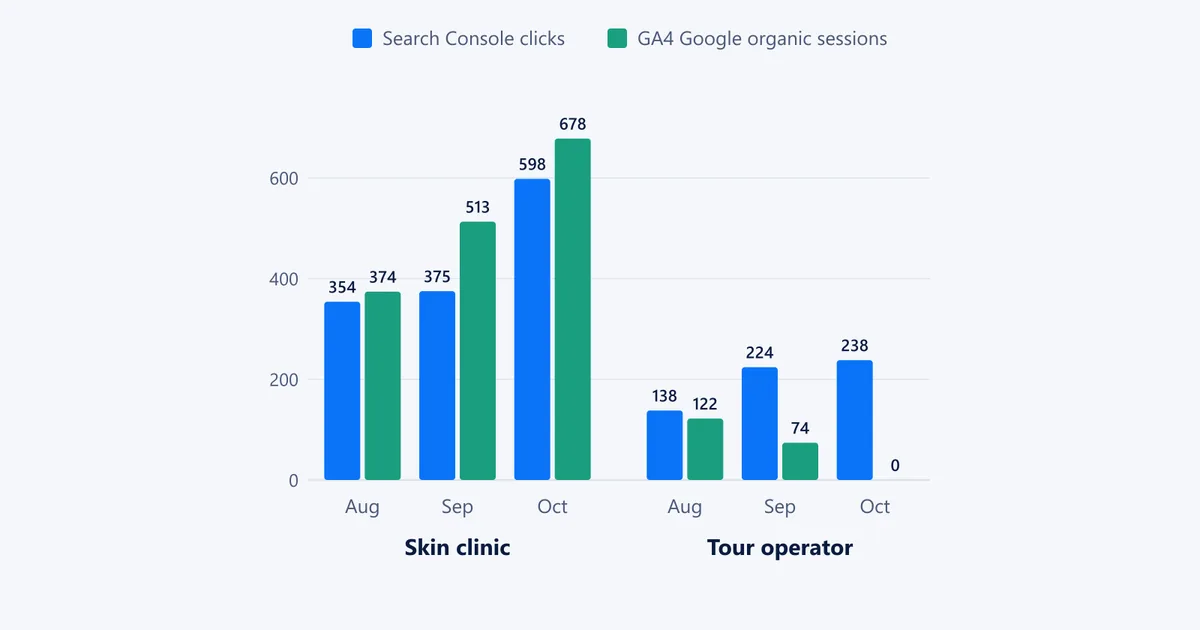
The clinic's site has service pages, local "skin specialist in [area]" pages and a blog. Here are its Google clicks in Search Console next to the sessions GA4 credited to google / organic:
| Month (2026) | Search Console clicks | GA4 Google organic sessions |
|---|---|---|
| August | 354 | 374 |
| September | 375 | 513 |
| October (1–28) | 598 | 678 |
| Total | 1,327 | 1,562 |
(GA4's months add up to 1,565, not 1,562: a session that runs past midnight at the end of a month is counted in both months.)
What Search Console showed. The site earned 151,143 impressions at an average position of 7.7 and a 0.9% click-through rate. Impressions doubled in October (from 38,750 to 76,900), and clicks rose from 375 to 598. 88% of clicks came from India and 78% from mobile. It also showed a clear gap: the query "dermatologist near me" got 696 impressions at position 7.2 but a CTR of just 0.6%, so the local pages and Google Business Profile need work.
What GA4 showed. Google organic visitors were the most engaged large group, with a 50.9% engagement rate, against 27.8% for the 1,355 Direct sessions. Short direct visits like those are worth checking for bots. GA4 also caught 38 sessions from ChatGPT and 10 from Gemini, traffic Search Console can't see at all (more on that in how to get cited by ChatGPT). And it showed a gap of its own: the property recorded zero key events, so nobody could yet say which pages bring appointment enquiries.
What the two showed together. With Search Console linked to GA4, one landing-page report shows both sides:
- The "Hydrafacial vs regular facial" guide got 61 clicks at position 5.2, but only 32.7% of its sessions were engaged, with 21 seconds of engagement on average. It ranks, but it doesn't answer the question fast enough.
- The "hair fall after dengue or typhoid" guide got 55 clicks and held readers for 1 minute 36 seconds on average. That's the one to expand.
- The
/servicesURL got 38 clicks in Search Console but 0 users in GA4. The reason: it redirects twice, to/services/and then/services/skin/, and GA4 records the visit under the final URL. Google still shows the old address, so the internal links and sitemap should point straight to the final page. (Our free redirect checker shows chains like this.)
Why GA4 was higher here. Search Console's main report counts web results only. Image search (12 clicks) and Discover (24 clicks) add 36 more. The rest comes from how sessions work: one click can start more than one session, for example when the visitor comes back later from a bookmark, and the two tools close each day in different time zones.
Case study 2: a Rajasthan tour operator
| Month (2026) | Search Console clicks | GA4 Google organic sessions |
|---|---|---|
| August | 138 | 122 |
| September | 224 | 74 |
| October (1–28) | 238 | 0 |
From 1 August to 10 September, the tools agreed reasonably well: 224 Search Console clicks and 195 Google organic sessions, so GA4 saw 87% of the clicks. That's a normal gap, explained by cookie refusals, ad blockers and people who leave before the page finishes loading.
Then GA4 went quiet. From 11 September to 28 October it recorded 2 sessions in total, from every source, while Search Console counted 376 Google clicks. Traffic hadn't collapsed; it had grown. When I checked the live homepage on 1 November, its HTML had no Google tag at all. Google's own list of reasons the tools disagree starts with exactly this: "there could be pages on your website where the Analytics tag is missing."
Without Search Console, this site would have looked like it lost all its visitors. With it, the real picture is clear:
- The Chittorgarh fort day-tour page is the best performer: 161 clicks at position 6.3 and a 3.1% CTR.
- A 7-day Udaipur–Jodhpur–Jaisalmer itinerary page ranks at position 4.5 with 6,719 impressions but only a 0.8% CTR. A sharper title and description could win far more of those clicks.
- The average position is 11.1, so many pages sit just off page one.
The lesson: compare weekly Search Console clicks with GA4's Google organic sessions. If the ratio is steady, your tracking is fine. If it jumps, check the tag before you panic about rankings.
Why Search Console and GA4 numbers never match
Google lists these reasons in its guide to using Search Console and Google Analytics together, and both case studies hit several of them:
- Missing tags. GA4 can't count pages it isn't on (case study 2).
- Consent and blockers. Visitors who refuse tracking or use ad blockers never reach GA4. Search Console still counts their clicks.
- Time zones. Search Console uses Pacific Time, and you can't change it. GA4 uses the property's time zone, so the two close each day at different times.
- Clicks aren't sessions. One click can create several sessions, or none if the visitor leaves before the tag loads. Google's Ads help says the same about ad clicks and sessions.
- Canonical URLs. Search Console reports the URL Google shows; GA4 reports the URL the visitor actually lands on (the
/servicesredirect in case study 1). - Search types. Search Console splits web, image, video, news and Discover into separate reports. GA4 lumps Google traffic together.
- Non-HTML files. Search Console counts clicks on PDFs; GA4 doesn't, unless you set it up to.
- Bots. GA4 filters known bots automatically; Search Console doesn't necessarily do the same.
Exact matches aren't the goal. What matters is that the trends move together, as they did for the clinic: both numbers rose every month, and GA4 stayed between 6% and 37% above Search Console.
Which tool should you use, and when?
| Question | Use |
|---|---|
| Why did my impressions or rankings drop? | Search Console |
| Which search terms bring visitors? | Search Console |
| Is this page indexed? | Search Console |
| Which pages turn visitors into enquiries or sales? | GA4 |
| How much traffic comes from Bing, Instagram or ChatGPT? | GA4 |
| Did my campaign links work? | GA4 (tag them with our UTM builder) |
| Does a page that ranks well also keep its readers? | Both, linked |
You need both. Search Console tells you how to get more of the right clicks; GA4 tells you whether those clicks turn into anything. If traffic is your main problem, start with Search Console and our guide on how to increase website traffic.
How to connect Search Console to Google Analytics 4
Linking takes about a minute. You need the Editor role on the GA4 property and must be a verified owner of the Search Console property.
- In GA4, open Admin, then under Product links choose Search Console links.
- Click Link, then Choose accounts and select your Search Console property. Click Confirm, then Next.
- Select your web data stream, click Next, then review and submit.
- Go to Reports → Library and publish the Search Console collection. It's unpublished by default.
You'll get two reports: Queries and Google organic search traffic. The second one is what I used above: Search Console's clicks, impressions and position next to GA4's engagement for each landing page.
Three limits from Google's Search Console integration help: each web data stream links to only one Search Console property, the data goes back up to 16 months, and it appears about 48 hours after Search Console collects it.
Frequently asked questions
Is Search Console more accurate than Google Analytics?
For clicks from Google Search, yes. Google calls Search Console the source of truth for Search performance, because it counts every click in Google's own logs. Google Analytics is the better source for what visitors do on your site. Neither is wrong; they measure different things.
Why does GA4 show more organic traffic than Search Console?
GA4's Organic Search channel also includes Bing, Yahoo and other search engines, and its google / organic traffic includes image and Discover clicks that Search Console's default view leaves out. One click can also start more than one session, for example when the visitor comes back later.
Why does GA4 show far less traffic than Search Console?
Usually because the GA4 tag is missing from some pages, visitors decline cookies or block trackers, or people leave before the tag loads. A small gap is normal. A gap that suddenly widens almost always means a tracking problem, so check that the tag is still on the site.
Can I see Search Console keywords in Google Analytics?
Yes, once you link the two. GA4 then gets a Search Console report collection with a Queries report and a Google organic search traffic report. The collection is unpublished by default, so publish it from Reports → Library.
Share
X (opens in a new tab)LinkedIn (opens in a new tab)WhatsApp (opens in a new tab)Akif Qureshi has worked in SEO for more than two years, auditing sites, planning content and tracking how Google updates change real traffic. He started SERP Times to report search changes clearly and to say exactly what site owners should do about them.
Certifications
- Google Analytics (Google)
- Google Ads Search (Google)
- HubSpot
- Digital Vidya
- DSIM
- Internship Studio