SEOGuide
How to Find the Sitemap of a Website (6 Ways)
Most sites point to their sitemap in one line of robots.txt, and the rest usually keep it at a handful of predictable addresses. Here are six ways to find it, how to read what you find, and what it means when there isn't one.

By Akif Qureshi
Published 6 min read
On this page
The fastest way to find the sitemap of a website is to open its robots.txt file, at the domain followed by /robots.txt, and look for a line that starts with Sitemap:.
If there's no such line, the sitemap is usually at one of a few standard addresses that depend on the platform, such as /sitemap.xml or /sitemap_index.xml. Below are six ways to find it, from quickest to most thorough, plus how to read what you find.
Key takeaways
1. Look in the site's robots.txt file
Open https://example.com/robots.txt in your browser. Any line that starts with Sitemap: points to a sitemap:
User-agent: *
Disallow: /cart

Sitemap: https://example.com/sitemap_index.xml
Sitemap: https://example.com/news-sitemap.xml
A few things to know:
- The line can appear anywhere in the file, and a site can list as many sitemaps as it likes.
- The address can be on another host. Google's robots.txt rules say the sitemap URL "doesn't have to be on the same host" as robots.txt, so a store might point to a file on a CDN or a subdomain.
- robots.txt is per host.
example.com,www.example.comandshop.example.comeach have their own file. If the main domain lists nothing, check the subdomain where the content actually lives, such as the blog or the store.
This is the most reliable method because it's the address the site gives search engines. Google and Bing both read these lines.
2. Try the common sitemap addresses
If robots.txt doesn't help, add these paths to the domain one at a time:
| Platform | Usual sitemap address | Notes |
|---|---|---|
| Most sites | /sitemap.xml | The default for many platforms and generators |
| WordPress with Yoast SEO | /sitemap_index.xml | An index that links to post, page and category sitemaps |
| WordPress with no SEO plugin | /wp-sitemap.xml | Built into WordPress since version 5.5 (August 2020); SEO plugins usually replace it |
| Shopify | /sitemap.xml | Created automatically, with child sitemaps for products, collections, blogs and pages |
| Squarespace | /sitemap.xml | Created automatically, with image data |
| Wix | /sitemap.xml | A sitemap index, with one sitemap per type of page |
Other names you'll see: /sitemap-index.xml, /sitemap1.xml, /post-sitemap.xml and compressed files ending in .xml.gz. A 404 on /sitemap.xml doesn't prove there's no sitemap; it may simply have a different name.
3. Search Google for it
Search for site:example.com filetype:xml inurl:sitemap. This finds sitemap files that Google happens to have indexed. Often it returns nothing, because sitemap files aren't always indexed, so treat an empty result as "not found this way," not as proof there's no sitemap.
4. Check Search Console or Bing Webmaster Tools (your own site)
If you manage the site, open Google Search Console, choose the property and go to Indexing, then Sitemaps. You'll see each submitted sitemap with its status (Success, Has errors or Couldn't fetch), the last read date and how many URLs Google found in it.
There's a catch: the report "does not show any sitemaps discovered through a robots.txt reference or other discovery methods." It only lists sitemaps someone submitted in the report or through the API. Google may still be reading others. Bing Webmaster Tools has a similar Sitemaps page.
Neither tool shows other people's sitemaps. For a competitor's site, use methods 1, 2, 3 and 6.
5. Check the CMS or SEO plugin settings
On sites you can log in to, the platform often shows the address. In WordPress, SEO plugins such as Yoast SEO and Rank Math have a sitemap setting with a link to view it. Shopify, Squarespace and Wix generate the file for you and document its address in their help centers. If a plugin is installed but the sitemap feature is switched off, you'll get WordPress's own /wp-sitemap.xml or nothing at all.
6. Use a sitemap checker
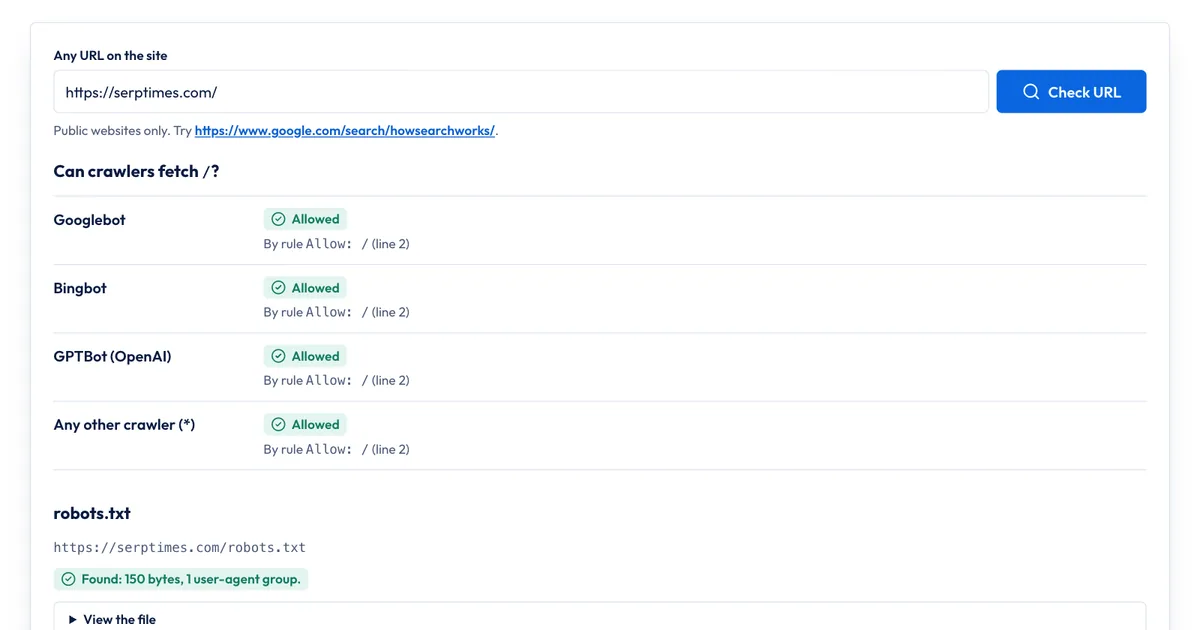
Our free Robots.txt & Sitemap Checker does methods 1 and 2 in one step:
- Enter any URL on the site, for example a blog post.
- Run the check. It fetches the site's robots.txt and opens the first sitemap listed there. If robots.txt lists none, it tries
/sitemap.xml. - Read the sitemap section: the address it used and where it found it, whether the file is a sitemap index or a list of URLs, how many entries it has, how many have a
lastmoddate, and the first 10 entries. Gzipped sitemaps are unzipped for you. - The same report shows whether Googlebot, Bingbot, GPTBot and other crawlers may fetch the URL you entered, and which robots.txt rule decides it.
What it doesn't do: it opens only the first sitemap in robots.txt and tells you how many more are listed, and it doesn't open the child sitemaps inside an index. It reads the first 2 MB of a sitemap, so counts for very large files are partial. It only checks public websites. For a full inventory of a big site, open each child sitemap or use a desktop crawler.
How to read a sitemap once you find it
There are two kinds of XML sitemap file. A sitemap index lists other sitemaps:
<sitemapindex xmlns="http://www.sitemaps.org/schemas/sitemap/0.9">
  <sitemap>
    <loc>https://example.com/post-sitemap.xml</loc>
    <lastmod>2026-11-18</lastmod>
  </sitemap>
</sitemapindex>
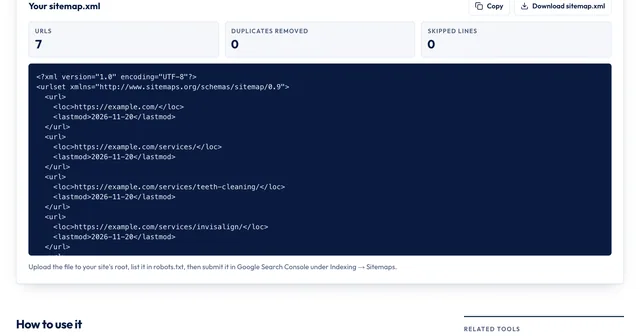
A URL sitemap lists pages, each in a <url> block with a <loc> and often a <lastmod> date. If you open an index, click through to the child sitemaps to see the actual pages.
Some plugins add a stylesheet so the file looks like a table in your browser. Use your browser's View Page Source to see the raw XML.
What a competitor's sitemap can tell you, with care:
- How the site is organized. Separate sitemaps for products, locations or guides show which sections exist and roughly how big each one is.
- What's new. URLs with recent
lastmoddates hint at what the site has been publishing or updating, if the site keeps those dates accurate. - What it doesn't tell you: which pages Google has indexed, or how much traffic they get. A sitemap is what the owner submits, not what Google keeps.
If the site doesn't have a sitemap
Some sites don't have one, and that can be fine. Google says a site with about 500 pages or fewer, where every important page is linked from the home page, may not need one. Large sites, new sites with few links pointing to them and sites with lots of video, images or news benefit most.
If it's your site and you want one, our guide on how to create a sitemap walks through it. Most platforms already generate one, so check that first. After you add it, list it in robots.txt and submit it in Search Console. Google retired its old sitemap "ping" URL in 2023, so those two are the ways to tell Google about it.
If you're checking robots.txt anyway, make sure it isn't blocking more than you meant; our guide to robots.txt disallow all shows what a site-wide block looks like.
Sources
All accessed Nov 20, 2026:
- Google Search Central: How Google interprets the robots.txt specification
- Google Search Central: Build and submit a sitemap
- Google Search Central: What is a sitemap
- Google Search Central Blog: Sitemaps ping endpoint is going away (June 2023)
- Search Console Help: Manage your sitemaps using the Sitemaps report
- sitemaps.org: Sitemaps XML format
- Make WordPress Core: New XML Sitemaps Functionality in WordPress 5.5
- Shopify Help Center: Finding and submitting your sitemap
- Squarespace Help Center: Verifying your site with Google Search Console
- Wix Help Center: Understanding your site's sitemap file
Frequently asked questions
Can a website have more than one sitemap?
Yes. Large sites split their URLs across several files, because one sitemap can hold at most 50,000 URLs or 50 MB uncompressed, and list them in a sitemap index. A robots.txt file can also list any number of Sitemap lines, and sites often keep separate sitemaps for pages, posts, products, images or news.
Is an XML sitemap the same as a sitemap page?
No. An XML sitemap is a file for search engines. A sitemap page, often linked in the footer, is an ordinary HTML page of links for visitors. A site can have either, both or neither, and finding one doesn't tell you whether the other exists.
Does a sitemap show which pages Google has indexed?
No. A sitemap lists the pages the site owner wants crawled. Google may skip some of them and index pages that aren't listed. Only the site owner can see what Google actually indexed, in Search Console's Page indexing report.
Why did the sitemap download instead of opening?
It's probably compressed. Sitemaps can be gzipped, with a name ending in .xml.gz, and browsers download those files rather than display them. Unzip it to read it, or run the URL through a sitemap checker that handles gzip.
Share
X (opens in a new tab)LinkedIn (opens in a new tab)WhatsApp (opens in a new tab)Akif Qureshi has worked in SEO for more than two years, auditing sites, planning content and tracking how Google updates change real traffic. He started SERP Times to report search changes clearly and to say exactly what site owners should do about them.
Certifications
- Google Analytics (Google)
- Google Ads Search (Google)
- HubSpot
- Digital Vidya
- DSIM
- Internship Studio