SEOGuide
Local Business Schema: Google's Rules and a JSON-LD Example
Local business schema tells Google your business's name, address, hours and type in code it reads reliably. Here's what Google requires, a complete example you can adapt, and what the markup can and can't do for you.

By Akif Qureshi
Published 6 min read
On this page
Local business schema is a block of JSON-LD code on your location page that tells Google your business's name, address, phone number, opening hours and type, using the LocalBusiness vocabulary from schema.org.
Google needs only two properties, a name and an address, but the markup is far more useful with the recommended ones. This guide covers what Google's local business structured data documentation requires, a complete example for a dental practice in Austin, Texas, how to mark up tricky hours, and how to test it. It also covers what the markup won't do, because most guides overpromise there.
Key takeaways
What local business schema does (and doesn't)
Google says the markup can feed a knowledge panel with details about a business and, for category searches, a carousel of businesses. It describes your location in a format search engines read reliably, so they don't have to guess your hours from a footer or your phone number from an image.
What it won't do is put you in the map pack on its own. Google's local ranking help page says local results are based mainly on relevance, distance and prominence, and the details shown in Maps come from your Google Business Profile. Think of local business schema as making your website agree with your profile, in a form machines can check.
And even valid markup is only eligible. Google's documentation says plainly: "Google does not guarantee that features that consume structured data will show up in search results."
Required and recommended properties
From Google's local business documentation (US version, accessed November 20, 2026):
| Property | Status | What Google says |
|---|---|---|
name | Required | The business name |
address | Required | A PostalAddress; include as many fields as apply |
telephone | Recommended | Include the country code and area code |
url | Recommended | The fully qualified URL of this specific location; it must work |
geo | Recommended | Latitude and longitude with at least 5 decimal places |
openingHoursSpecification | Recommended | One object or an array; times as hh:mm:ss (hh:mm also appears in Google's examples) |
priceRange | Recommended | Under 100 characters, or Google won't show it |
department | Recommended | A nested business for a department, such as a store's pharmacy |
menu, servesCuisine | Recommended | Restaurants only |
review, aggregateRating | Recommended | Only for sites that review other local businesses |
Google also says to "use the most specific LocalBusiness sub-type possible." A dental practice is Dentist, a plumber is Plumber, a law office is LegalService. If two types fit, use an array such as ["Dentist", "MedicalClinic"]. Google notes that additionalType isn't supported.
A complete example: a dentist in Austin
Here's markup for a made-up practice, Example Family Dental, on South Lamar in Austin. The business, address and coordinates are illustrations. The phone number uses the 555-01xx range reserved for fiction. Swap in your own details:
<script type="application/ld+json">
{
  "@context": "https://schema.org",
  "@type": "Dentist",
  "name": "Example Family Dental",
  "url": "https://example.com/locations/south-lamar/",
  "image": ["https://example.com/images/south-lamar-office.jpg"],
  "telephone": "+1-512-555-0142",
  "priceRange": "$$",
  "address": {
    "@type": "PostalAddress",
    "streetAddress": "1234 S Lamar Blvd, Suite 200",
    "addressLocality": "Austin",
    "addressRegion": "TX",
    "postalCode": "78704",
    "addressCountry": "US"
  },
  "geo": {
    "@type": "GeoCoordinates",
    "latitude": 30.25012,
    "longitude": -97.76653
  },
  "openingHoursSpecification": [
    {
      "@type": "OpeningHoursSpecification",
      "dayOfWeek": ["Monday", "Tuesday", "Wednesday", "Thursday"],
      "opens": "08:00",
      "closes": "17:00"
    },
    {
      "@type": "OpeningHoursSpecification",
      "dayOfWeek": "Friday",
      "opens": "08:00",
      "closes": "13:00"
    }
  ],
  "sameAs": [
    "https://www.facebook.com/example",
    "https://www.yelp.com/biz/example"
  ]
}
</script>
A few choices worth copying:
urlis the location page, not the homepage, because a practice with two offices needs two pages with two blocks of markup.- The phone number has the
+1country code, as Google asks. - Saturday and Sunday are left out, because the office isn't open. If you want to say so explicitly, use the closed-all-day pattern in the next section.
sameAslists profiles about this location, such as its Facebook page and Yelp listing.
Marking up tricky hours
Google's documentation shows how to handle hours that don't fit a simple 9-to-5:
| Situation | How to mark it up |
|---|---|
| Open 24 hours | "opens": "00:00" and "closes": "23:59" |
| Closed all day | "opens": "00:00" and "closes": "00:00" |
| Open past midnight | One object, such as Saturday "opens": "18:00", "closes": "03:00" |
| Holiday or seasonal closure | Add validFrom and validThrough dates (YYYY-MM-DD) |
For example, if the Austin practice closes for the holidays from December 24 to January 1, add a second set of hours that applies only to those dates:
{
  "@type": "OpeningHoursSpecification",
  "dayOfWeek": ["Monday", "Tuesday", "Wednesday", "Thursday", "Friday"],
  "opens": "00:00",
  "closes": "00:00",
  "validFrom": "2026-12-24",
  "validThrough": "2027-01-01"
}
Set the same closure as special hours on your Business Profile, so the two never disagree.
The review rule that trips people up
It's tempting to add your star rating to your local business schema. Google's review snippet guidelines say that when "the entity that's being reviewed controls the reviews about itself," its pages are "ineligible for star review feature." That applies whether the markup is in your own code or comes from an embedded widget, and Google names Google Business reviews and Facebook reviews widgets as examples. In plain terms: a dentist can't mark up its own patient reviews and expect stars. The review and aggregateRating properties are meant for sites that review other businesses, such as a city guide.
The same guidelines say "Don't aggregate reviews or ratings from other websites," and that Google may take manual action against a site that breaks them.
Generate the code with our schema generator
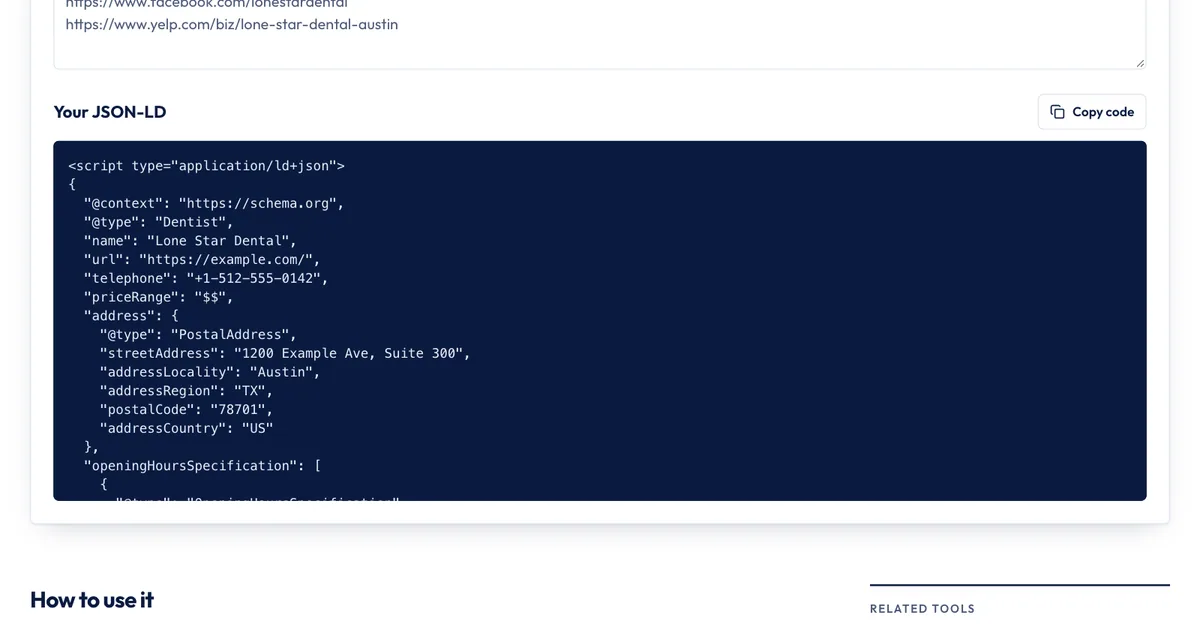
If you'd rather fill in a form than edit JSON, the free SERP Times schema markup generator builds the same block in your browser:
- Under Schema type, choose Local business.
- Pick a Business type. The list covers 12 common types, including Dentist, Restaurant, LegalService, AutoRepair and Store.
- Fill in the name, website, photo URL, phone, street address, city, two-letter state and ZIP code. US phone numbers are formatted with
+1for you. - Add latitude and longitude if you have them, and tick the days you're open in Opening hours. Days with the same hours are grouped into one entry.
- Read the warnings under the form. They flag a missing address part, a state that isn't a two-letter code, a ZIP code that isn't five digits, and a closing time earlier than the opening time.
- Click Copy code and paste the script tag into your location page.
What it doesn't do: it doesn't add department, holiday hours with validFrom and validThrough, more than one type, or aggregateRating for a local business (on purpose, given the rule above). Hours past midnight need splitting by hand, and it can't check that your coordinates have five decimal places, so copy them from a map at full precision. For one or a few locations, the generator and a careful copy-paste are enough. For dozens of locations, build the markup into your CMS template so every page pulls from the same database as your store locator.
Test it before and after you publish
- Before: paste the code into Google's Rich Results Test. Fix anything marked as an error; warnings about missing recommended properties are optional but worth fixing.
- Check the vocabulary: the Schema Markup Validator checks the code against schema.org itself, including types Google doesn't use for rich results.
- After: open URL Inspection in Search Console, test the live URL, and request indexing. Google says crawling and indexing can take several days.
While you're on the page, make sure the visible text matches the markup: the same hours, address and phone number. Google's guidelines say structured data must describe content people can see. Our on-page SEO checklist covers the rest of the page, and if you want to see how your title and description might look in results, try the SERP preview tool.
Sources
All accessed Nov 20, 2026:
- Google Search Central: Local business (LocalBusiness) structured data
- Google Search Central: Review snippet (Review, AggregateRating) structured data
- Google Search Central: Introduction to structured data markup in Google Search
- Google Business Profile Help: Tips to improve your local ranking on Google
- Schema.org: LocalBusiness and Dentist
- Google: Rich Results Test; Schema.org: Schema Markup Validator
Frequently asked questions
Does local business schema improve my rankings?
Google doesn't say it does. Its local ranking help page says local results are based mainly on relevance, distance and prominence, and doesn't mention structured data. Treat the markup as a way to describe your business accurately, not as a ranking boost.
Should the JSON-LD go in the head or the body?
Either works. Google's introduction to structured data says JSON-LD sits in a script tag in the head or body of the page, so use whichever your site builder or CMS makes easier.
What's the difference between LocalBusiness and Organization schema?
On schema.org, LocalBusiness is a more specific kind of Organization: one with a physical location that customers visit or that serves a local area. Use Organization on your homepage to describe the company as a whole, and LocalBusiness (or a subtype such as Dentist) on each location page.
Do I need schema if I already have a Google Business Profile?
You don't need it, but it helps keep things consistent. Your Business Profile drives what shows in Maps and the local pack. The markup on your own site describes the same location, so keep the name, address, phone number and hours identical in both.
Share
X (opens in a new tab)LinkedIn (opens in a new tab)WhatsApp (opens in a new tab)Akif Qureshi has worked in SEO for more than two years, auditing sites, planning content and tracking how Google updates change real traffic. He started SERP Times to report search changes clearly and to say exactly what site owners should do about them.
Certifications
- Google Analytics (Google)
- Google Ads Search (Google)
- HubSpot
- Digital Vidya
- DSIM
- Internship Studio