SEOGuide
On-Page SEO Checklist: 22 Checks for Every Page
Most on-page checklists start with keywords. This one starts where Google does: can the page be indexed at all? Then 21 more checks, each tied to Google's documentation, and a short list of things you can stop worrying about.

By Akif Qureshi
Published 7 min read
On this page
This on-page SEO checklist covers 22 checks for a single page, in the order that matters: first whether Google can index the page at all, then its title and description, content, links, images, page experience and structured data.
Every item is tied to Google's own documentation, mostly its SEO Starter Guide. Many popular checklists skip the first group and jump to keyword placement, yet a stray noindex tag or a wrong canonical cancels everything else on the list.
Key takeaways
1. Can Google index the page?
These five checks come first because each one can silently remove a page from search.
- The page returns a 200 status. Not a 404, not a server error and not a redirect. If an old URL redirects here, make sure it's a permanent redirect; our guide to the 302 redirect explains why.
- There's no
noindex. Look for it in a robots meta tag and in anX-Robots-TagHTTP header. Staging sites often launch with one still in place. - robots.txt doesn't block the URL. A blocked page can't be crawled, so Google never sees its content, and it can't see a
noindexon it either. - The canonical tag points to the right URL. Usually that's the page itself. Google's guide says each piece of content should be reachable through one URL, with redirects or a
rel="canonical"link for duplicates. A canonical pointing at another page asks Google to index that page instead. - The main content is in the HTML Google sees. If your site builds text with JavaScript, open Search Console's URL Inspection tool, run a live test and check the rendered HTML. Google also needs your CSS and JavaScript files, so don't block them.
2. Title, description and head tags
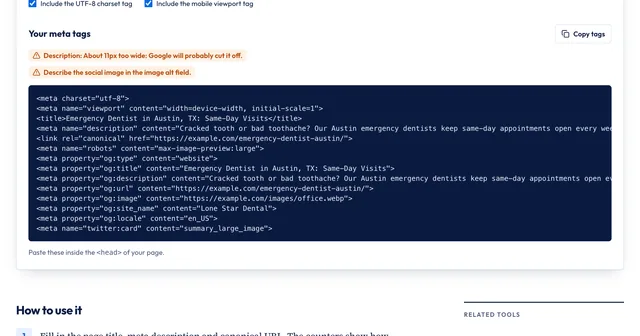
- A unique, descriptive title. Google says a good title is "unique to the page, clear and concise, and accurately describes the contents of the page." Put the most important words first, and add your brand at the start or end if you like. There's no length limit; Google truncates long titles "to fit the device width." Our guide to meta tags for SEO goes deeper on each head tag.
- A meta description that summarizes the page. Google has said it doesn't use this tag in ranking, and it often writes its own snippet from the page text. A good one is "short, unique to one particular page, and includes the most relevant points." Product pages can include the price; articles can include the author and date.
- A mobile viewport and a language.
<meta name="viewport" content="width=device-width, initial-scale=1">and alangattribute on the<html>tag, such asen-US. - Open Graph tags for sharing.
og:title,og:descriptionandog:imagecontrol how the link looks on Facebook, LinkedIn, Slack and iMessage. They don't affect rankings, but a bare shared link gets fewer clicks.
3. Content
- One clear H1 and headings that outline the page. Google says the number and order of headings don't matter for ranking, and several H1s are fine. Headings still help readers skim, so use them to break up long content in a logical order.
- It answers the search better than what's already ranking. Google's guide asks for content that's "easy-to-read and well organized," original and helpful. Before you write, search the query and note what the top results cover and what they leave out.
- It uses the words searchers use. A homeowner in Phoenix searches "AC not blowing cold air," not "refrigerant charge diagnostics." Google's guide suggests anticipating these differences in vocabulary and covering both where it fits.
- It's current. Check older pages and update facts, prices and screenshots. If dates matter for the topic, show a visible published or updated date.
- The URL is short and descriptive. Google suggests words that are useful to people, such as
/water-heater-repair/rather than/page?id=4821. A keyword in the URL has very little effect on ranking, so don't change an existing URL just to add one.
4. Links
- Internal links point to the page with descriptive anchor text. Google finds pages mainly through links. "Water heater repair prices" tells readers and Google what the target page is about; "click here" doesn't. Link from related pages, not only from the menu.
- Outbound links are qualified where needed. Mark paid and affiliate links
rel="sponsored", links in comments or forumsrel="ugc", and userel="nofollow"when neither fits and you don't want to vouch for the link. - No broken links. Links to 404 pages waste the reader's time and the crawler's. Fix or remove them.
5. Images
- Meaningful images have descriptive alt text. Google calls alt text the most important image attribute. Describe what the image shows in context ("Rheem 50-gallon water heater in a garage") and don't stuff it with keywords. Decorative images get an empty
alt="". - Images are real
<img>elements near related text. Google doesn't index CSS background images, and it uses the text around an image to understand it. Short, descriptive filenames give it a light extra clue.
6. Page experience and structured data
- Core Web Vitals pass. The targets are Largest Contentful Paint of 2.5 seconds or less, Interaction to Next Paint of 200 milliseconds or less and Cumulative Layout Shift of 0.1 or less, measured at the 75th percentile of real visits. Google says its ranking systems use Core Web Vitals but that good scores don't guarantee top rankings.
- The page is served over HTTPS, works on phones and keeps ads out of the way. No intrusive pop-ups that cover the content, and a main content area visitors can tell apart from everything else.
- Structured data matches the visible page. Use it where it fits, such as Article, Product or LocalBusiness, and never mark up something readers can't see. Google says markup must be "a true representation of the page content" and doesn't guarantee rich results.
What you can skip
Google's Starter Guide lists several things that don't help, and some checklists still include them:
- The meta keywords tag. Google doesn't use it.
- Keyword density targets. Repeating a phrase over and over annoys readers and breaks Google's spam policies. Use the keyword naturally in the title, the opening and where it fits.
- A minimum word count. Google says there's "no magical word count target." Write as much as the question needs.
- Strict character counts. The 60-character title and 155-character description rules are rough guides to avoid truncation, not ranking rules.
- Heading order. Out-of-order headings don't hurt ranking. Fix them for accessibility, not for Google.
How to run the checklist with a free tool
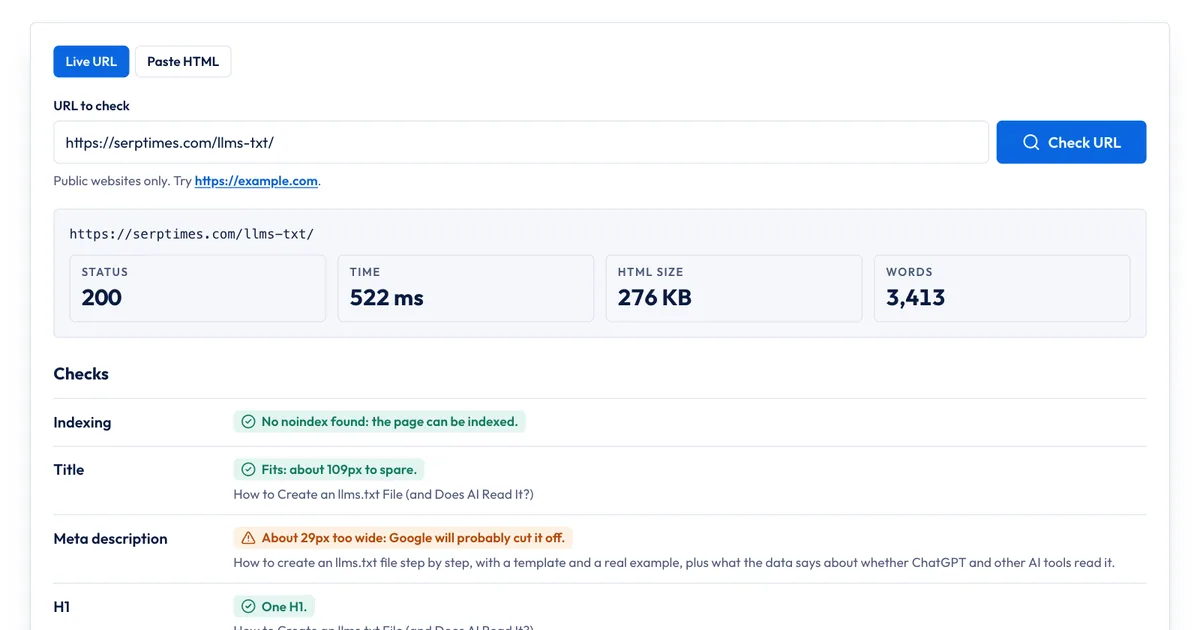
Our free On-Page SEO Checker reads a page's HTML the way a crawler does and puts most of the head and content checks on one screen:
- Enter the URL of a live page. For a page that isn't public yet, choose Paste HTML and paste the page source; that check runs in your browser and nothing is uploaded.
- Run the check. The tool follows redirects and shows the final status, response time, HTML size and word count.
- Work down the results. Green has passed, amber needs a look and red is a likely problem: indexing (noindex in a tag or header), title, meta description, H1, canonical, Open Graph, X card, hreflang, language, viewport, image alt text and the structured data types it found. Below that is the page's heading outline.
- Fix the issues in your CMS or templates and run the check again.
What it covers from the checklist: items 1, 2, 4, 6 to 10 and 18, plus the structured data types on the page. What it doesn't do: it doesn't run JavaScript, so compare with URL Inspection if your content is rendered in the browser. It doesn't read robots.txt; use the Robots.txt & Sitemap Checker for item 3. It doesn't measure Core Web Vitals; use PageSpeed Insights or Search Console's Core Web Vitals report for item 20, since those show data from real Chrome users. And no tool can judge items 11 to 13 for you: read the page next to the pages that already rank and be honest about which one answers the question better.
For a few pages, a free checker like this is enough. For a site with thousands of URLs, use a crawler that checks every page at once, and Search Console's Page indexing report to see what Google actually indexed.
Sources
All accessed Nov 20, 2026:
- Google Search Central: SEO Starter Guide
- Google Search Central: Influencing your title links
- Google Search Central: Control your snippets in search results
- Google Search Central: Block search indexing with noindex
- Google Search Central: Qualify your outbound links to Google
- Google Search Central: Image SEO best practices
- Google Search Central: Understanding page experience in Google Search results
- Google Search Central: General structured data guidelines
- Google Search Central Blog: Google does not use the keywords meta tag in web ranking (2009)
- Google Search Central: Optimizing for generative AI features in Search
- web.dev: Web Vitals
Frequently asked questions
What is the difference between on-page and technical SEO?
On-page SEO is about one page: its content, title, headings, links and images. Technical SEO is about the whole site: crawling, robots.txt, sitemaps, redirects, site speed and how the server responds. They overlap, which is why this checklist starts with indexing checks that are technical but page specific.
How often should I run an on-page SEO check?
Run it on every new page before or right after it goes live, and again after a redesign, a CMS change or a template update, since those are when noindex tags and broken canonicals slip in. For important pages that already rank, a check every few months is a reasonable habit.
Does on-page SEO still matter with AI Overviews?
Yes. Google says a page has to be crawlable, indexed and eligible to show in Search with a snippet to appear in its generative AI features, and that you don't need special files or markup for them. The same basics apply: an indexable page with clear, helpful content.
Do I need to include the keyword in the meta description?
It isn't required. Google has said it doesn't use the description meta tag in ranking. Write the description to summarize the page accurately for a searcher, and use the keyword if it fits naturally.
Share
X (opens in a new tab)LinkedIn (opens in a new tab)WhatsApp (opens in a new tab)Akif Qureshi has worked in SEO for more than two years, auditing sites, planning content and tracking how Google updates change real traffic. He started SERP Times to report search changes clearly and to say exactly what site owners should do about them.
Certifications
- Google Analytics (Google)
- Google Ads Search (Google)
- HubSpot
- Digital Vidya
- DSIM
- Internship Studio