SEOGuide
302 Redirect vs 301, 307 and 308: Which One to Use
A 302 redirect tells browsers and Google that a move is temporary, so the original URL keeps its place in search. Here's when that's what you want, when it quietly costs you, and how to check what your server really sends.

By Akif Qureshi
Published 8 min read
On this page
A 302 redirect is an HTTP response that sends visitors and crawlers from one URL to another while telling them the move is temporary, so Google keeps treating the original URL as the one to show in search.
That makes it the right choice for a short sale page, a page under maintenance or an A/B test. It's the wrong choice for anything permanent, such as a new URL structure or a move to HTTPS, and it's often sent by accident because several popular servers and CMSs use it as their default.
Key takeaways
What a 302 redirect looks like
When a browser or Googlebot requests a URL that has a 302, the server answers with the status code and a Location header, and the client then requests the new address:
HTTP/1.1 302 Found
Location: https://example.com/black-friday/
The official name of 302 is "Found." Older documentation calls it "Moved Temporarily," which describes what it's for. Visitors don't see any difference between a 301 and a 302: the browser simply loads the new page. The difference matters to search engines, caches and anything that sends forms.
301 vs 302 vs 307 vs 308
There are five redirect codes you'll run into. For SEO, only one question matters: is the move permanent or temporary? The method column matters for forms, APIs and checkout flows.
| Code | Name | Permanent? | Request method | How Google treats it |
|---|---|---|---|---|
| 301 | Moved Permanently | Yes | Some clients change POST to GET | Strong signal that the new URL is canonical |
| 308 | Permanent Redirect | Yes | Method and body are kept | Same as 301 |
| 302 | Found | No | Some clients change POST to GET | Weak signal that the new URL is canonical |
| 307 | Temporary Redirect | No | Method and body are kept | Same as 302 |
| 303 | See Other | No | Always switches to GET | Same as 302 |
Why do 307 and 308 exist? The HTTP spec never meant 301 and 302 to change the request method, but browsers did it anyway, turning a submitted form (a POST) into a plain page load (a GET). 307 and 308 were added so a redirect can promise to keep the method and body. That's why Next.js uses 307 and 308 for its redirects instead of 302 and 301.
Google's documentation lists 302 and 307 as equivalent, but adds that they're "semantically different," so use the code that describes what you mean. Other clients, such as browsers and API tools, rely on the difference.
How Google treats a 302 redirect
Googlebot follows a 302 just like a 301; it doesn't stop at the first hop. The difference is in indexing. A 301 or 308 is a strong signal that the destination should be the canonical URL. A 302, 303 or 307 is a weak signal, so the destination "might still be indexed if other canonicalization signals are present," in Google's words.
In practice, that means the original URL usually stays in search results while the 302 is in place. If your spring collection page at /new-arrivals/ sends visitors to /spring-sale/ for two weeks, Google keeps showing /new-arrivals/, and the sale page doesn't replace it. That's exactly what you want for a temporary change.
Googlebot follows up to 10 redirect hops. Each hop still adds a delay for visitors and another place where things can break, so keep it to one.
What happens when a 302 stays up for months
Google's John Mueller explained this in April 2021. Google puts the redirecting URL and its target "into the same bucket" and then uses canonicalization to pick which one to show. A 302 hints that the source URL might be preferred. But if the 302 stays in place and every other signal points to the destination, for example all your internal links and external links point there, Google will probably pick the destination anyway. He also said there is "no fixed cut-off time for that."
So a forgotten 302 usually isn't a disaster, but you lose control over which URL Google shows and when. If a move is permanent, use a permanent redirect and you don't have to hope Google works it out.
When to use a 302 redirect
Use a 302 (or a 307) when you plan to undo the redirect and want the original URL to keep its place in search:
- A short promotion. A Shopify store sends
/deals/to its Black Friday landing page from Thanksgiving through Cyber Monday, then removes the redirect. - Maintenance on one page. A dentist in Austin is rebuilding the online booking page, so
/book/points to the contact page for a few days. - A/B tests that redirect visitors to a variant URL. Google's testing guidance says to "use a 302 (temporary) redirect, not a 301," add a canonical tag on the variants that points to the original, and end the test as soon as you can.
- Sign-in and session flows. A logged-out visitor who opens
/account/is sent to/login/. These pages are usually kept out of search anyway.
When not to use a 302
Use a 301 or 308 for every move you don't plan to reverse:
- Changing a page's URL or slug
- Moving from HTTP to HTTPS, or between
wwwand the bare domain - Merging two articles into one
- Replacing a discontinued product page with its successor
- Moving to a new domain
For site moves, Google recommends server-side permanent redirects, pointing each old URL straight at its final destination, and keeping the redirects "as long as possible, generally at least 1 year."
Where accidental 302s come from
Many tools send a 302 unless you ask for something else. Check these first when an audit flags temporary redirects you didn't mean to create:
| Where | Default | How to make it permanent |
|---|---|---|
Apache Redirect (mod_alias) | 302 when no status is given | Redirect 301 /old/ https://example.com/new/ |
Nginx return with only a URL, or rewrite ... redirect | 302 | return 301 https://example.com/new/; or the permanent flag |
PHP header("Location: ...") | 302 | Pass the status: header("Location: /new/", true, 301); |
WordPress wp_redirect() | 302 | wp_redirect( $url, 301 ); or set 301 in your redirect plugin |
Next.js redirects() | 307 with permanent: false | permanent: true sends a 308 |
WordPress redirect plugins such as Redirection let you pick the code in a menu. Either way, look at the actual response rather than trusting the setting.
One thing that isn't a server redirect: on an HTTPS site, Chrome DevTools may show "307 Internal Redirect" when you type an http:// address. That's the browser applying the site's HSTS policy before it sends anything. Your server never sent a 307, and crawlers that request the http:// URL still see your real 301.
How to check what a URL returns
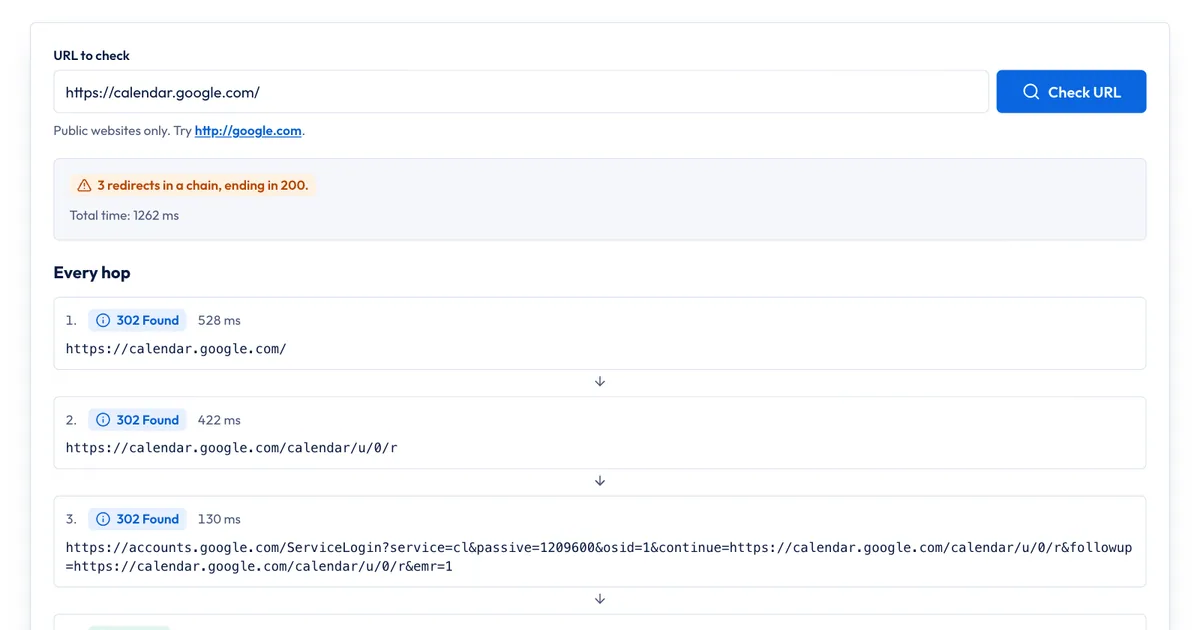
Our free HTTP Status & Redirect Checker requests a URL the way a crawler does and follows the chain hop by hop:
- Paste the old URL, for example
http://example.com/old-page. - Run the check. The tool follows up to 5 redirects.
- Read each hop: its status code, the URL and how long the server took. The summary flags chains, temporary redirects (302, 303 and 307) and chains that end in an error or on an
http://page. - Fix what it flags, then run it again.
What it doesn't do: it checks server-side HTTP redirects only, so meta refresh and JavaScript redirects aren't followed. It sends no cookies, so a redirect that depends on a login or a location cookie may look different from what you see in your browser. It checks one URL at a time. For hundreds of URLs after a migration, use a desktop crawler, and use the Page indexing report in Search Console to see which redirected URLs Google has noticed.
If you prefer the command line, curl shows the same thing:
curl -sIL http://example.com/old-page | grep -iE "^(HTTP|location)"How to fix a 302 that should be a 301
- Confirm the move is permanent. If you're going to undo it, leave the 302 alone.
- Change the status code where the redirect is set: the redirect plugin, the server config or your framework's redirect file. Keep the same destination.
- Point it at the final URL. If the old URL goes through two or three hops, skip the middle ones.
- Update your internal links to the new URL so visitors and crawlers stop hitting the redirect at all.
- Test it again with the checker or curl, from a private browser window. Browsers can remember a permanent redirect for a long time, so test a new permanent redirect before you rely on it, and check the destination is right before you switch a 302 to a 301.
If you also maintain a sitemap, list only the final URLs. Our guide on how to create a sitemap explains which URLs belong in it, and the on-page SEO checklist covers the canonical tag that should match.
Sources
All accessed Nov 20, 2026:
- Google Search Central: Redirects and Google Search
- Google Search Central: How HTTP status codes, and network and DNS errors affect Google Search
- Google Search Central: Site moves with URL changes
- Google Search Central: Minimize A/B testing impact in Google Search
- Search Engine Roundtable: Why Google Often Treats 302 Redirects As 301 Redirects (Apr 9, 2021, quoting John Mueller)
- MDN Web Docs: Redirections in HTTP and 302 Found
- Apache HTTP Server: mod_alias Redirect directive
- nginx: ngx_http_rewrite_module
- PHP Manual: header()
- WordPress Developer Resources: wp_redirect()
- Next.js Docs: redirects
- Screaming Frog: An SEO's Guide to Crawling HSTS
Frequently asked questions
Is a 302 redirect bad for SEO?
No, not when the move really is temporary. A 302 keeps the original URL in Google's results, which is what you want for a sale page or a short test. It becomes a problem when it's used for a permanent move, because Google may keep showing the old URL and the new page takes longer to replace it.
Does a 302 redirect pass link value?
Google groups the two URLs and then picks one as the canonical, and signals such as links consolidate on that URL. With a 302 Google usually keeps the original URL as the canonical, which is the point of a temporary redirect. If you want the new URL to collect those signals, use a 301 or 308.
Can I change a 302 to a 301 later?
Yes. Change the status code in your server, CMS or redirect plugin and keep the same destination. Google processes the change the next time it crawls the old URL, and you don't need to submit anything.
What's the difference between a 302 redirect and a meta refresh?
A 302 is sent by the server before any page loads. A meta refresh is a tag inside the HTML that the browser acts on after loading the page. Google treats an instant meta refresh as permanent and a delayed one as temporary, but it recommends server-side redirects because they're the most reliable.
Share
X (opens in a new tab)LinkedIn (opens in a new tab)WhatsApp (opens in a new tab)Akif Qureshi has worked in SEO for more than two years, auditing sites, planning content and tracking how Google updates change real traffic. He started SERP Times to report search changes clearly and to say exactly what site owners should do about them.
Certifications
- Google Analytics (Google)
- Google Ads Search (Google)
- HubSpot
- Digital Vidya
- DSIM
- Internship Studio