SEOGuide
Robots.txt Disallow All: How to Block Every Crawler
Two lines in robots.txt ask every well-behaved crawler to stay off your whole site. Here's the exact code, what it doesn't do (it won't deindex anything or keep a staging site private), and the right tool for each job people use it for.

By Akif Qureshi
Published 7 min read
On this page
A robots.txt disallow all rule is two lines, User-agent: * followed by Disallow: /, and it asks every crawler that follows the robots.txt standard to stay away from every URL on your site.
It's the right tool for a narrow job: stopping well-behaved bots from crawling a site that isn't meant for search. It's the wrong tool for most of the jobs people reach for it to do, such as removing pages from Google, hiding a staging site or taking a site offline for a day. This guide shows the code, what it really does, and what to use instead.
Key takeaways
The disallow all code
Create a plain text file named robots.txt with these two lines and upload it to the root of the host, so it loads at https://example.com/robots.txt:
User-agent: *
Disallow: /
User-agent: *starts a group of rules for every crawler that doesn't have a group of its own.Disallow: /matches every path on the host, because every URL path starts with a slash.
robots.txt works per host. www.example.com, example.com and staging.example.com each need their own file, and the rules apply only to the protocol, host and port where the file is served.
Small changes flip the meaning completely:
| What robots.txt contains | What Google does |
|---|---|
User-agent: * and Disallow: / | Crawls nothing on the host |
User-agent: * and an empty Disallow: | Crawls everything |
| No robots.txt (a 404) | Crawls everything, as if there were no rules |
| robots.txt returns a server error (5xx) | Stops crawling for 12 hours, then uses its last good copy for up to 30 days |
Google caches robots.txt for up to 24 hours, so a change usually takes up to a day to apply.
What disallow all doesn't do
It doesn't remove pages from Google
Google's documentation is direct about this: robots.txt is "not a mechanism for keeping a web page out of Google." A blocked URL can still appear in search results, without a description, when other pages link to it.
It also hides your noindex tags. For noindex to work, Google says the page "must not be blocked by a robots.txt file," because Google has to crawl the page to read the tag. Combining disallow all with noindex is a common mistake: the block wins, and the noindex is never seen.
WordPress learned this the hard way. Its "Discourage search engines from indexing this site" setting used to add Disallow: / to robots.txt. In version 5.3 (2019) it switched to a robots meta tag, because blocked sites could still be listed in search results without content.
It doesn't keep anything private
robots.txt is a public file anyone can read, so listing secret paths in it advertises them. RFC 9309, the standard that formalized robots.txt in 2022, says the rules are "not a form of access authorization." Reputable crawlers follow them; others don't have to.
Even among reputable companies, not everything follows the * group:
- Some Google crawlers ignore it. For AdsBot-Google, Google's documentation says "the global user agent (
*) is ignored." Block it by name if you need to. - Fetches a user asks for may skip robots.txt. OpenAI says that for ChatGPT-User, "robots.txt rules may not apply," and Perplexity says Perplexity-User "generally ignores robots.txt rules."
Pick the right tool for the job
| Your goal | Use this | Why not disallow all |
|---|---|---|
| Keep a staging or dev site out of search | A password (HTTP authentication) or an IP allowlist, plus disallow all as a backup | Links to the site can still get its URLs listed |
| Keep a live page out of Google | A noindex meta tag or X-Robots-Tag header on a crawlable page | Google can't read noindex on a blocked page |
| Remove pages that are already indexed | noindex, a 404 or 410, or a password; the Search Console Removals tool hides them for about six months meanwhile | Google's removal guide says not to use robots.txt to block |
| Take the site down for a day or two | A 503 status on your pages | Google's guidance says "Don't disallow all crawling in the robots.txt file" |
| Stop AI model training | Block the training crawlers by name | Disallow all also blocks Google and Bing |
| Reduce server load from crawling | Targeted rules for low-value URLs, such as filters and internal search | Blocking the whole site removes it from search over time |
On the 503 point, Google also warns not to return a 503 for robots.txt itself, "because this blocks all crawling."
Variations you may need
Block everyone except Google and Bing
User-agent: *
Disallow: /

User-agent: Googlebot
User-agent: Bingbot
Allow: /
Each crawler follows only the most specific group that names it, and Google says specific groups and the * group "are not combined." So Googlebot and Bingbot follow the Allow: / group, and everyone else is blocked. Remember that Google runs other crawlers, such as Googlebot-Image and AdsBot-Google, that you may also want to list.
Block AI training crawlers only
To opt out of model training while staying in Google and Bing, name the training bots instead of blocking everyone:
User-agent: GPTBot
User-agent: ClaudeBot
User-agent: Google-Extended
User-agent: Applebot-Extended
User-agent: CCBot
User-agent: Meta-ExternalAgent
Disallow: /
Google says Google-Extended "does not impact a site's inclusion in Google Search." Blocking search bots such as OAI-SearchBot or PerplexityBot is a different choice: it can keep you out of those products' answers. Our llms.txt vs robots.txt guide lists which bot does what.
If your live site launched with disallow all
This happens after redesigns and CMS moves, when the staging file goes live with the site. To recover:
- Replace the file with your real rules and confirm the new version loads at
/robots.txt. - Open Search Console's robots.txt report (in Settings), check the fetched version and choose Request a recrawl.
- Inspect your key URLs with the URL Inspection tool and request indexing for the most important ones.
- Resubmit your sitemap in the Sitemaps report so Google rediscovers pages faster. Our guide to finding the sitemap of a website helps if you don't know its address.
- Watch the Page indexing report for the next few weeks. Rankings often come back as pages are recrawled, but it isn't instant.
Build and test the file with free tools
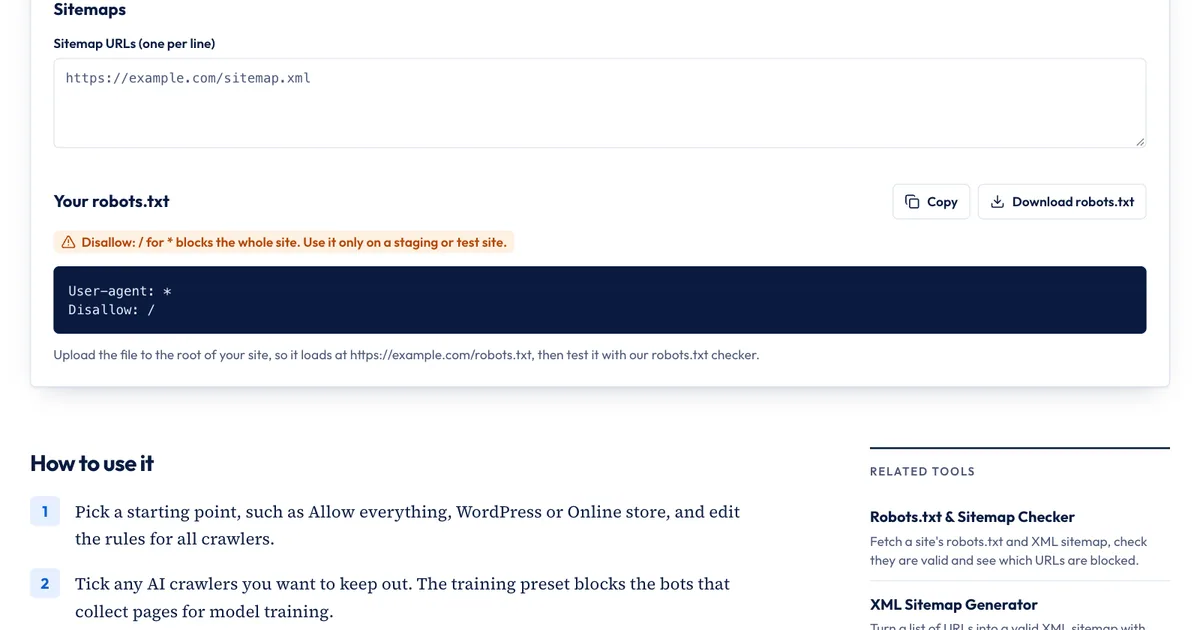
Our free Robots.txt Generator has a Block everything preset for staging sites:
- Choose Block everything under "Rules for all crawlers." The tool writes
User-agent: *andDisallow: /, and shows a warning that this blocks the whole site. - To block only AI training instead, start from Allow everything, then click Block AI training crawlers or tick individual bots.
- Add your sitemap URL if the site has one, then copy or download the file and upload it to the root of the host.
- Test it with the Robots.txt & Sitemap Checker, which shows whether Googlebot, Bingbot, GPTBot and other crawlers may fetch a URL, and which line decides it.
What the generator doesn't do: it writes one rule group for all crawlers plus one group for the AI bots you tick. For exceptions like "block everyone except Googlebot," copy the output and add the extra group by hand, as in the example above. It also can't add a password, a noindex tag or a 503; those are set on your server or in your CMS.
Sources
All accessed Nov 20, 2026:
- Google Search Central: Introduction to robots.txt
- Google Search Central: How Google interprets the robots.txt specification
- Google Search Central: Block search indexing with noindex
- Google Search Central: Pausing or disabling a website
- Google Crawling Infrastructure: Google's special-case crawlers and Google's common crawlers
- Search Console Help: robots.txt report and Removals tool
- IETF: RFC 9309, Robots Exclusion Protocol (September 2022)
- Make WordPress Core: Changes to prevent search engines indexing sites (Sep 2, 2019)
- OpenAI: Overview of OpenAI crawlers
- Perplexity: Perplexity crawlers
Frequently asked questions
Is robots.txt case-sensitive?
Partly. The file name must be lowercase (robots.txt). Field names such as User-agent and Disallow aren't case-sensitive, and neither are user-agent names, but paths are: Disallow: /Private/ doesn't block /private/.
What does Allow: / do?
It explicitly allows every URL for that group, which has the same effect as an empty Disallow line. It's useful inside a specific group, such as a Googlebot group in a file that otherwise blocks everyone, because it makes the exception easy to read.
Does Disallow: / block Bing and the AI crawlers too?
It asks every crawler that follows the robots.txt standard to stay out, including Bingbot and documented AI crawlers such as GPTBot, ClaudeBot and PerplexityBot. Some Google crawlers, such as AdsBot-Google, ignore the * group and must be named, and fetchers triggered by a user, such as ChatGPT-User and Perplexity-User, may not apply robots.txt rules.
Should a staging site have a robots.txt file?
Yes, as a backup. A disallow all file reduces crawling if the address leaks. The real protection is a password or an IP allowlist, and you need a launch step that replaces the file before the site goes live.
Share
X (opens in a new tab)LinkedIn (opens in a new tab)WhatsApp (opens in a new tab)Akif Qureshi has worked in SEO for more than two years, auditing sites, planning content and tracking how Google updates change real traffic. He started SERP Times to report search changes clearly and to say exactly what site owners should do about them.
Certifications
- Google Analytics (Google)
- Google Ads Search (Google)
- HubSpot
- Digital Vidya
- DSIM
- Internship Studio