
AI SearchGuide
How to Create an llms.txt File (and Does AI Read It?)
An llms.txt file gives AI tools a short map of your site, and it takes about 20 minutes to make. Here's how to write one, what the data says about whether AI crawlers read it, and what actually gets AI tools to visit your site more often.

By Akif Qureshi
Published 8 min read
On this page
An llms.txt file is a plain Markdown file at yourdomain.com/llms.txt that gives AI tools a short summary of your site and links to its most useful pages, and you can create one in about 20 minutes.
Before you do, know what it won't do: there's no evidence that llms.txt makes ChatGPT, Gemini or other AI tools read your site more often. No major AI company says its crawlers use other sites' llms.txt files, and in Ahrefs' study of 137,000 sites, 97% of the files were never requested in a month. This guide shows how to create one properly anyway, using SERP Times' own file as the example, and then covers what really controls how AI tools find and crawl your pages.
Key takeaways
What is an llms.txt file?
llms.txt is a proposal, not an official standard. Jeremy Howard of Answer.AI published it on llmstxt.org on September 3, 2024, and updated it to version 2 on August 10, 2026. The idea: a website is full of navigation, ads and scripts that waste an AI model's limited context, so give AI tools one clean Markdown file that says what the site is and where the useful pages are.
The format has a fixed order:
- An H1 with the site or project name. This is the only required part.
- A blockquote (a line starting with
>) with a one- or two-sentence summary. - Optional details in plain paragraphs or lists, with no headings.
- H2 sections of links, each line written as
- [Page name](URL): short note. - An "Optional" H2 section, by convention, for secondary links an AI tool can skip when it's short on space.
llms.txt doesn't replace your other files. robots.txt says which bots may crawl which pages, the XML sitemap lists every page for search engines, and llms.txt is a short, curated guide for AI tools. The proposal also suggests offering clean Markdown copies of key pages at the same URL with .md added, so AI tools don't have to strip out the page design.
Does llms.txt make AI tools read your site more often?
No, based on everything published so far.
What the AI companies say:
- Google says in its guide to optimizing for generative AI features that Google Search doesn't use AI text files, and that creating them "will neither harm nor help your site's visibility or rankings in Google Search."
- OpenAI, Anthropic, Perplexity, Microsoft and Meta document their crawlers in detail, and none of them says its crawlers read or honor other sites' llms.txt files. Several publish an llms.txt for their own developer docs, which isn't the same thing.
What server logs show:
| Study | Sites | What it found |
|---|---|---|
| Ahrefs, June 2026 | 137,210 domains, one month of logs | 97% of llms.txt files got zero requests. 77% of the bots that did read them weren't AI tools. GPTBot fetched them most among AI bots, Claude Code second, and no AI bot ever asked for a file that didn't exist. |
| SE Ranking, updated October 2026 | About 300,000 domains | About 10% had an llms.txt file, with no measurable link between having one and being cited by AI. |
So if your goal is more visits from ChatGPT or Google's AI, llms.txt isn't the lever. The sections below on crawlers, sitemaps and IndexNow are.
When an llms.txt file is still worth having
It costs little and does no harm, and it has real uses:
- Documentation and APIs. Coding assistants fetch llms.txt files when a developer asks about your product; Claude Code was the second-biggest AI fetcher in Ahrefs' data. Stripe, Cloudflare, Vercel and the developer docs of OpenAI, Anthropic and Google's Gemini API all publish one.
- Large sites. A curated list of your 20 best pages is a useful map for any AI agent a user sends to your site.
- Agent readiness checks. Chrome's Lighthouse has an experimental "Agentic Browsing" audit that looks for an llms.txt file, and it treats a missing file as not applicable rather than a failure.
How to create an llms.txt file, step by step
1. Pick the pages that matter
List 10 to 30 pages an AI tool should know about: your home page, main services or products, pricing, location or service-area pages, your best guides, about and contact. Leave out tag pages, logins, carts and thin pages.
2. Write the file in Markdown
Here's a template for a US business. Replace the example details with your own:
# Example Plumbing Co.

> Licensed plumbers serving Austin, Texas, since 2009: repairs, water heaters and 24/7 emergency service.

Example Plumbing Co. is a family-owned company with 12 licensed plumbers. We serve Austin, Round Rock and Cedar Park. Prices on our site are in US dollars and include a free estimate.

## Services

- [Emergency plumbing](https://example.com/emergency/): 24/7 call-outs, with typical arrival times
- [Water heater repair and installation](https://example.com/water-heaters/): tank and tankless, brands we service, price ranges
- [Drain cleaning](https://example.com/drains/): clogs, camera inspections and hydro jetting

## Company

- [About us](https://example.com/about/): licenses, insurance and our team
- [Service area](https://example.com/service-area/): every city and ZIP code we cover
- [Pricing](https://example.com/pricing/): call-out fees and common job prices

## Optional

- [Blog](https://example.com/blog/): seasonal maintenance tips
- [Careers](https://example.com/careers/)
3. Write useful link notes
The note after each link is what helps an AI tool choose the right page, so make it specific: what the page covers, for whom, and any key facts. "Water heater repair: tank and tankless, price ranges" beats "Learn more."
4. Save and upload it
Save the file as plain text in UTF-8, named exactly llms.txt, and upload it to your site's root folder, the same place as robots.txt. Then open https://yourdomain.com/llms.txt in a browser: it should load as plain text with a 200 status, not a 404 or a login page.
5. Keep it current
An out-of-date llms.txt that points to deleted pages is worse than none. Update it when you add or remove key pages, or generate it automatically. On WordPress, Yoast SEO (in its free plugin since June 2025) and Rank Math can generate and update the file for you, and documentation platforms such as Mintlify create it automatically.
6. Optional: Markdown pages and llms-full.txt
Documentation sites can go further: offer a Markdown copy of each page at the same URL with .md added, and an llms-full.txt file with the full text of the docs in one file. llms-full.txt isn't in the proposal; Mintlify popularized it in November 2024. For a typical business site, skip both.
A real example: SERP Times' llms.txt
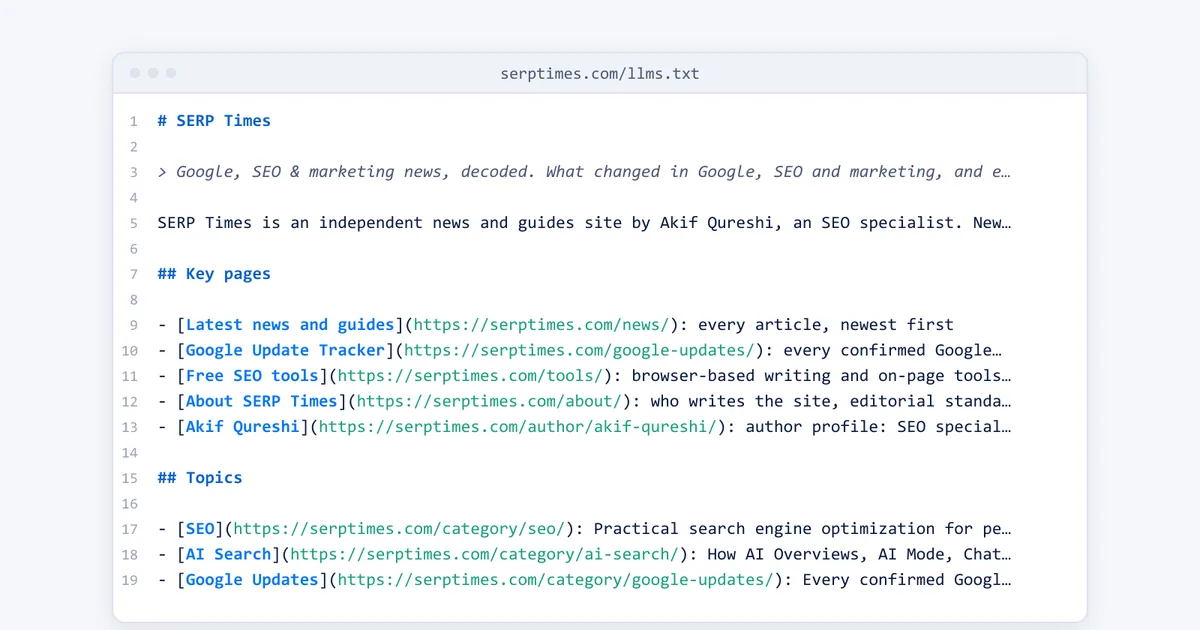
The screenshot at the top of this article is the start of our own llms.txt. It follows the format above:
- H1 and summary: the site name, then our tagline and promise as the blockquote.
- Details: one paragraph on who writes the site and what it covers.
- Key pages: latest news, the Google Update Tracker, our free SEO tools, the about page and the author profile.
- Topics, Free tools and Latest articles: each link with a short note taken from the page's own summary.
- Optional: the RSS feed, sitemap, contact and legal pages.
We don't edit it by hand. The site generates the file from the same data as the rest of the site and refreshes it every 15 minutes, so a new article appears in "Latest articles" without anyone touching the file. If your site runs on a framework such as Next.js, a small route that builds the file from your content is less work than keeping a static file up to date.
What actually gets AI tools to read your site
If you want ChatGPT, Gemini, Perplexity or Copilot to find and use your pages more often, these are the levers that work.
Allow the right crawlers in robots.txt
Each AI company runs separate bots for training, search and user-requested visits, and blocking the wrong one can remove you from AI answers:
| Company | Search and answers | Training | Fetches a user asked for |
|---|---|---|---|
| OpenAI | OAI-SearchBot (ChatGPT search) | GPTBot | ChatGPT-User |
| Anthropic | Claude-SearchBot | ClaudeBot | Claude-User |
Googlebot (Search, AI Overviews and AI Mode) | Google-Extended token (Gemini) | — | |
| Perplexity | PerplexityBot | Not used for training | Perplexity-User |
OpenAI says that if you block OAI-SearchBot, your pages won't appear in ChatGPT search answers, and that robots.txt changes take about 24 hours to apply. You can block training (GPTBot, ClaudeBot, Google-Extended) and still allow search bots. Our robots.txt generator has AI crawler presets, and our robots.txt and sitemap checker shows what your current file allows.
Check your CDN and firewall
Robots.txt isn't the only gate. Since July 1, 2025, Cloudflare has asked every new domain at signup whether to allow AI crawlers, with blocking as the default, and many hosts and security plugins rate-limit unfamiliar bots. If AI bots never appear in your logs, check these settings before anything else. OpenAI also asks sites to allow its published search-bot IP addresses at the host or CDN.
Keep an accurate XML sitemap
Submit your sitemap in Google Search Console and Bing Webmaster Tools, and keep each page's lastmod date honest: Google uses it only when it's consistently accurate, and Bing calls it a key signal for recrawling, checking sitemaps typically at least once a day. Our XML sitemap generator builds one from a list of URLs.
Use IndexNow for Bing and Copilot
IndexNow lets you notify Bing, Yandex, Naver, Seznam.cz, Yep and Amazon the moment a page changes. Bing says it helps keep content fresh across its search and AI experiences, though it doesn't guarantee a recrawl. Google doesn't participate. Many SEO plugins and CDNs can send IndexNow pings automatically.
Make your site fast, fresh and worth citing
Google crawls more when your server responds quickly and steadily, and crawls popular and frequently updated pages more often. The same logic applies to AI search: clear, current pages that answer real questions get cited. Our guide on how to get cited by ChatGPT covers the content side, and Bing Webmaster Tools' AI Performance report shows when Copilot cites your pages.
The bottom line
Create an llms.txt file if you have documentation or a large site, or simply because it takes 20 minutes and can't hurt. Just don't expect it to bring AI crawlers to your door. Allow the right bots in robots.txt and at your CDN, keep your sitemap accurate, send IndexNow pings, and publish pages worth citing: that's what gets AI tools reading your site.
Frequently asked questions
Does Google use llms.txt?
No. Google's guide to optimizing for AI features says Google Search doesn't use AI text files such as llms.txt, and that creating one will neither harm nor help your visibility or rankings in Google Search. AI Overviews and AI Mode use Google's normal search index.
Does ChatGPT read llms.txt?
OpenAI hasn't said that its crawlers read other sites' llms.txt files. In Ahrefs' study of 137,000 sites, OpenAI's GPTBot was the AI bot that fetched llms.txt most often, but 97% of the files got no requests at all in a month. To appear in ChatGPT search, allow OAI-SearchBot in robots.txt instead.
Where do I put my llms.txt file?
At the root of your site, so it loads at https://yourdomain.com/llms.txt, like robots.txt. The current version of the proposal also allows files in subfolders, such as /docs/llms.txt, which cover the pages under that path.
What is llms-full.txt?
A single Markdown file with the full text of your documentation, popularized by Mintlify for developer docs. It isn't part of the llms.txt proposal, and it's mainly useful for documentation sites that coding assistants read.
Share
X (opens in a new tab)LinkedIn (opens in a new tab)WhatsApp (opens in a new tab)Akif Qureshi has worked in SEO for more than two years, auditing sites, planning content and tracking how Google updates change real traffic. He started SERP Times to report search changes clearly and to say exactly what site owners should do about them.
Certifications
- Google Analytics (Google)
- Google Ads Search (Google)
- HubSpot
- Digital Vidya
- DSIM
- Internship Studio