ContentGuide
CoSchedule Headline Analyzer: A Free, No-Signup Alternative
CoSchedule's Headline Analyzer now lives inside Headline Studio, which asks for a free account and gives 10 credits a month. Here's what you get on each plan, and when a free, no-signup checker is enough.

By Akif Qureshi
Published 7 min read
On this page
The CoSchedule Headline Analyzer is still free to use, but it now sits inside CoSchedule's Headline Studio, which asks you to create a free account before it shows your report and gives free users 10 credits a month. If you just want to check a headline quickly, without signing up, a free browser-based checker such as our Headline Analyzer covers the core checks: length, clarity, keyword placement and tone.
This guide sets out exactly what CoSchedule offers on each plan as of November 20, 2026, how its score compares with ours, and when it's worth paying for Headline Studio instead.
Key takeaways
What the CoSchedule Headline Analyzer needs now
CoSchedule launched its Headline Analyzer as a free web tool and later folded it into a product called Headline Studio. Here's what its US site shows as of November 20, 2026:
- Sign-up: You type a headline on the Headline Analyzer page and click "Analyze Now." The page then asks you to finish creating your free account to get your full report. Headline Studio's own messaging says the tool is "still totally free to use forever."
- Credits: The pricing page says you "use credits to generate and analyze headlines, captions, and titles." The free Basic plan includes 10 credits a month. CoSchedule's credit explainer says each new set of generated ideas, or each reanalysis, uses 1 credit.
- What's scored: CoSchedule lists word count, character count, word balance (common, uncommon, emotional and power words), headline type, reading grade level, sentiment, clarity and skimmability, among other factors.
- Where it works: Besides the website, there's a free WordPress plugin and a browser extension for Chrome, Safari, Firefox and Edge, so you can score headlines inside the editors you already use.
Headline Studio plans and prices
| Basic | Premium | |
|---|---|---|
| Price | Free | From $4/month or $29/year |
| Credits | 10 a month | Starts at 10 a month; more credits cost more |
| Headline scores, word balance, sentiment | Yes | Yes |
| Email, YouTube, TikTok, Instagram, podcast and ad formats | Yes | Yes |
| AI idea generation | Limited | Advanced |
| History of past scores | Limited | Unlimited |
| Headline and keyword suggestions, competitor analysis, Headline AI | No | Yes |
Source: Headline Studio pricing, CoSchedule, accessed Nov 20, 2026. Prices are in US dollars. The pricing page has a credit slider, and the price on both plans goes up as you add monthly credits, so check it for the number of headlines you write.
None of this is unreasonable for a commercial product. Ten credits a month is plenty if you write a few blog posts. It runs out fast if you're testing 15 variations of a Black Friday subject line.
A free alternative: the SERP Times Headline Analyzer
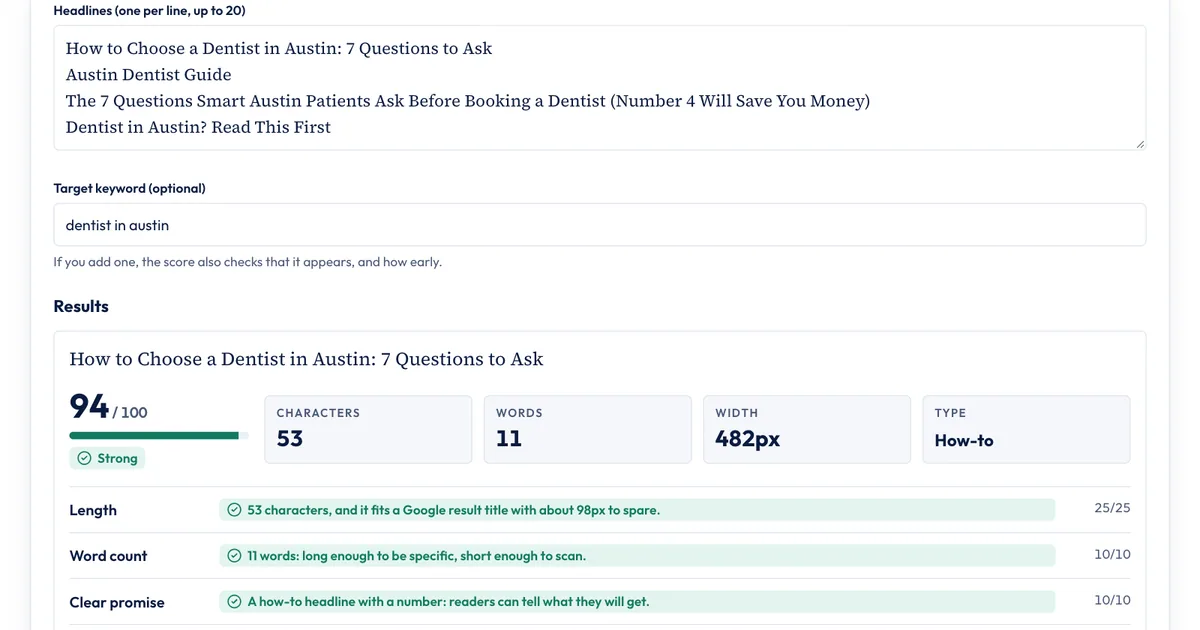
We built our Headline Analyzer for the quick checks most writers need, with no account and no limits. It runs entirely in your browser, so nothing you type is stored or sent anywhere.
It runs up to seven checks per headline, and each shows the points it's worth:
| Check | Points | What it looks for |
|---|---|---|
| Length | 25 | Whether the headline fits a Google title (about 580 pixels on desktop) and isn't too short |
| Word count | 10 | 6 to 12 words gets full points |
| Clear promise | 10 | A number, a how-to or a question that tells readers what they'll get |
| Keyword | 15 | Only if you enter one: whether it appears, and how early |
| Useful words | 10 | Words such as "guide," "checklist," "examples" or "update" |
| Tone | 20 | No all-caps shouting, exclamation marks, clickbait phrases or piles of emotional words |
| Specific | 10 | Not mostly small words such as "the" and "of" |
The score is the points earned out of the points possible: 80 or more is "Strong," 60 to 79 "Good," 40 to 59 "Needs work" and below 40 "Weak." It also shows the headline's width in pixels, its type (how-to, list, question or statement) and its word mix.
How the two compare
| CoSchedule (Basic, free) | SERP Times Headline Analyzer | |
|---|---|---|
| Account needed | Yes, free | No |
| Monthly limit | 10 credits | None |
| How the score is built | Factors listed; weights not published | Points for every check shown |
| Length checks | Word and character count | Word and character count, plus pixel width against Google's title space |
| Sentiment and emotion | Sentiment analysis, word balance | Flags hype and stacked emotional words |
| AI headline ideas | Limited | No |
| Keyword research | Premium only | Checks a keyword you enter; no search data |
| Saved history | Limited | None |
| WordPress plugin, browser extension | Yes | No |
Try it: three Black Friday headlines
Here are three headlines for the same post, scored by our Headline Analyzer with the keyword "black friday email":
| Headline | Score | Why |
|---|---|---|
| You Won't Believe These INSANE Black Friday Email Tricks!!! | 65, Good | Fits Google's title space, but loses all 20 tone points for the clickbait phrase, the all-caps word and the exclamation marks |
| Black Friday Emails | 69, Good | Clean, with the keyword up front, but short (19 characters) and only three words, with no promise |
| Black Friday Email Ideas: 12 Examples From US Retailers | 100, Strong | Keyword first, a number, a useful word ("examples") and room to spare at 517 pixels |
The first result is worth a second look. A checklist can't judge everything: the clickbait headline still scores 65 because it gets the length and word count right. That's why every check is shown separately, so you can see the zero on tone and fix it.
To check your own:
- Type or paste your headlines, one per line, up to 20.
- Add your target keyword if you have one.
- Read each check. Green passed, amber needs a look, and the points show what it's worth.
- Rewrite the weak ones and compare the new scores side by side.
Which one should you use?
Our free tool is enough if you:
- Write blog posts, product pages or local service pages and want a quick sense check before publishing.
- Want to compare several versions at once without spending credits.
- Don't want to create another account or share drafts with a third party.
CoSchedule's Headline Studio is worth it if you:
- Want AI-generated headline ideas and suggested rewrites.
- Want keyword suggestions and competitor analysis built into the score (Premium).
- Write headlines inside WordPress, Google Docs or a CMS all day and want the score in the editor through the plugin or extension.
- Need a saved history of past headlines for a team.
Neither replaces real data. Once a page is live, Google Search Console's Performance report shows impressions, clicks and click-through rate for every page and query. If a page gets plenty of impressions but few clicks, its title is the first thing to test. Our guide on the difference between Search Console and Google Analytics explains where to find those numbers.
What makes a headline work in Google
Whichever analyzer you use, these points come from Google's own documentation:
- Google may rewrite your title. Its title link documentation says it can build the title it shows from your
<title>element, your main heading, link text pointing at the page and other sources. Titles that are descriptive and concise get rewritten less. - There's no fixed character limit, but Google cuts long titles to fit the screen. Our guide to meta title length covers how much space you have.
- No clickbait. Google's Discover guidelines ask for titles that "capture the essence of the content" and warn against exaggerated details or withholding the information needed to understand the story.
- Pick one capitalization style and stick to it. Our guide to title case rules compares AP, Chicago, APA and MLA.
Sources
- Headline Analyzer, CoSchedule, accessed Nov 20, 2026.
- Headline Studio Plans & Pricing, CoSchedule, accessed Nov 20, 2026.
- Influencing your title links in search results, Google Search Central, accessed Nov 20, 2026.
- Discover and your website, Google Search Central, accessed Nov 20, 2026.
Frequently asked questions
Is the CoSchedule Headline Analyzer still free?
There's a free plan. As of Nov 20, 2026, CoSchedule's Headline Studio Basic plan costs nothing and includes 10 credits a month, but you need a free account to see your full report. Premium starts at $4 a month or $29 a year.
Do headline analyzers improve click-through rate?
No analyzer can promise more clicks. A score tells you whether a headline follows good habits, such as a clear promise and a sensible length. To see what actually earns clicks, compare click-through rates for your pages in Google Search Console's Performance report before and after you change a title.
Can I use a headline analyzer for email subject lines?
Yes, for clarity and tone. CoSchedule's paid and free plans both cover email subject lines. Our Headline Analyzer's width check measures a Google result title, not an inbox, so ignore that one check for email and focus on the promise, the wording and the tone.
Does CoSchedule store my headlines?
Headline Studio keeps a history of your headline scores (limited on Basic, unlimited on Premium), so your headlines are saved to your account. Our Headline Analyzer runs in your browser and doesn't save or send what you type.
Share
X (opens in a new tab)LinkedIn (opens in a new tab)WhatsApp (opens in a new tab)Akif Qureshi has worked in SEO for more than two years, auditing sites, planning content and tracking how Google updates change real traffic. He started SERP Times to report search changes clearly and to say exactly what site owners should do about them.
Certifications
- Google Analytics (Google)
- Google Ads Search (Google)
- HubSpot
- Digital Vidya
- DSIM
- Internship Studio