
ToolsGuide
Hostinger Shared Hosting vs VPS: Which One Do You Need?
Hostinger's standard web hosting is managed for you but shares a server; its VPS plans give you dedicated resources and root access but leave the software to you. Here's how they compare on price, limits and effort, from a site that runs on Hostinger.

By Akif Qureshi
Published 9 min read
On this page
Hostinger shared hosting vs VPS comes down to who runs the server: on Hostinger's standard web hosting (Premium, Unlimited and Cloud Startup), Hostinger manages the server and you share its resources, while a Hostinger VPS (KVM 1 to KVM 8) gives you your own virtual server with root access that you set up and look after yourself.
For most small business sites and blogs, web hosting is the right call. A VPS earns its place when you need software, background jobs or guaranteed resources that shared hosting doesn't allow. This guide compares US prices and limits, explains what each option really costs after the intro price ends, and shares what I've learned running SERP Times itself on Hostinger's web hosting.
Key takeaways
Hostinger shared hosting vs VPS at a glance
| Web hosting (Premium, Unlimited) | Cloud Startup | VPS (KVM 1 to KVM 8) | |
|---|---|---|---|
| Who manages the server | Hostinger | Hostinger | You (Hostinger manages hardware and network) |
| Resources | Shared; 1–2 CPU cores, 2–3 GB RAM | 4 CPU cores, 4 GB RAM | Dedicated; 1–8 vCPU, 4–32 GB RAM |
| Root access | No | No | Yes |
| Control panel | hPanel | hPanel | Hostinger's VPS dashboard, plus optional panels (cPanel, Plesk, CloudPanel and others) |
| Websites | 3 (Premium) or unlimited | Up to 100 | As many as the server can handle |
| Node.js apps | Unlimited plan only, up to 5 | Up to 10 | Any number, any runtime |
| Backups | Weekly (Premium) or daily (Unlimited) | Daily and on demand | Free weekly backups |
| Best for | WordPress, blogs, small business sites | Busier sites and small online stores | Custom apps, Docker, background jobs, developers |
Sources: Hostinger's web hosting and VPS pages and its plan limits article, accessed November 2, 2026.
Hostinger prices in the US: intro vs renewal
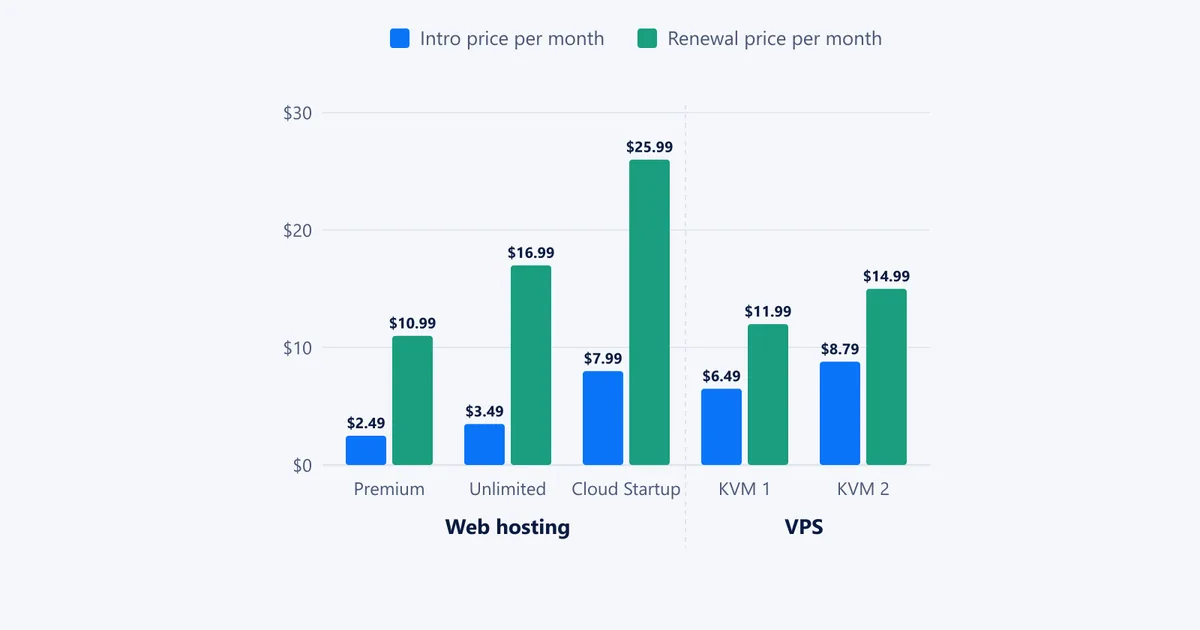
Hostinger's headline prices assume a long prepaid term: 48 months for web hosting and 24 months for VPS plans in the current sale. You pay the whole term up front, and the plan then renews at a much higher monthly rate.
| Plan (as of November 2, 2026) | Intro price | Term | Due today | Renews at |
|---|---|---|---|---|
| Web hosting Premium | $2.49/mo | 48 months | $119.52 | $10.99/mo |
| Web hosting Unlimited | $3.49/mo | 48 months | $167.52 | $16.99/mo |
| Cloud Startup | $7.99/mo | 48 months | $383.52 | $25.99/mo |
| VPS KVM 1 | $6.49/mo | 24 months | $155.76 | $11.99/mo |
| VPS KVM 2 | $8.79/mo | 24 months | $210.96 | $14.99/mo |
| VPS KVM 4 | $12.99/mo | 24 months | $311.76 | $28.99/mo |
| VPS KVM 8 | $25.99/mo | 24 months | $623.76 | $49.99/mo |
Two things stand out. First, the cheapest plan today isn't the cheapest later: Unlimited renews at $16.99 a month, more than either KVM 1 ($11.99) or KVM 2 ($14.99). Second, the shorter VPS term means you hit the renewal price two years sooner. Compare total cost over the period you actually plan to use, not the headline monthly price.
What you get with Hostinger web hosting
Web hosting is shared hosting: many customers' sites live on one server, and each plan is capped so no one hogs it. Hostinger's limits article lists:
| Plan | CPU cores | RAM | PHP workers | Inodes | Storage | Websites |
|---|---|---|---|---|---|---|
| Premium | 1 | 2 GB | 40 | 400,000 | 20 GB | 3 |
| Unlimited | 2 | 3 GB | 60 | 600,000 | 50 GB | Unlimited |
| Cloud Startup | 4 | 4 GB | 100 | 2,000,000 | 100 GB | 100 |
In return, Hostinger does the server work: operating system updates, security, backups, SSL certificates and the hPanel dashboard, with one-click WordPress installs and a free domain for the first year. If you don't want to think about servers at all, this is the point of web hosting.
The trade-off is control. You can't install system software, run your own database server or keep a process running in the background. And limits bite during traffic spikes: according to Hostinger's guide to plan limits, hitting the CPU limit makes the site "feel sluggish," running out of PHP workers causes delays or timeouts, and running out of RAM or processes can show visitors a 503 error.
One inconsistency to know about: the sales page lists unlimited websites on Cloud Startup, while the limits article caps it at 100. For most buyers the difference won't matter.
What you get with a Hostinger VPS
A VPS (virtual private server) is your own slice of a physical server, with CPU cores and RAM reserved for you. Hostinger's KVM plans range from 1 vCPU, 4 GB RAM and 50 GB NVMe storage (KVM 1) to 8 vCPUs, 32 GB RAM and 400 GB (KVM 8), each with a dedicated IP address, DDoS filtering, free weekly backups and a choice of data centers, including Boston.
You get full root access, so you can install anything your Linux distribution supports: Docker, Node.js or Python apps, databases, queues, cron jobs and self-hosted tools such as n8n. Hostinger's template library sets up common operating systems and stacks in a few clicks.
The catch is in Hostinger's own description of its self-managed VPS: Hostinger "maintains the physical hardware," and supports "hardware, network, and Hostinger dashboard functionality," but you manage the software. Security updates, firewall rules, web server settings and fixing a broken app are your job. Hostinger's built-in AI assistant can generate configurations and help troubleshoot, and an optional panel such as CloudPanel or cPanel takes some of the work off your hands.
What I learned running SERP Times on Hostinger web hosting
SERP Times is a Next.js app, not a WordPress site, and it runs as a Node.js web app on Hostinger's web hosting rather than on a VPS. A few real limits shaped how it's built:
- The app sleeps when it's quiet. Node.js apps on web hosting stop after a period with no traffic, and the next visitor waits for a cold start. We pre-render pages and use a free uptime monitor that pings the site every five minutes.
- We can't build on the server. Hostinger's build environment was too old for the Next.js 16 compiler, so the site is built in GitHub Actions and Hostinger only runs the finished server. On a VPS we could install whatever toolchain we wanted.
- Process limits are shared across every site on the plan. On the Business plan we started on, hPanel showed a limit of 120 processes and 60 entry processes for all websites together. So there are no background workers or in-app scheduled jobs; scheduled tasks run through hPanel's cron jobs instead.
- Nothing written at runtime survives a deploy. Everything the site needs comes from the Git repository, which suits a content site anyway.
For a content site, those limits are fine: pages are pre-rendered and fast, and Hostinger handles the server. If the site outgrows its plan, our next step is Cloud Startup, which keeps the same Node.js workflow, not a VPS. A VPS would only make sense once we need long-running jobs or software web hosting can't run.
Which should you choose?
Choose web hosting (Premium or Unlimited) if:
- you run WordPress or another PHP site, such as a bakery in Portland, a dental practice in Austin or a personal blog;
- you want Hostinger to handle security, updates and backups;
- your traffic is steady and modest.
Choose Cloud Startup if you want managed hosting with more headroom, for example a WooCommerce store expecting a Black Friday rush, or an agency hosting dozens of client sites.
Choose a VPS (KVM 2 is a sensible start) if:
- you're running a custom app in Node.js, Python, Go or Docker;
- you need background workers, queues, WebSockets or your own database server;
- you want to self-host tools such as n8n, a mail server or an analytics platform;
- you're comfortable on the Linux command line, or willing to learn.
If you're unsure, start with web hosting. Hostinger offers a 30-day money-back guarantee on web, cloud and KVM VPS plans, though its refund policy adds conditions for VPS refunds and most domain charges aren't refundable.
How to get a Hostinger discount (coupon codes, sales and referrals)
If you searched for a Hostinger coupon code, here's what actually lowers the price, as of November 2, 2026:
- The Black Friday sale, no code needed. Hostinger's Black Friday page says the sale runs from October 19 to December 14, 2026, with up to 80% off web hosting and 67% off VPS hosting. The prices above already include it. The page notes the sale price applies only to the first term.
- Longer terms. The lowest monthly prices need a 48-month (web hosting) or 24-month (VPS) prepayment. Shorter terms cost more per month.
- Referral discounts for new customers. Hostinger's referral terms say a new customer who signs up through an existing customer's referral link or code gets "up to 20% discount at the checkout." Domains aren't eligible, shared hosting needs a 12-month or longer term, and a referral discount can't be combined with other Hostinger incentives on the same purchase.
Many codes on coupon sites are referral codes, so they carry the same rules. Before you use one, compare the checkout total with and without it, because the sale price may already be lower. And check the renewal price shown at checkout, which is what you'll pay after the first term.
SERP Times runs on Hostinger and pays for its plan like any customer. This article contains no affiliate or referral links.
The bottom line
Hostinger's web hosting is a managed apartment: cheap to move into, maintained for you, with rules about what you can run. A VPS is an empty house: more space and freedom, but the repairs are yours. Most small business sites belong in the apartment. Move to a VPS when you can name the specific thing web hosting won't let you do, and budget for the time it takes to run a server.
Whichever you pick, speed and uptime affect how your pages perform in search; our on-page SEO checker and guide on how to increase website traffic cover what to do once the site is live.
Frequently asked questions
Is Hostinger VPS better than shared hosting?
Only if you need what it adds. A VPS gives you dedicated CPU and RAM, root access and any software you like, but you have to set up, secure and update the server yourself. For a WordPress site or a small business site, Hostinger's managed web hosting is simpler and usually enough.
Is Hostinger VPS managed?
No, it's self-managed. Hostinger looks after the hardware, network and its dashboard; you manage the operating system and software. Hostinger's built-in AI assistant can help with setup and troubleshooting, and optional control panels such as CloudPanel or cPanel make it easier.
Is there a Hostinger coupon code?
You don't need one for the main deals. Hostinger's Black Friday sale runs from October 19 to December 14, 2026, and the discounted prices on its site apply without a code. New customers can get up to 20% off eligible plans with a friend's referral link or code, but that can't be combined with other Hostinger incentives on the same purchase.
Can I run Node.js on Hostinger shared hosting?
Yes, on the Unlimited plan (up to 5 Node.js websites) and Cloud Startup (up to 10), according to Hostinger's plan limits. Apps run on demand and share the plan's resources, so long-running background jobs belong on a VPS.
Share
X (opens in a new tab)LinkedIn (opens in a new tab)WhatsApp (opens in a new tab)Akif Qureshi has worked in SEO for more than two years, auditing sites, planning content and tracking how Google updates change real traffic. He started SERP Times to report search changes clearly and to say exactly what site owners should do about them.
Certifications
- Google Analytics (Google)
- Google Ads Search (Google)
- HubSpot
- Digital Vidya
- DSIM
- Internship Studio