
SEOGuide
How to Increase Website Traffic: What Real Data Shows
We compared three months of Search Console and GA4 data from two real sites. Here is what actually moved their traffic, what only looked like a loss, and the fixes to make first.

By Akif Qureshi
Published 12 min read
On this page
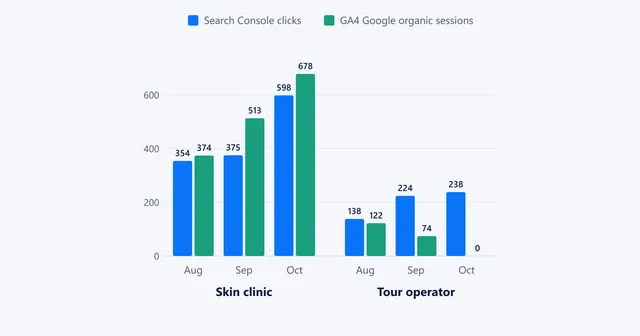
Most advice on how to increase website traffic starts with "publish more", but three months of Search Console and GA4 data from two real sites point to a different order of work.
Key takeaways
The two sites and the data
Both are real sites, anonymised here. We compared the last three months (28 July to 27 October 2026) with the three months before in Search Console and GA4, then checked backlink data and the live results pages for their main queries.
- Site A is a digital marketing agency in Delhi: about 600 indexed pages, service pages plus a blog that mixes Google news with "list of sites" posts.
- Site B is a young SEO blog: about 110 indexed pages, mostly Google and AI-search news, plus downloadable templates.
| Metric (last 3 months vs previous 3) | Site A | Site B |
|---|---|---|
| Google clicks | 193 → 230 (+19%) | 107 → 69 (−36%) |
| Google impressions | 80.4k → 38.7k (−52%) | 11.1k → 14.5k (+31%) |
| Average CTR | 0.2% → 0.6% | 1.0% → 0.5% |
| Average position | 42.4 → 42.7 | 50.0 → 49.1 |
| Referring domains | 303 | 9 |
Look at the first two rows. Site A lost half its impressions and gained clicks. Site B gained impressions and lost a third of its clicks. Judge either site by the headline chart and you fix the wrong thing.
Step 1: Split your traffic before you try to grow it
Totals hide the cause. Before planning anything, break the comparison into four cuts in Search Console (Performance → Search results → date filter → Compare → "Compare last 3 months to previous period"):
- Brand vs non-brand. Add a Query filter → Custom (regex) → "Doesn't match regex" with your brand name and its misspellings, for example
brandname|brand name|brnd. Switch it to "Matches regex" for the brand-only view. - Pages. Sort by the clicks difference, then by the impressions difference, and group winners and losers by page type: service pages, guides, news, tools.
- Countries. A loss in a country you don't serve is a different problem from a loss at home.
- Devices. Desktop-heavy impressions at low positions often come from research queries that rarely turn into visits.
Here is what the split showed.
Site A's loss was almost all foreign, off-topic impressions. United States impressions fell from 32.7k to 12.0k, yet US clicks only went from 13 to 12. India, where the agency's clients are, rose from 128 to 185 clicks, and its average position there improved from 52.8 to 40.6. Desktop carried 89% of all impressions.
Site B's loss was almost all navigational. The homepage fell from 58 to 23 clicks, the brand name from 32 to 19, and "site:" searches for the domain disappeared. That usually means the owner and early readers stopped checking the site through Google, not that rankings fell. Its non-brand pages gained impressions.
Step 2: Cut the traffic that was never going to convert
Site A's blog had four posts aimed at broad, worldwide research queries: an explainer on SEO in digital marketing and lists of website archive, blog submission and directory submission sites. Together they earned 52,000 impressions and 59 clicks in the earlier three months, roughly one click per 900 impressions, at average positions in the 40s. None of them had anything to do with what the agency sells.
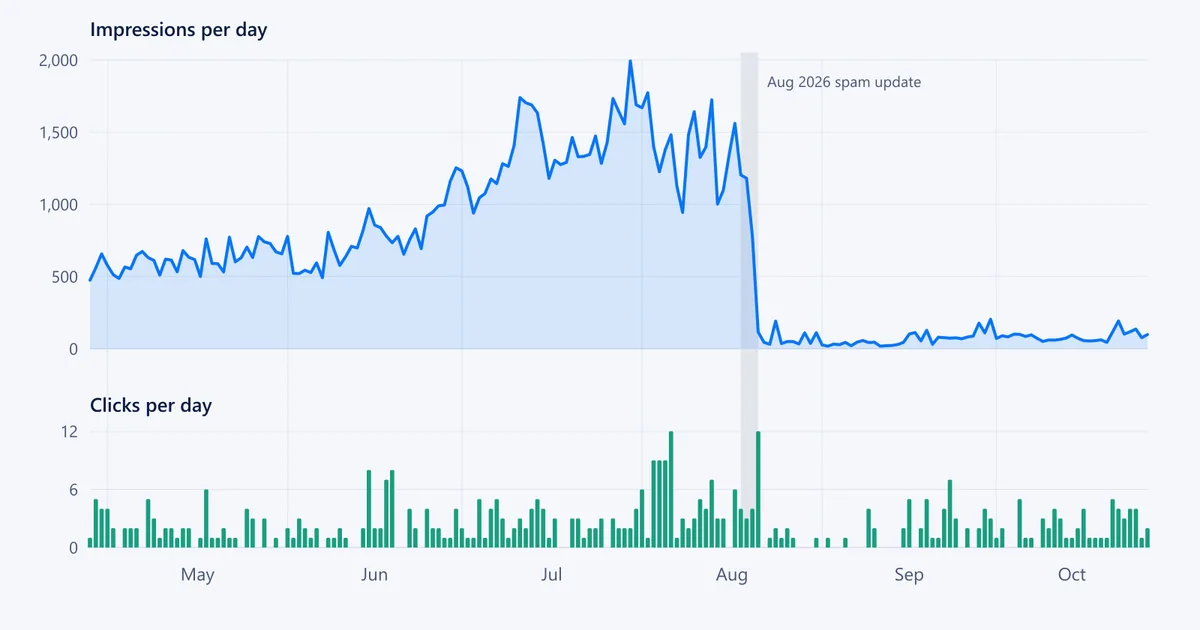
The chart at the top of this guide is Site A's daily data. Impressions averaged about 1,400 a day in the weeks before 20 August 2026, then fell below 100 and stayed there. That was the third day of the August 2026 spam update. There was no manual action, and timing alone doesn't prove the cause, but the posts that dropped were thin "list of sites" pages in a link-building niche that Google's spam policies watch closely.
Clicks fell too, from about 4 a day to about 1 a day for three and a half weeks. From mid-September they settled at about 2.3 a day, slightly above the spring average of 2.1, on a tenth of the impressions. Over the quarter, the four posts lost about 34,700 impressions but only 37 clicks. They looked big in the chart and were worth very little.
What to do with posts like these:
- Off-topic and thin: noindex or remove them. A Delhi agency gains nothing from ranking 45th in the US for "web archive".
- On-topic but thin: merge several weak posts into one strong one and 301-redirect the old URLs to it.
- On-topic and close to page one: improve them. They are your fastest wins.
Repeat this check every quarter: filter Pages for more than 1,000 impressions and fewer than 5 clicks, and ask of each page whether it could ever lead to a customer or a returning reader.
Step 3: Stop Google wasting crawls on the wrong URLs
Site A's Page indexing report showed 614 pages indexed and 1,335 not indexed. The biggest groups:
- 937 "Not found (404)": 860 on a test subdomain and 49 on a second staging subdomain. Both still served live pages, their robots.txt allowed crawling, and one listed its own sitemap. In six months, 164 staging URLs earned impressions, competing with the real pages.
- 228 "Crawled, currently not indexed", including dozens of tag archives, their RSS feeds and several service pages.
Site B had a smaller version of the same problem. Its 25 crawled-but-not-indexed URLs were mostly Word and Excel files, WordPress scripts and feeds, and its 33 "Discovered, currently not indexed" URLs included the About page and the author page. Google knew the trust pages existed and hadn't fetched them.
Fix them in this order:
- Put staging sites behind a password. HTTP authentication keeps every crawler out. A robots.txt block alone can leave URLs in the index, and a noindex tag only works if Google can crawl the page and see it. Then request removal of the staging host in Search Console and delete its sitemap.
- Noindex tag archives and stop linking to feeds unless they rank for something useful.
- Link to the pages you want crawled. Add an author box that links to the author and About pages on every post, put both in the main menu and the XML sitemap, and link from the homepage to your best guides. Internal links are how a small site tells Google what matters.
- Re-check in two to four weeks. Inspect a few fixed URLs with the URL Inspection tool, then watch the "Indexed" line in the Page indexing report.
Our robots.txt and sitemap checker shows in seconds what a host's robots.txt allows and which sitemaps it lists.
Step 4: For local businesses, win the map pack first
Site A's money keyword is "digital marketing agency in" plus its area. The results page for it showed, in order:
- a map pack with three local businesses;
- a business directory listing;
- small agencies' own pages;
- "Top 10 agencies in" the area, written by other sites.
Site A ranked around 84th. No amount of blog content changes that layout. These do:
- A complete Google Business Profile for one real address, with the same name, address and phone number on the site, in LocalBusiness schema and in directories. Site A's schema named one neighbourhood while several service pages targeted another where it has no office. Target the area you can prove.
- Reviews. A search for the agency's name plus "reviews" appeared this quarter with 224 impressions. People check before they call, so ask every satisfied client for a review.
- The directories and listicles that already rank. If a "top 10 agencies" page holds position 9, getting listed on it is faster than outranking it.
Google names relevance, distance and prominence as the main local ranking factors in its tips to improve your local ranking.
Step 5: Put the asset on the page, not in a download
Site B earns close to 1,000 impressions a quarter for "seo strategy template", at an average position of 43. Its templates exist, but only as .docx and .xlsx downloads, and Search Console lists those files as crawled but not indexed.
The page ranking first shows its template on the page, and so do most of the smaller sites on page one: a structured outline you can read and copy, often with a preview image, with the download as an extra. An image pack sits in second place, so a clear screenshot of the template can earn a second listing.
If you offer templates, checklists or calculators:
- Build the template as HTML on the page, with headings that match what people search for ("SEO strategy template", "SEO plan template").
- Add a preview image with descriptive alt text.
- Keep the file download, but as a bonus, not the content itself.
Step 6: Build evergreen hubs alongside the news
News posts get a burst of fresh rankings and then slide. On Site B:
| News post topic | Avg. position, previous 3 months | Avg. position, last 3 months |
|---|---|---|
| Which search engine ChatGPT uses | 16.8 | 38.5 |
| A Search Console report change | 12.8 | 35.2 |
| Which search engine Claude uses | 11.9 | 35.3 |
A young site can't hold news rankings once publishers with tens of thousands of linking domains cover the same story. What held up on Site B were practical guides, such as getting pages indexed in Brave Search (still at positions 15 to 20), and one update report that stayed around position 8.
Keep covering news, but pair it with pages that keep their value:
- Keep one evergreen hub per recurring topic, for example every Google core update, or how each AI assistant finds its sources, and update it whenever something changes.
- Link each news post to its hub, and the hub to the latest news.
- Change the hub's updated date only when you change its substance.
Step 7: Earn links with numbers nobody else has
Site B has 9 referring domains, 5 of them dofollow. Nearly all of them point to posts with original numbers, such as an estimate of how many searches an AI assistant runs, cited with anchors like "35% of those prompts trigger web search". None point to the posts that summarised other people's news.
Site A has 303 referring domains, but the profile is weaker than the count suggests:
- 2,276 links are "managed by" footer credits on client sites.
- 125 domains link with the same exact-match anchor for its main service keyword.
- 83 low-cost domains carry an identical, auto-generated anchor.
Whoever built them, links like these are a risk, not an asset.
What works:
- Publish one piece of original data a month, such as a survey, a count or a test with screenshots, and send it to the writers who cover that topic.
- Make footer credits on client sites brand-only and nofollow.
- Audit for automated link patterns. If links look like a paid or automated network and you can't get them removed, a disavow file is the documented last resort.
Step 8: Treat AI assistants as a traffic channel
Site A's best-engaged visitors didn't come from Google.
| Channel (last 3 months) | Sessions | Engagement rate | Avg. engagement time per session |
|---|---|---|---|
| Direct | 1,776 | 28% | 51 s |
| Organic search | 441 | 68% | 2 min 4 s |
| AI assistant (ChatGPT) | 100 | 71% | 5 min 19 s |
AI assistant sessions went from 4 to 100 in three months. The numbers are still small, but these visitors arrive with a specific question, and they read.
To see this channel and grow it:
- In GA4, open Reports → Acquisition → Traffic acquisition. If the channel list has an "AI Assistant" row, start there. If not, switch the dimension to Session source and look for chatgpt.com, perplexity.ai, gemini.google.com and copilot.microsoft.com.
- Check which pages they land on, and write more like them: a direct answer near the top, original numbers and clear headings.
- Make sure robots.txt doesn't block the AI search crawlers you want, such as OpenAI's OAI-SearchBot.
Step 9: Measure what the traffic does
Site A grew sessions by 72%, users by 61% and engaged sessions by 78%, and recorded zero key events in both periods. No contact-form submissions, phone taps or WhatsApp clicks were tracked, so nobody can say whether the extra visits brought a single lead.
The same report hid two more problems. Direct traffic made up 73% of sessions with a 28% engagement rate, a sign of bots and internal visits. A referral from "localhost" showed that a developer's test visits were being counted.
Before your next traffic push:
- Mark form submissions and phone and WhatsApp clicks as key events in GA4.
- Define internal traffic (Admin → Data streams → your stream → Configure tag settings → Define internal traffic) and activate the internal-traffic data filter.
- Tag every campaign link with UTM parameters so it doesn't land in Direct. Our UTM builder does it in one step.
A 30-day plan
| Week | Do this | Done when |
|---|---|---|
| 1 | Split clicks by brand, page type, country and device; set up key events and the internal-traffic filter | You can name the pages that bring leads |
| 2 | Lock down staging hosts, noindex tag archives and feeds, link to the About and author pages | Removal requests filed, sitemap lists only real pages |
| 3 | Decide on every page with 1,000+ impressions and under 5 clicks: noindex, merge or improve | Each page has a decision and the redirects are live |
| 4 | Local businesses: complete the business profile and ask for reviews. Publishers: publish one original-data piece and pitch it | The profile is complete, or the piece is live and pitched |
Then run the three-month comparison again. If clicks from the pages and countries that matter are up, and key events are being recorded, your traffic is growing in the way that counts.
Frequently asked questions
How long does it take to increase website traffic?
Technical fixes, such as taking staging pages out of Google or linking to pages that aren't crawled, usually show in Search Console within two to six weeks as Google recrawls. New content, local reviews and links take longer: plan on three to six months before judging them.
Why are my impressions down but my clicks up?
You have probably lost rankings for queries that rarely clicked, often broad research terms at positions 30 to 60 or searches from countries you don't serve. Compare the two periods by page and by country in Search Console to confirm it before changing anything.
Is traffic from ChatGPT and other AI assistants worth optimising for?
In our data it was small but the best-engaged channel: 100 sessions in three months with a 71% engagement rate and over five minutes of engagement per session, against about two minutes for Google organic. Track it in GA4 and write clear, answer-first pages with original numbers.
Should I delete old blog posts that get impressions but no clicks?
Not automatically. Remove or noindex posts that are off-topic for your business, merge thin posts on the same subject into one and redirect the old URLs, and improve posts that are relevant and already close to page one.
Share
X (opens in a new tab)LinkedIn (opens in a new tab)WhatsApp (opens in a new tab)Akif Qureshi has worked in SEO for more than two years, auditing sites, planning content and tracking how Google updates change real traffic. He started SERP Times to report search changes clearly and to say exactly what site owners should do about them.
Certifications
- Google Analytics (Google)
- Google Ads Search (Google)
- HubSpot
- Digital Vidya
- DSIM
- Internship Studio